用python实现感知器模型

探索损失函数在每一步中是如何变化的。确保您可以确定/更改在每个步骤错误分类的数据点,使得可以生成多个超平面。

用python实现感知器模型
 分享
分享
 关注
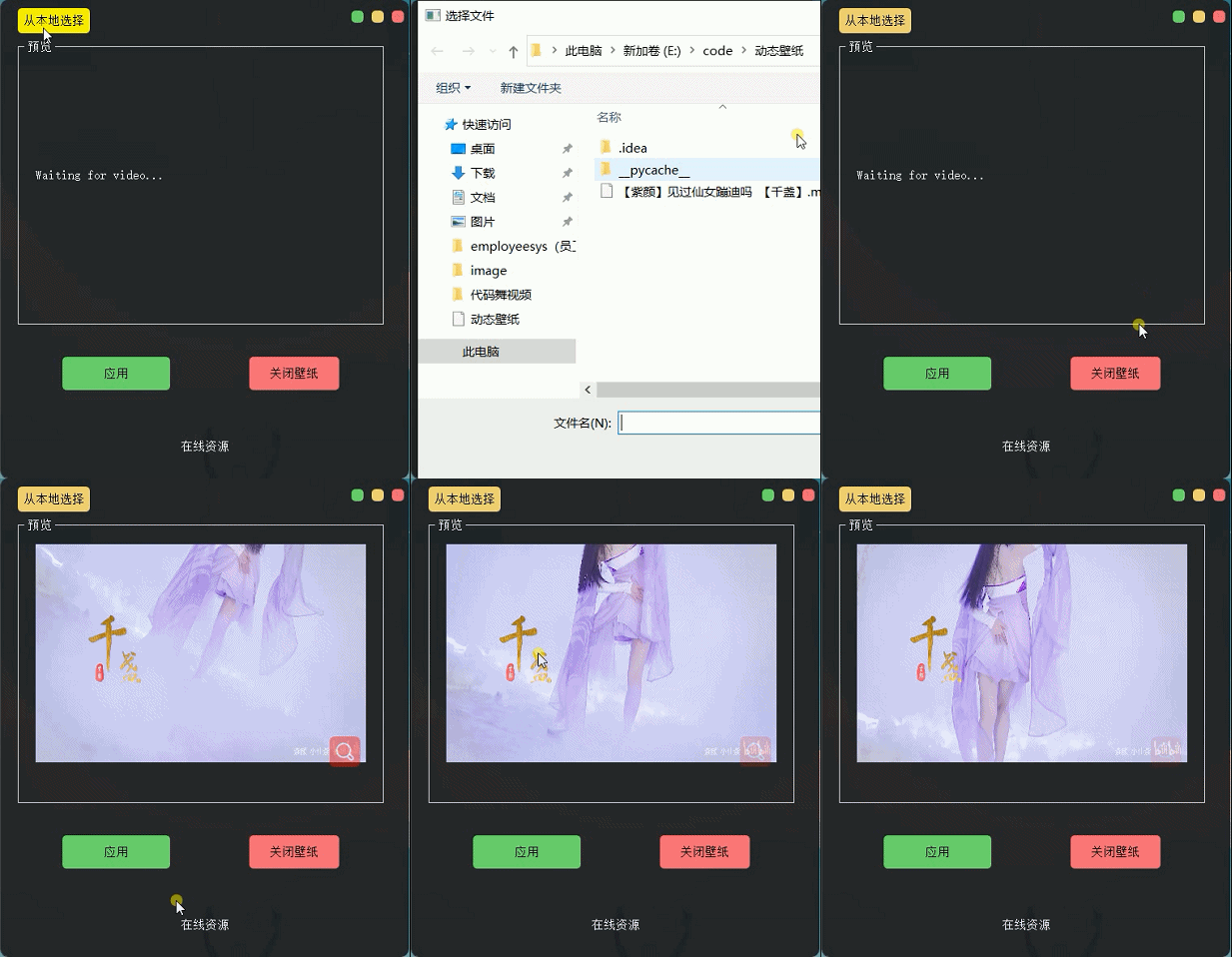
关注接来下我们可以根据自己喜欢的视频,从本地读取视频,并且将视频预览播放显示。这里视频演示,博主还是用之前的那篇紫颜小姐姐的跳舞视频进行演示。
读取视频:
读取视频我们可以通过打开文件对话框,选择视频资源,开启一个子线程用来进行视频开启停止播放。核心代码如下:
# author: CSDN-Dragon少年
def openmp4(self):
    try:
        global path
        path, filetype = QFileDialog.getOpenFileName(None, "选择文件", '.',
                                                     "视频文件(*.AVI;*.mov;*.rmvb;*.rm;*.FLV;*.mp4;*.3GP)")  # ;;All Files (*)
        if path == "":  # 未选择文件
            return

        self.slotStart()
        t = Thread(target=self.Stop)
        t.start()  # 启动线程,即让线程开始执行
    except Exception as e:
        print (e)
视频流读取播放:
接下来,我们需要对视频文件进行按帧读取加载显示,并通过计时器实现动画效果。核心代码如下:
# author:CSDN-Dragon少年
def slotStart(self):
    videoName = path
    if videoName != "":  # “”为用户取消
        self.cap = cv2.VideoCapture(videoName)
        self.timer_camera.start(50)
        self.timer_camera.timeout.connect(self.openFrame)
# author:CSDN-Dragon少年
def openFrame(self):
    if (self.cap.isOpened()):
        ret, self.frame = self.cap.read()
        if ret:
            frame = cv2.cvtColor(self.frame, cv2.COLOR_BGR2RGB)
            if self.detectFlag == True:
                # 检测代码self.frame
                self.label_num.setText("There are " + str(5) + " people.")
            height, width, bytesPerComponent = frame.shape
            bytesPerLine = bytesPerComponent * width
            q_image = QImage(frame.data, width, height, bytesPerLine,
                             QImage.Format_RGB888).scaled(self.label.width(), self.label.height())
            self.label.setPixmap(QPixmap.fromImage(q_image))
        else:
            self.cap.release()
            self.timer_camera.stop()  # 停止计时器
至此,我们已经可以实现视频读取加载,并且进行视频预览了,效果如下:
分享 已结题
(查看结题原因) 6月20日
赞助了问题酬金15元
6月16日
创建了问题
6月15日
已结题
(查看结题原因) 6月20日
赞助了问题酬金15元
6月16日
创建了问题
6月15日


