除此之外, 这篇博客: echarts 柱状图 x轴数据为0占位情况 多X轴展示中的 echarts 柱状图 x轴多维度显示不同数据源 部分也许能够解决你的问题, 你可以仔细阅读以下内容或跳转源博客中阅读:
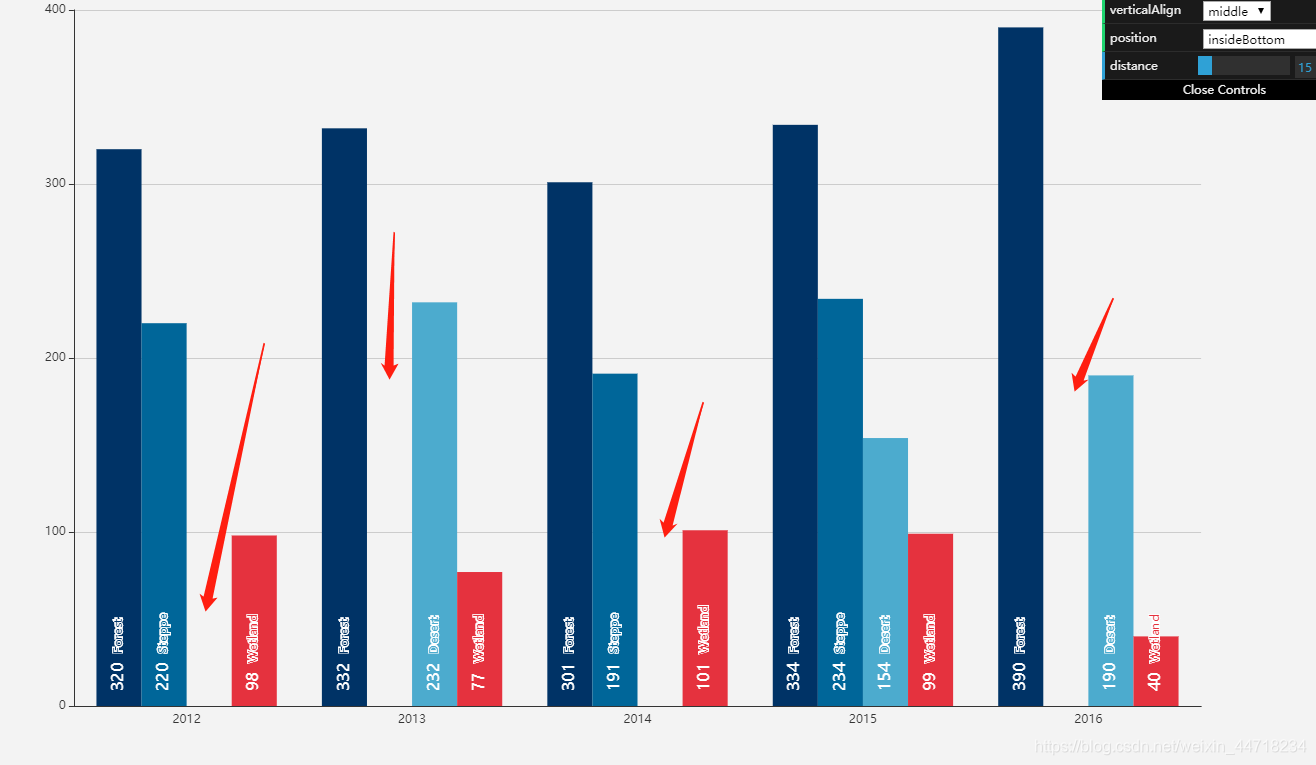
echarts 柱状图 x轴数据某个值为空时就会出现柱状图不显示并且占位现象,如上图,如果不让显示空的,每个维度有几天就显示几条,那怎么解决呢?
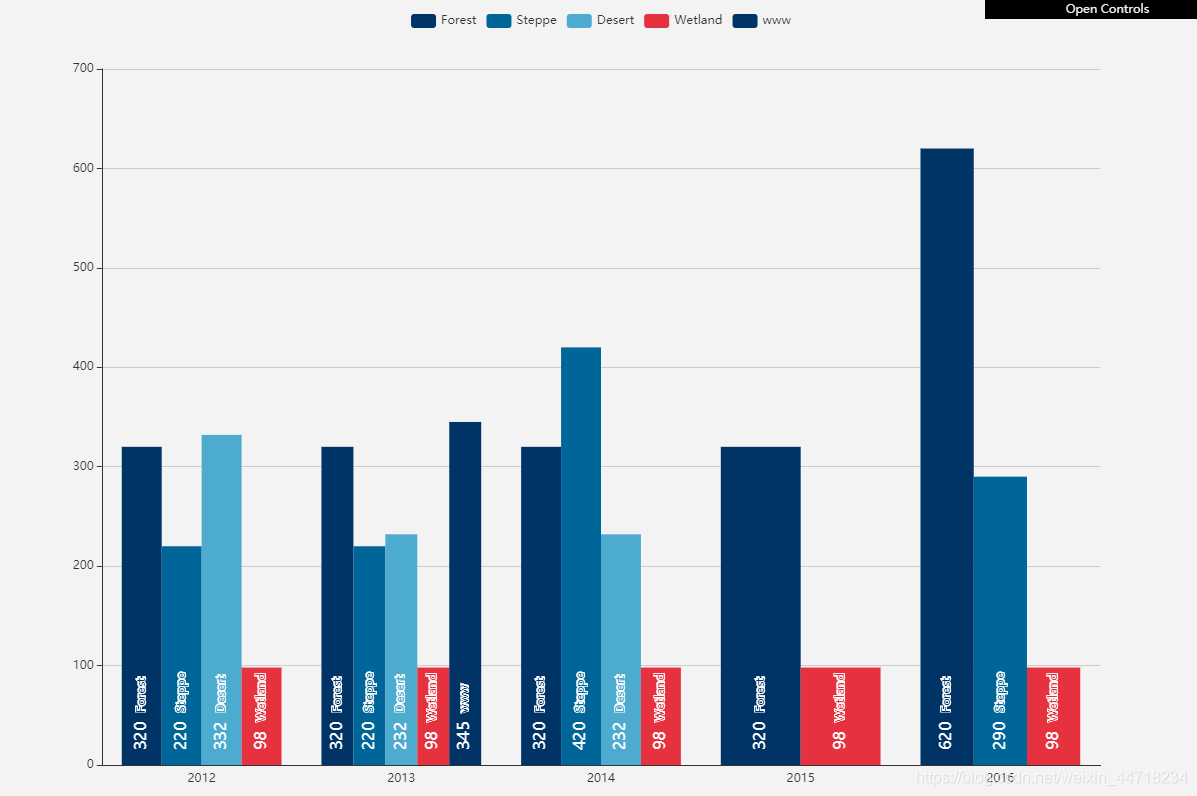
想了两天终于想到了办法,那就是添加多个X轴的数据就可以,在这记录一下,如果哪位有更好的办法,请告知:
效果图:
代码:
<!DOCTYPE html>
<html style="height: 100%">
   <head>
       <meta charset="utf-8">
   </head>
   <body style="height: 100%; margin: 0">
       <div id="container" style="height: 100%"></div>
       <script type="text/javascript" src="https://cdn.jsdelivr.net/npm/echarts/dist/echarts.min.js"></script>
       <script type="text/javascript" src="https://cdn.jsdelivr.net/npm/echarts-gl/dist/echarts-gl.min.js"></script>
       <script type="text/javascript" src="https://cdn.jsdelivr.net/npm/echarts-stat/dist/ecStat.min.js"></script>
       <script type="text/javascript" src="https://cdn.jsdelivr.net/npm/echarts/dist/extension/dataTool.min.js"></script>
       <script type="text/javascript" src="https://cdn.jsdelivr.net/npm/echarts/map/js/china.js"></script>
       <script type="text/javascript" src="https://cdn.jsdelivr.net/npm/echarts/map/js/world.js"></script>
       <script type="text/javascript" src="https://api.map.baidu.com/api?v=2.0&ak=xfhhaTThl11qYVrqLZii6w8qE5ggnhrY&__ec_v__=20190126"></script>
       <script type="text/javascript" src="https://cdn.jsdelivr.net/npm/echarts/dist/extension/bmap.min.js"></script>
       <script type="text/javascript">
var dom = document.getElementById("container");
var myChart = echarts.init(dom);
var app = {};
option = null;
var posList = [
    'left', 'right', 'top', 'bottom',
    'inside',
    'insideTop', 'insideLeft', 'insideRight', 'insideBottom',
    'insideTopLeft', 'insideTopRight', 'insideBottomLeft', 'insideBottomRight'
];

app.configParameters = {
    rotate: {
        min: -90,
        max: 90
    },
    align: {
        options: {
            left: 'left',
            center: 'center',
            right: 'right'
        }
    },
    verticalAlign: {
        options: {
            top: 'top',
            middle: 'middle',
            bottom: 'bottom'
        }
    },
    position: {
        options: echarts.util.reduce(posList, function (map, pos) {
            map[pos] = pos;
            return map;
        }, {})
    },
    distance: {
        min: 0,
        max: 100
    }
};

app.config = {
    rotate: 90,
    align: 'left',
    verticalAlign: 'middle',
    position: 'insideBottom',
    distance: 15,
    onChange: function () {
        var labelOption = {
            normal: {
                rotate: app.config.rotate,
                align: app.config.align,
                verticalAlign: app.config.verticalAlign,
                position: app.config.position,
                distance: app.config.distance
            }
        };
        myChart.setOption({
            series: [{
                label: labelOption
            }, {
                label: labelOption
            }, {
                label: labelOption
            }, {
                label: labelOption
            }]
        });
    }
};


var labelOption = {
    show: true,
    position: app.config.position,
    distance: app.config.distance,
    align: app.config.align,
    verticalAlign: app.config.verticalAlign,
    rotate: app.config.rotate,
    formatter: '{c}  {name|{a}}',
    fontSize: 16,
    rich: {
        name: {
            textBorderColor: '#fff'
        }
    }
};

option = {
    color: ['#003366', '#006699', '#4cabce', '#e5323e'],
    tooltip: {
        trigger: 'axis',
        axisPointer: {
            type: 'shadow'
        },
         // 进行数据处理
        formatter: function (params) {
            var html = '';
            if (params.length != 0) {
                // 可以自己打印一下console.info(params[0]);
                var getName = params[0].name;
                html += getName + '<br/>';
                for (var i = 0; i < params.length; i++) {
                    // 如果为0 为空的数据我们不要了(你们可以直接判断 > 0)
                    if (params[i].value != null && params[i].value != 0
                        && params[i].value != '') {
                        html += params[i].marker;
                        html += params[i].seriesName + ': ' + params[i].value + '<br/>';
                    }
                }
            }
            return html;
        }
    },
    legend: {
        data: ['Forest', 'Steppe', 'Desert', 'Wetland', 'www']
    },
    toolbox: {
        show: true,
        orient: 'vertical',
        left: 'right',
        top: 'center',
        feature: {
            mark: {show: true},
            dataView: {show: true, readOnly: false},
            magicType: {show: true, type: ['line', 'bar', 'stack', 'tiled']},
            restore: {show: true},
            saveAsImage: {show: true}
        }
    },
    xAxis: [
        {
            type: 'category',
            axisTick: {show: false},
            position: 'bottom',
            data: ['2012', '', '', '', '']
        },
        {
            type: 'category',
            axisTick: {show: false},
            position: 'bottom',
            data: ['', '2013', '', '', '']
        },
        {
            type: 'category',
            axisTick: {show: false},
            position: 'bottom',
            data: ['', '', '2014', '', '']
        },
        {
            type: 'category',
            axisTick: {show: false},
            position: 'bottom',
            data: ['', '', '', '2015', '']
        },
        {
            type: 'category',
            axisTick: {show: false},
            position: 'bottom',
            data: ['', '', '', '', '2016']
        }
    ],
    yAxis: [
        {
            type: 'value'
        }
    ],
    series: [
        {name: 'Forest',type: 'bar',barGap: 0,label: labelOption,xAxisIndex: 0,data: [320]},
        {name: 'Steppe',type: 'bar',label: labelOption,xAxisIndex: 0,data: [220]},
        {name: 'Desert',type: 'bar',label: labelOption,xAxisIndex: 0,data: [332]},
        {name: 'Wetland',type: 'bar',label: labelOption,xAxisIndex: 0,data: [98]},
        {name: 'Forest',type: 'bar',barGap: 0,label: labelOption,xAxisIndex: 1,data: ['',320]},
        {name: 'Steppe',type: 'bar',label: labelOption,xAxisIndex: 1,data: ['',220]},
        {name: 'Desert',type: 'bar',label: labelOption,xAxisIndex: 1,data: ['',232]},
        {name: 'Wetland',type: 'bar',label: labelOption,xAxisIndex: 1,data: ['',98]},
        {name: 'www',type: 'bar',label: labelOption,xAxisIndex: 1,data: ['',345]},
        {name: 'Forest',type: 'bar',barGap: 0,label: labelOption,xAxisIndex: 2,data: ['','',320]},
        {name: 'Steppe',type: 'bar',label: labelOption,xAxisIndex: 2,data: ['','',420]},
        {name: 'Desert',type: 'bar',label: labelOption,xAxisIndex: 2,data: ['','',232]},
        {name: 'Wetland',type: 'bar',label: labelOption,xAxisIndex: 2,data: ['','',98]},
        {name: 'Forest',type: 'bar',barGap: 0,label: labelOption,xAxisIndex: 3,data: ['','','',320]},
        {name: 'Wetland',type: 'bar',label: labelOption,xAxisIndex: 3,data: ['','','',98]},
        {name: 'Forest',type: 'bar',barGap: 0,label: labelOption,xAxisIndex: 4,data: ['','','','',620]},
        {name: 'Steppe',type: 'bar',label: labelOption,xAxisIndex: 4,data: ['','','','',290]},
        {name: 'Wetland',type: 'bar',label: labelOption,xAxisIndex: 4,data: ['','','','',98]}
    ]
};
if (option && typeof option === "object") {
    myChart.setOption(option, true);
}
       </script>
   </body>
</html>


