you-get 报错
you-get: [error] oops, something went wrong.
you-get: don't panic, c'est la vie. please try the following steps:
you-get: (1) Rule out any network problem.
you-get: (2) Make sure you-get is up-to-date.
you-get: (3) Check if the issue is already known, on
you-get: https://github.com/soimort/you-get/wiki/Known-Bugs
you-get: https://github.com/soimort/you-get/issues
you-get: (4) Run the command with '--debug' option,
you-get: and report this issue with the full output.
已尝试升级you-get
debug后
[DEBUG] get_response: https://www.kugou.com/mixsong/j31j3ee.html?fromsearch=%E5%A4%9C%E7%A9%BA%E4%B8%AD%E6%9C%80%E4%BA%AE%E7%9A%84%E6%98%9F
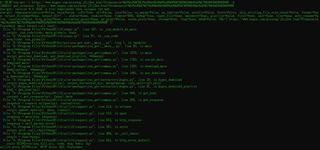
you-get: [error] oops, something went wrong. you-get: don't panic, c'est la
- 写回答
- 好问题 0 提建议
- 关注问题
- 邀请回答
-
1条回答 默认 最新
关注引自强大而免费的微信小程序:皆我百晓生。
It seems that you are encountering an error when using the you-get tool. The error message suggests a few steps you can try to resolve the issue:
- Rule out any network problems. Make sure you have an active and stable internet connection.
- Ensure that you have the latest version of you-get. You can try upgrading it to see if that resolves the issue.
- Check if the issue is already known by visiting the you-get GitHub page. Look for any known bugs or issues that match your situation.
- Run the command with the "--debug" option to gather more information about the error. You can then report the issue and provide the full output to the you-get developers.
If you have already tried upgrading you-get and it didn't resolve the issue, you may want to consider visiting the you-get GitHub page to see if others have reported a similar problem or if there are any workarounds available. Additionally, you can try reaching out to the you-get community for further assistance.
解决评论 打赏 举报无用 2