
问题描述:
我公司的WPF项目,我发现一个问题,很多用户控件界面(UserControl)在设计阶段没有预览效果。
如下所示
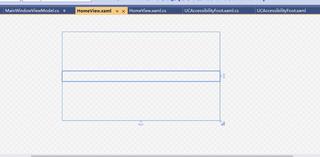
明明里头添加了三张图片,还有TextBlock,但是却是空白的。
但是运行之后,效果却是看见的,如下图所示

相关的XAML代码如下
<UserControl x:Class="BookDispenser.Views.HomeView"
             xmlns="http://schemas.microsoft.com/winfx/2006/xaml/presentation"
             xmlns:x="http://schemas.microsoft.com/winfx/2006/xaml"
             xmlns:mc="http://schemas.openxmlformats.org/markup-compatibility/2006"
             xmlns:d="http://schemas.microsoft.com/expression/blend/2008"
             xmlns:controls="clr-namespace:BookDispenser.Controls"
             xmlns:converter="clr-namespace:BookDispenser.Converters"
             xmlns:system="clr-namespace:System;assembly=mscorlib"
             xmlns:prism="http://prismlibrary.com/"
             prism:ViewModelLocator.AutoWireViewModel="True"
             xmlns:langs="clr-namespace:BookDispenser.Langs"
             xmlns:i="http://schemas.microsoft.com/xaml/behaviors"
             mc:Ignorable="d"
             d:DesignHeight="450" d:DesignWidth="800">
    <UserControl.Resources>
        <Style x:Key="canIcon" TargetType="Canvas">
            <Setter Property="Width" Value="270"></Setter>
        </Style>

        <Style x:Key="canText" TargetType="TextBlock">
            <Setter Property="FontSize" Value="50"></Setter>
            <Setter Property="FontWeight" Value="Bold"></Setter>
            <Setter Property="Foreground" Value="White"></Setter>
            <Setter Property="TextAlignment" Value="Center"></Setter>
            <Setter Property="HorizontalAlignment" Value="Center"></Setter>
        </Style>
        <Style x:Key="BlackText" TargetType="TextBlock">
            <Setter Property="FontSize" Value="50"></Setter>
            <Setter Property="FontWeight" Value="Bold"></Setter>
            <Setter Property="Foreground" Value="Black"></Setter>
            <Setter Property="TextAlignment" Value="Center"></Setter>
            <Setter Property="HorizontalAlignment" Value="Center"></Setter>
            <Setter Property="Width" Value="300"></Setter>
            <Setter Property="Margin" Value="0 20"></Setter>
            <Setter Property="TextWrapping" Value="Wrap"></Setter>
        </Style>

        <Style x:Key="iconBorder" TargetType="Border" BasedOn="{StaticResource baseBorder}">
            <Setter Property="CornerRadius" Value="8"></Setter>
            <Setter Property="BorderThickness" Value="6"></Setter>
            <Setter Property="Background" Value="White"></Setter>
            <Setter Property="Padding" Value="10"></Setter>

            <Style.Triggers>
                <EventTrigger RoutedEvent="TouchDown">
                    <BeginStoryboard>
                        <Storyboard>
                            <ColorAnimation Storyboard.TargetProperty="(Border.Background).(SolidColorBrush.Color)" From="Transparent" To="White" Duration="0:0:1"></ColorAnimation>
                        </Storyboard>
                    </BeginStoryboard>
                </EventTrigger>
            </Style.Triggers>
        </Style>

        <converter:BooleanToVisibilityConverter x:Key="BooleanToVisibilityConverter" />
    </UserControl.Resources>

    <StackPanel Orientation="Vertical" Margin="0 200">
        <TextBlock Style="{StaticResource BaseMsgTextBlock}" FontSize="60" FontWeight="Bold" Text="{langs:Lang Key={x:Static langs:Lang.WelcomeText}}" Margin="0 300 0 60" Width="1000" TextAlignment="Center"></TextBlock>

        <StackPanel Orientation="Horizontal" Margin="20">
            <Border Style="{StaticResource iconBorder}" >
                <StackPanel>

                    <Image Source="pack://SiteOfOrigin:,,,/Images/home1.png" Width="260" />

                    <TextBlock Style="{StaticResource BlackText}" Text="{langs:Lang Key={x:Static langs:Lang.TextLend}}"></TextBlock>
                </StackPanel>

                <i:Interaction.Triggers>
                    <i:EventTrigger EventName="MouseUp">
                        <i:InvokeCommandAction Command="{Binding BorrowCommand}"/>
                    </i:EventTrigger>
                </i:Interaction.Triggers>
            </Border>

            <Border Style="{StaticResource iconBorder}" Margin="20 0 20 0">
                <StackPanel>
                    <Image Source="pack://SiteOfOrigin:,,,/Images/home2.png" Width="260"/>

                    <TextBlock Style="{StaticResource BlackText}" Text="{langs:Lang Key={x:Static langs:Lang.TextClaimAppointment}}"></TextBlock>
                </StackPanel>

                <i:Interaction.Triggers>
                    <i:EventTrigger EventName="MouseUp">
                        <i:InvokeCommandAction Command="{Binding TakeReservedCommand}"/>
                    </i:EventTrigger>
                </i:Interaction.Triggers>
            </Border>

            <Border Style="{StaticResource iconBorder}">
                <StackPanel>
                    <Image Source="pack://SiteOfOrigin:,,,/Images/home3.png" Width="260" />

                    <TextBlock Style="{StaticResource BlackText}" Text="{langs:Lang Key={x:Static langs:Lang.TextContributions}}"></TextBlock>
                </StackPanel>

                <i:Interaction.Triggers>
                    <i:EventTrigger EventName="MouseUp">
                        <i:InvokeCommandAction Command="{Binding PaymentCommand}"/>
                    </i:EventTrigger>
                </i:Interaction.Triggers>
            </Border>
        </StackPanel>

        <StackPanel Orientation="Vertical" HorizontalAlignment="Center" Visibility="{Binding IsLogined, Converter={StaticResource BooleanToVisibilityConverter}}">
            <Border CornerRadius="8" BorderThickness="0" Margin="0 50 0 0">
                <StackPanel>
                    <Image Source="pack://SiteOfOrigin:,,,/Images/Logout.png" Height="140" />

                    <TextBlock Style="{StaticResource canText}" Text="{langs:Lang Key={x:Static langs:Lang.TextExit}}"></TextBlock>

                </StackPanel>
                <i:Interaction.Triggers>
                    <i:EventTrigger EventName="MouseUp">
                        <i:InvokeCommandAction Command="{Binding LogoutCommand}"/>
                    </i:EventTrigger>
                </i:Interaction.Triggers>
            </Border>

        </StackPanel>
    </StackPanel>
</UserControl>
里面的home1.png,home2.png,home3.png就是界面上的三张图片。
可见,运行时是没有问题的。
提出问题:
请教各位,出现这种现象的原因会是什么呢?我尝试把StaticResource 去掉,也不起作用哦
,期望大家能指点指点,感谢!


