引自强大而免费的微信小程序:皆我百晓生。如有帮助,还望采纳。
以下是一个使用PyQt5实现以上功能的窗口程序的示例代码:
import os
from PyQt5.QtCore import Qt
from PyQt5.QtGui import QStandardItemModel, QStandardItem
from PyQt5.QtWidgets import QApplication, QMainWindow, QTreeView, QComboBox, QPushButton, QVBoxLayout, QWidget, QTextEdit, QHBoxLayout, QFileDialog, QLabel


class FileTreeModel(QStandardItemModel):
    def __init__(self, parent=None):
        super(FileTreeModel, self).__init__(parent)

    def setRootPath(self, root_path):
        self.clear()
        self.setHorizontalHeaderLabels(["Name"])
        self.root_path = root_path
        self.root_item = self.invisibleRootItem()

        self.generate_file_tree()

    def generate_file_tree(self):
        for dirpath, dirnames, filenames in os.walk(self.root_path):
            path = dirpath.replace(self.root_path, "")
            path = path.lstrip(os.sep)

            parent_item = self.root_item
            for name in path.split(os.sep):
                child_item = parent_item.child(name)
                if child_item is None:
                    child_item = QStandardItem(name)
                    parent_item.appendRow(child_item)
                parent_item = child_item

            for filename in filenames:
                file_item = QStandardItem(filename)
                parent_item.appendRow(file_item)


class MainWindow(QMainWindow):
    def __init__(self, parent=None):
        super(MainWindow, self).__init__(parent)

        self.setWindowTitle("File Explorer")
        self.resize(800, 600)

        self.combo_unit = QComboBox()

        self.combo_year = QComboBox()

        self.btn_query = QPushButton("Query")
        self.btn_query.clicked.connect(self.query_files)

        self.tree_file = QTreeView()

        self.text_preview = QTextEdit()
        self.text_preview.setReadOnly(True)

        self.btn_open = QPushButton("Open")
        self.btn_open.clicked.connect(self.open_file)

        self.layout_combo = QHBoxLayout()
        self.layout_combo.addWidget(self.combo_unit)
        self.layout_combo.addWidget(self.combo_year)
        self.layout_combo.addWidget(self.btn_query)

        self.layout_left = QVBoxLayout()
        self.layout_left.addLayout(self.layout_combo)
        self.layout_left.addWidget(self.tree_file)

        self.layout_right = QVBoxLayout()
        self.layout_right.addWidget(QLabel("Preview:"))
        self.layout_right.addWidget(self.text_preview)
        self.layout_right.addWidget(self.btn_open)

        self.layout_main = QHBoxLayout()
        self.layout_main.addLayout(self.layout_left)
        self.layout_main.addLayout(self.layout_right)

        main_widget = QWidget()
        main_widget.setLayout(self.layout_main)
        self.setCentralWidget(main_widget)

        self.file_tree_model = FileTreeModel()
        self.tree_file.setModel(self.file_tree_model)
        self.tree_file.doubleClicked.connect(self.preview_file)

    def query_files(self):
        unit = self.combo_unit.currentText()
        year = self.combo_year.currentText()

        root_path = os.path.join("D:", "程序_" + unit + "__" + year + "_")
        self.file_tree_model.setRootPath(root_path)

    def preview_file(self, index):
        file_path = self.get_selected_file_path(index)
        if file_path:
            with open(file_path, "r") as file:
                file_content = file.read()
            self.text_preview.setText(file_content)
        else:
            self.text_preview.setText("")

    def open_file(self):
        index = self.tree_file.currentIndex()
        file_path = self.get_selected_file_path(index)
        if file_path:
            QFileDialog().getOpenFileUrl(self, "Open File", file_path)

    def get_selected_file_path(self, index):
        file_path = ""
        model = index.model()
        while index.isValid():
            file_item = model.itemFromIndex(index)
            if file_item and file_item.text() != "":
                file_name = file_item.text()
                file_path = os.path.join(file_path, file_name)
            index = index.parent()
        return file_path[::-1]


if __name__ == '__main__':
    import sys

    app = QApplication(sys.argv)

    window = MainWindow()
    window.show()

    sys.exit(app.exec_())
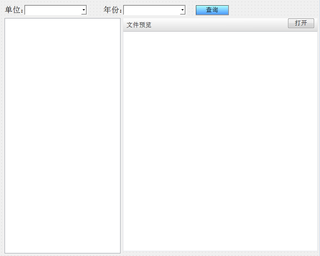
请确保已经安装了PyQt5。运行示例代码后,将会显示一个窗口,其中包含了两个下拉框和一个查询按钮。您可以选择单位和年份,然后单击查询按钮,将会在左侧的树形视图中显示指定文件夹目录树。当双击选择左侧树形视图中的某个文件后,将会在右侧的文本编辑器中显示该文件的内容预览。您还可以单击“打开”按钮来打开选中的文件。