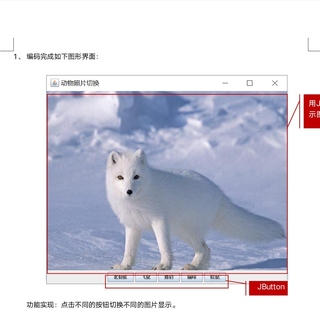
package javaclass;
import javax.swing.*;
import java.awt.*;
import java.awt.event.ActionEvent;
import java.awt.event.ActionListener;


public class FramePractise  {
    JFrame jf;
    JButton jb1;
    JButton jb2;
    JButton jb3;
    JButton jb4;
    JButton jb5;

    ImageIcon imageicon;
    JLabel jl;

    JPanel jp2;
    FramePractise framePractise;
    public FramePractise(){

        JPanel jp2=new JPanel();                                                                                        //构造方法,用来构造对象
        jb1=new JButton("北极狐");
        ListenerA A = new ListenerA();   //创建A动作监听器(先看listenerA类)
        jb1.addActionListener(A);        //对按钮jb1应用A监听器(传统方法)
        jb2=new JButton("飞鼠");
        jb3=new JButton("猎豹");
        jb4=new JButton("猫咪");
        jb5=new JButton("松鼠");

        jf=new JFrame("动物照片切换");

        jl=new JLabel();
        //imageicon=new ImageIcon("C:/Users/HP/Desktop/jk/maomi(1).jpg");                //写入图片路径
        //jl=new JLabel(imageicon);
        jp2.add(jl);

        jf.setSize(500, 500);
        jf.setVisible(true);
        init();
        jf.setDefaultCloseOperation(JFrame.EXIT_ON_CLOSE);

    }


    public void init() {     //创建init方法,在这里进行jp1,jp2添加到jf方法的操作,稍后只用调用方法即可
        JPanel jp1=new JPanel();    //创建jp,类似jf,稍后将这俩jp添加到jf面板
        JPanel jp2=new JPanel();
        this.jp2=jp2;
        jf.setLayout(new BorderLayout());   //jf应用边界布局管理器
        jp1.setLayout(new FlowLayout());      //jp1当场构建流布局
        jp1.add(jb1);                         //添加按钮jbX至jp1
        jp1.add(jb2);
        jp1.add(jb3);
        jp1.add(jb4);
        jp1.add(jb5);
        jp2.add(jl);

        jf.add(jp1,BorderLayout.SOUTH);        //jf添加jp1时,放置于南边   jp1后是逗号
        jf.add(jp2,BorderLayout.NORTH);
    }


        public class ListenerA implements ActionListener{
                                                                 //该类应用ActionListener接口


        @Override
            public void actionPerformed(ActionEvent e) {            //应用接口:必须实现其抽象方法
                if(e.getSource()==jb1){
                    imageicon=new ImageIcon("C:/Users/HP/Desktop/jk/beijihu.jpg");
                    jl=new JLabel(imageicon);
                    jp2.add(jl);
                }
            }
        }


    public static void main(String[]args){
        FramePractise fp = new FramePractise();
    }
}


