
arco.design vue组件
<script setup lang="ts">
import { reactive } from "vue";

const handleSubmit = () => {
  alert(123);
};

const form = reactive({
  username: "",
  password: "",
  isRead: "",
});
</script>

<template>
  <div id="userlogin">
    <h1 style="text-align: center; margin-bottom: 100px">登录页面</h1>
    <a-row class="grid-demo" :gutter="24">
      <a-col :span="12">
        <div>col - 12</div>
      </a-col>
      <a-col :span="12">
        <div>
          <a-form
            :model="form"
            :style="{ width: '500px' }"
            @submit-success="handleSubmit"
            size="large"
          >
            <a-form-item
              field="username"
              hide-asterisk="true"
              :rules="[{ required: true, message: '用户名不能为空' }]"
            >
              <icon-stamp />
              <a-input v-model="form.username" placeholder="请输入账号" />
            </a-form-item>

            <a-form-item
              field="password"
              hide-asterisk="true"
              :rules="[{ required: true, message: '密码不能为空' }]"
            >
              <icon-lock />
              <a-input-password
                v-model="form.password"
                placeholder="请输入密码"
              />
            </a-form-item>

            <a-form-item field="isRead">
              <a-checkbox v-model="form.isRead">单选按钮</a-checkbox>

              <a class="forgetpas">忘记密码?</a>
            </a-form-item>

            <a-form-item>
              <a-button html-type="submit" type="primary" long>登录</a-button>
            </a-form-item>

            <a-form-item>
              <a-button long>注册</a-button>
            </a-form-item>
          </a-form>
        </div>
      </a-col>
    </a-row>
  </div>
</template>

<style scoped>
#userlogin {
  padding: 30px;
}

.forgetpas {
  margin-left: 250px;
  text-decoration: none;
  color: #57A9FB ;
  cursor: pointer;
}

.forgetpas:hover {
  color: #3491FA;
}
</style>
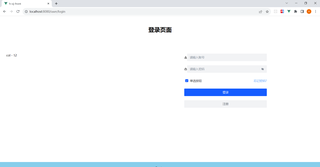
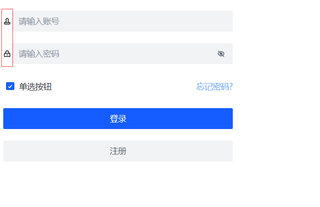
###如何iang图片放到输入框中


