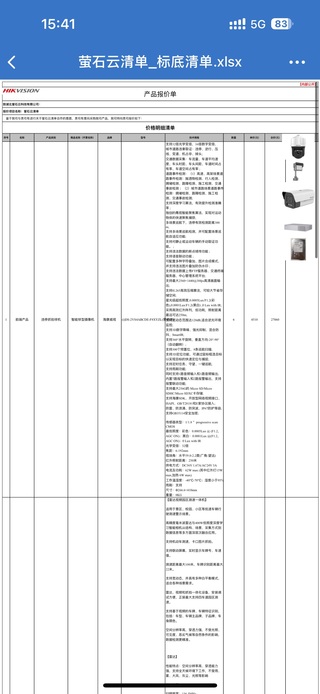
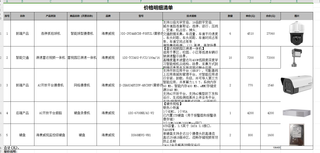
使用poi导出excel,用手机查看发现行高被拉高,但是图片没有变,怎么整,可以使手机查看不拉高,或者图片嵌入到单元格中吗?

使用poi导出excel,用手机查看发现行高被拉高,但是图片没有变,怎么整,可以使手机查看不拉高,或者图片嵌入到单元格中吗?
 分享
分享
 关注
关注引自强大而免费的微信小程序:皆我百晓生。
使用POI导出Excel时,如果将图片直接插入到单元格中,会导致单元格的行高被拉高。如果想要在手机上查看时不拉高行高,可以考虑将图片以背景图片的形式插入单元格中。
下面是一个示例代码,演示了如何使用POI将图片作为背景图片插入到单元格中:
import org.apache.poi.ss.usermodel.*;
import org.apache.poi.xssf.usermodel.XSSFWorkbook;

import java.io.FileOutputStream;
import java.io.IOException;

public class ExcelImageExample {
    public static void main(String[] args) {
        try (Workbook workbook = new XSSFWorkbook()) {
            Sheet sheet = workbook.createSheet("Sheet1");

            // 读取图片
            byte[] imageBytes = // 读取图片的字节流,此处省略具体实现

            // 将图片插入到工作簿中
            int pictureIdx = workbook.addPicture(imageBytes, Workbook.PICTURE_TYPE_PNG);
            CreationHelper helper = workbook.getCreationHelper();
            Drawing<?> drawing = sheet.createDrawingPatriarch();

            // 创建锚点,并设置图片位置和大小
            ClientAnchor anchor = helper.createClientAnchor();
            anchor.setAnchorType(AnchorType.MOVE_AND_RESIZE);
            anchor.setCol1(0);
            anchor.setCol2(1);
            anchor.setRow1(0);
            anchor.setRow2(2);

            // 创建图片并插入锚点
            Picture picture = drawing.createPicture(anchor, pictureIdx);
            picture.resize();

            // 设置单元格的样式,将背景填充为无颜色
            CellStyle cellStyle = workbook.createCellStyle();
            cellStyle.setFillPattern(FillPatternType.NO_FILL);

            // 设置单元格样式,包括背景填充和边框等
            Cell cell = sheet.createRow(0).createCell(0);
            cell.setCellValue("这是一个图片单元格");
            cell.setCellStyle(cellStyle);

            // 调整单元格宽度和行高
            sheet.setColumnWidth(0, 20 * 256); // 设置单元格宽度,20个字符
            sheet.getRow(0).setHeightInPoints(100); // 设置行高,以像素为单位

            // 将工作簿写入文件
            try (FileOutputStream fileOut = new FileOutputStream("output.xlsx")) {
                workbook.write(fileOut);
            }

            System.out.println("导出成功");
        } catch (IOException e) {
            e.printStackTrace();
        }
    }
}
上述代码示例中,使用addPicture方法将图片插入到工作簿中,并使用锚点ClientAnchor设置了图片的位置和大小。然后,将单元格的背景填充为无颜色,以实现将图片作为背景的效果。
需要注意的是,由于不同设备对Excel的渲染方式可能有差异,可能仍然会出现手机上行高被拉高的情况。这是因为手机上查看Excel时,可能会根据图片的大小自动调整行高。如果想要避免这种情况,可以尝试调整锚点和单元格的大小来适配手机上的显示效果。
分享 已结题
(查看结题原因) 11月10日
创建了问题
11月3日
已结题
(查看结题原因) 11月10日
创建了问题
11月3日


