
问题描述:
在SpriteManager.h文件中声明了函数 SpriteCollision 和 SpriteDying ,
但是在SpriteManager.cpp文件中没有 SpriteCollision 和 SpriteDying 相关函数的定义,
因为涉及到相关参数的引用所以想在GameMain.cpp 中去定义 ,
(为什么不直接在GameMain中去直接声明和定义,是因为在 SpriteManager.cpp 有相关的函数需要用到 SpriteCollision 和 SpriteDying函数)
总而言之: 在GameMain.cpp 中去定义函数 SpriteCollision 和 SpriteDying的时候遇到了以下问题:
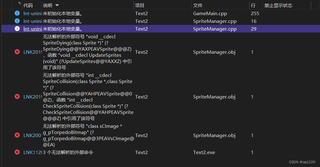
怎么解决?
相关代码:
1.GameMain.cpp
#define WIN32_LEAN_AND_MEAN
#include <windows.h>
#include <windowsx.h>
#include <ctime>
#include "sCImage.h"
#include "sprite.h"
#include "SpriteManager.h"
#include "resource1.h"

#include "AlienSprite.h"

#pragma comment(lib, "winmm.lib")
//////////////////////////////////////////////////5)
#pragma comment(lib,"Msimg32.lib")//当使用函数TransparentBlt时,需引用这个库
//////////////////////////////////////////////////5)


#define WINDOW_TITLE "飞机大战"
#define WINDOW_WIDTH 640
#define WINDOW_HEIGHT 480


enum GameState  ///控制游戏的三种状态 菜单界面 运行界面 结束界面
{
    GS_Menu,
    GS_Playing,
    GS_Result
};

GameState gameState;//定义一个状态的变量


/////////////////////////////////////////////////////////////////////////////////////////////////1
//HDC hDC;
//HDC g_hdc;
//HDC g_mdc;
//HDC g_bufdc;
/////////////////////////////////////////////////////////////////////////////////////////////////1
HWND        g_hWnd = NULL;//保存全局窗口句柄
HINSTANCE    g_hInstance = NULL;//保存全局实例句柄

HDC hdc;
HDC         g_hOffscreenDC;
HBITMAP     g_hOffscreenBitmap;

void ChangeToState(HDC hDC, GameState gs, HWND hwnd);

struct GameMenu
{
    //////////////////////////////////////////////////1)
    sCImage* imgMenu;
    sCImage* imgButton1;
    sCImage* imgButton2;
    sCImage* imgButton5;
    sCImage* imgButton6;
    sCImage* imgButton3;
    sCImage* imgButton4;
    sCImage* imgButton7;
    sCImage* imgButton8;
    sCImage* imgTeam1;
    sCImage* imgTeam2;
    //////////////////////////////////////////////////1)

    void Init(HDC hDC) {//当程序启动时,做初始化的工作
    //////////////////////////////////////////////////2)
        g_hOffscreenDC = CreateCompatibleDC(hDC);
        g_hOffscreenBitmap = CreateCompatibleBitmap(hDC, 640, 430);
        SelectObject(g_hOffscreenDC, g_hOffscreenBitmap);


        imgMenu = new sCImage("Res/menu.png");
        imgButton1 = new sCImage("Res/button1.png");
        imgButton2 = new sCImage("Res/button2.png");
        imgButton5 = new sCImage("Res/button5.png");
        imgButton6 = new sCImage("Res/button6.png");
        imgButton3 = new sCImage("Res/button3.png");
        imgButton4 = new sCImage("Res/button4.png");
        imgButton7 = new sCImage("Res/button7.png");
        imgButton8 = new sCImage("Res/button8.png");
        imgTeam1 = new sCImage("Res/team1.png");
        imgTeam2 = new sCImage("Res/team2.png");

    ////////////////////////////////////////////////////2)
    }
    void Start(HDC hDC) {//当进入到当前状态需要做的初始化工作,当进入到当前状态时会执行这个函数
    //////////////////////////////////////////////////3)
        //绘制背景
        imgMenu->Draw(hDC, 0, 0);
        //imgButton1->Draw(hDC, 200, 200, true, RGB(255, 255, 255));
        imgButton2->Draw(hDC, 190, 220, true, RGB(255, 255, 255));
        //imgButton5->Draw(hDC, 200, 200, true, RGB(255, 255, 255));
        imgButton6->Draw(hDC, 190, 270, true, RGB(255, 255, 255));
        //imgButton3->Draw(hDC, 200, 200, true, RGB(255, 255, 255));
        imgButton4->Draw(hDC, 190, 320, true, RGB(255, 255, 255));
        //imgButton7->Draw(hDC, 200, 200, true, RGB(255, 255, 255));
        imgButton8->Draw(hDC, 190, 370, true, RGB(255, 255, 255));
        //imgTeam1->Draw(hDC, 200, 200, true, RGB(255, 255, 255));
        imgTeam2->Draw(hDC, 450, 100, true, RGB(0,0,0));


    }
    void Update(HDC hDC) {//在当前状态 游戏运行的时候,循环调用的函数,用来放置游戏的逻辑

    }
    void OnWindowMessage(HWND hwnd, UINT uMsg, WPARAM wParam, LPARAM lParam)
    {
        switch (uMsg)
        {
        case WM_LBUTTONUP:
            //进入下一个状态
            ChangeToState(hdc, GS_Playing, hwnd);
            /*gameState = GS_Playing;
            gamePlaying.Start(hdc);*/
            break;

        }
    }

    void Destroy(HDC hDC) {//当程序退出,终止的时候,调用,做一些清理的工作

    }
};

struct GamePlaying
{
    sCImage* g_pBackgroundBitmap;//背景图
    sCImage* g_pShipBitmap;//轮船位图
    sCImage* g_pBombBitmap;//导弹位图
    sCImage* g_pLeftSubmarineBitmap;//潜艇位图
    sCImage* g_pRightSubmarineBitmap;//潜艇位图
    sCImage* g_pTorpedoBitmap;//水雷位图

    sCImage* g_pGameOverBitmap;
    sCImage* g_pSmExplosionBitmap;//小爆炸位图
    sCImage* g_pLgExplosionBitmap;//大爆炸位图

    Sprite* g_pShipSprite;


    //按键延迟
    int         g_iFileInputDelay;  //输入延迟变量,有助于改变键盘和游戏杆的输入响应,以便改进游戏的可玩性
    int         g_iNumLives, g_iScore, g_iDifficulty; //
    BOOL        g_bGameOver;//游戏是否结束
    int flag = 0;

    int seq[8] = { 0,1,2,3,4,5,6,7 };

    void NewGame()
    {
        CleanupSprites();
        RECT rcBounds = { 0,0,640,480 };
        g_pShipSprite = new Sprite(g_pShipBitmap, 1, 1, rcBounds, BA_WRAP);
        g_pShipSprite->SetPosition(320, 70 - 27);
        AddSprite(g_pShipSprite);

        g_iFileInputDelay = 0;
        g_iNumLives = 3;
        g_iScore = 0;
        g_iDifficulty = 80;
        g_bGameOver = FALSE;

        //PlayMIDISong(TEXT("Music.mid"));

    }
    void Init(HDC hDC) {//当程序启动时,做初始化的工作
        // Seed the random number generator
        srand(GetTickCount());

        // Create the offscreen device context and bitmap
        g_hOffscreenDC = CreateCompatibleDC(hDC);
        g_hOffscreenBitmap = CreateCompatibleBitmap(hDC, 640, 430);
        SelectObject(g_hOffscreenDC, g_hOffscreenBitmap);

        g_pBackgroundBitmap = new sCImage("Res/Background.bmp");
        g_pShipBitmap = new sCImage("Res/SHIP.BMP");
        g_pLeftSubmarineBitmap = new sCImage("Res/submarine1.bmp");
        g_pRightSubmarineBitmap = new sCImage("Res/submarine2.bmp");
        g_pBombBitmap = new sCImage("Res/BOMB.BMP");
        g_pTorpedoBitmap = new sCImage("Res/TORPEDO.BMP");
        g_pSmExplosionBitmap = new sCImage("Res/SmExplosion.bmp");
        g_pLgExplosionBitmap = new sCImage("Res/LgExplosion.bmp");
        g_pGameOverBitmap = new sCImage("Res/GameOver.bmp");

        NewGame();

    }
    void Start(HDC hDC) {//当进入到当前状态需要做的初始化工作,当进入到当前状态时会执行这个函数

    }
    void Update(HDC hDC) {//在当前状态 游戏运行的时候,循环调用的函数,用来放置游戏的逻辑
        //绘制背景
        g_pBackgroundBitmap->Draw(hDC, 0, 0);
        //绘制精灵
        //DrawSprites(hDC);
    }
    void OnWindowMessage(HWND hwnd, UINT uMsg, WPARAM wParam, LPARAM lParam)
    {

    }
    void Destroy(HDC hDC) {//当程序退出,终止的时候,调用,做一些清理的工作

    }
};

struct GameResult
{
    void Init(HDC hDC) {//当程序启动时,做初始化的工作

    }
    void Start(HDC hDC) {//当进入到当前状态需要做的初始化工作,当进入到当前状态时会执行这个函数

    }
    void Update(HDC hDC) {//在当前状态 游戏运行的时候,循环调用的函数,用来放置游戏的逻辑

    }
    void OnWindowMessage(HWND hwnd, UINT uMsg, WPARAM wParam, LPARAM lParam)
    {

    }
    void Destroy(HDC hDC) {//当程序退出,终止的时候,调用,做一些清理的工作

    }
};
//声明结构体的变量
GameMenu gameMenu;//开始界面
GamePlaying gamePlaying;//游戏对战界面
GameResult gameResult;//游戏结束界面


LRESULT CALLBACK WinProc(HWND hwnd, UINT uMsg, WPARAM wParam, LPARAM lParam);
void GameStart(HDC hDC);
void GameUpdate(HDC hDC);
void GameEnd(HDC hDC);


//hInstance 实例句柄,每一个应用程序都是有一个应用程序的实例句柄(唯一的);Windows自动分配
//lpCmdLine 命令行的参数
//nShowCmd 用来指定窗口如何显示,最大化,还是最小化
/*windows主函数(程序运行的入口,从这里进入执行,离开该函数表示程序的结束)*/
int WINAPI WinMain(HINSTANCE hInstance, HINSTANCE hPrevInstance,
    LPSTR lpCmdLine, int nCmdShow
)
{
    //定义一个窗口类的对象(参考MSDN)
    WNDCLASSEX winclass;
    winclass.cbSize = sizeof(WNDCLASSEX);
    winclass.style = CS_DBLCLKS | CS_HREDRAW | CS_VREDRAW | CS_OWNDC;
    winclass.lpfnWndProc = WinProc;
    winclass.cbClsExtra = 0;
    winclass.cbWndExtra = 0;
    winclass.hInstance = hInstance;
    winclass.hIcon = LoadIcon(hInstance, IDI_APPLICATION);
    winclass.hCursor = LoadCursor(hInstance, IDC_ARROW);
    winclass.hbrBackground = (HBRUSH)GetStockObject(BLACK_BRUSH);
    winclass.lpszMenuName = NULL;
    winclass.lpszClassName = "GameWndClass";
    winclass.hIconSm = LoadIcon(hInstance, IDI_APPLICATION);

    //注册窗口类
    if (!RegisterClassEx(&winclass))
        return 0;

    //将实例句柄用一个全局变量保存,方便在其他函数中使用
    g_hInstance = hInstance;

    //根据上面定义的窗口类创建一个特定的窗口对象
    HWND hwnd = CreateWindowEx(
        NULL,
        "GameWndClass",
        "Submarine Battle",
        WS_OVERLAPPEDWINDOW | WS_VISIBLE,
        //WS_POPUP | WS_VISIBLE,
        0,
        0,
        WINDOW_WIDTH,
        WINDOW_HEIGHT,
        NULL,
        NULL,
        hInstance,
        NULL
    );

    //将窗口句柄用一个全局变量保存,方便在其他函数中使用
    g_hWnd = hwnd;

    ShowWindow(hwnd, SW_SHOW);//显示窗口
    UpdateWindow(hwnd);//重新绘制一遍窗口

    HDC hdc = GetDC(hwnd);

    GameStart(hdc);/////////////////////////////////////////////////////终于,找到问题所在了,应该在已经创建了的画布hdc上操作,而该画布又在已经创建好的窗口hwnd上,完美!

    //启动消息循环,注意这里使用一种非阻塞的获取消息的方式
    MSG msg;
    while (1)
    {
        DWORD starttime = GetTickCount();

        if (PeekMessage(&msg, NULL, 0, 0, PM_REMOVE))
        {
            if (msg.message == WM_QUIT)
                break;

            TranslateMessage(&msg);
            DispatchMessage(&msg);
        }

        if (KEYDOWN(VK_ESCAPE))
            PostQuitMessage(1);

        GameUpdate(hdc);

        if (GetTickCount() - starttime < 33)
            Sleep(33 - (GetTickCount() - starttime));

    }

    GameEnd(hdc);

    return 1;
}

void ChangeToState(HDC hDC,GameState gs, HWND hwnd)
{
    gameState = gs;
    switch (gs)
    {
    case GS_Menu:
        gameMenu.Start(hDC);
        break;
    case GS_Playing:
        gamePlaying.Start(hDC);
        break;
    case GS_Result:
        gamePlaying.Start(hDC);
        break;
    }
}


//回调函数,完成对消息的处理,由操作系统直接调用
LRESULT CALLBACK WinProc(HWND hwnd, UINT uMsg, WPARAM wParam, LPARAM lParam)
{    //根据不同的消息类型进行相应的处理
    switch (uMsg)
    {//分发事件给当前游戏的状态,来处理
    case WM_KEYDOWN:
    case WM_LBUTTONUP:
    case WM_LBUTTONDOWN:
        switch (gameState)
        {
        case GS_Menu:
            gameMenu.OnWindowMessage(hwnd, uMsg, wParam, lParam);
            break;
        case GS_Playing:
            gamePlaying.OnWindowMessage(hwnd, uMsg, wParam, lParam);
            break;
        case GS_Result:
            gameResult.OnWindowMessage(hwnd, uMsg, wParam, lParam);
            break;
        }
        break;
    case WM_DESTROY: //窗口销毁时触发的消息
        PostQuitMessage(0);
        break;
    default:
        break;
    }
    //未被上述代码处理的消息都交由这里处理。
    return DefWindowProc(hwnd, uMsg, wParam, lParam);
}

void GameStart(HDC hDC)
{


    gameMenu.Init(hDC);
    gamePlaying.Init(hDC);
    gameResult.Init(hDC);

    //设置默认状态
    gameState = GS_Menu;
    gameMenu.Start(hDC);
}
void GameUpdate(HDC hDC)
{
    switch (gameState)
    {
    case GS_Menu:
        gameMenu.Update(hDC);
        break;
    case GS_Playing:
        gamePlaying.Update(hDC);
        break;
    case GS_Result:
        gameResult.Update(hDC);
        break;
    }

}
void GameEnd(HDC hDC)
{
    /////////////////////////////////////////////////////////////////////////////////////////////////3
    /*DeleteDC(g_bufdc);
    DeleteDC(g_mdc);
    ReleaseDC(hwnd, g_hdc);*/
    DeleteObject(g_hOffscreenBitmap);
    DeleteDC(g_hOffscreenDC);
    /////////////////////////////////////////////////////////////////////////////////////////////////3

    gameMenu.Destroy(hDC);
    gamePlaying.Destroy(hDC);
    gameResult.Destroy(hDC);
}
2.SpriteManager.h
/*精灵管理器*/

#include "Sprite.h"


#include <vector>
using namespace std;


/////////////////////////////////6)
#define KEYDOWN(vk_code) ((GetAsyncKeyState(vk_code) & 0x8000) ? 1:0)
#define KEYUP(vk_code)   ((GetAsyncKeyState(vk_code) & 0x8000) ? 0:1)

extern HWND g_hWnd;
////////////////////////////////////声音播放引擎//////////////////////////////////////7)
extern UINT m_uiMIDIPlayerID;//记录MIDI设备ID
void PlayMIDISong(const char* szMIDIFileName = TEXT(""), BOOL bRestart = TRUE);
void ReplayMIDISong();
void PauseMIDISong();
void CloseMIDIPlayer();
/////////////////////////////精灵管理器//////////////////////////////////////////////////////////////////////////////////////
extern sCImage* g_pTorpedoBitmap;
extern vector<Sprite*>     m_vSprites;

//精灵碰撞响应函数接口,由特定的游戏实现
BOOL SpriteCollision(Sprite* pSpriteHitter, Sprite* pSpriteHittee);//8)

//精灵死亡事件响应函数
void SpriteDying(Sprite* pSprite);

BOOL CheckSpriteCollision(Sprite* pTestSprite);

void AddSprite(Sprite* pSprite);

void DrawSprites(HDC hDC);

void UpdateSprites();

void CleanupSprites();

Sprite* IsPointInSprite(int x, int y);
3.函数 SpriteCollision 和 SpriteDying
BOOL SpriteCollision(Sprite* pSpriteHitter, Sprite* pSpriteHittee)
{
    sCImage* pHitter = pSpriteHitter->GetBitmap();
    sCImage* pHittee = pSpriteHittee->GetBitmap();
    //1.玩家导弹与NPC潜艇的碰撞
    if ((pHitter == g_pBombBitmap && (pHitter == g_pLeftSubmarineBitmap || pHittee == g_pRightSubmarineBitmap)) ||
        (pHittee == g_pBombBitmap && (pHitter == g_pLeftSubmarineBitmap || pHitter == g_pRightSubmarineBitmap)))
    {
        //碰撞先销毁
        pSpriteHitter->kill();
        pSpriteHittee->kill();

        //销毁的同时发生爆炸
        RECT rcpos = pSpriteHitter->GetPosition();//先获取爆炸位置:发生碰撞的精灵的位置 ;  定义一个位置矩形

        RECT rcBounds = { 0,0,640,480 };
        Sprite* explore_Sprite = new Sprite(g_pLgExplosionBitmap, 8, 1, rcBounds , BA_STOP, true);
        explore_Sprite->setSequence(seq, 8, 1);//帧数:8,帧延迟:3  ; 起始帧、结束帧和循环次数
        explore_Sprite->SetPosition(rcpos.left,rcpos.top);
        AddSprite(explore_Sprite);
        // 每次播放动画序列时,将 Sprite 对象的位置设置为上一帧的位置
        explore_Sprite->SetPosition(explore_Sprite->GetPosition());
    }

    //2.潜艇水雷与玩家轮船的碰撞
    if ((pHitter == g_pTorpedoBitmap && pHittee == g_pShipBitmap) ||
        (pHittee == g_pTorpedoBitmap && pHitter == g_pShipBitmap))
    {
        if (pHitter == g_pTorpedoBitmap)
            pSpriteHitter->kill();
        else
            pSpriteHittee->kill();

        //销毁的同时发生爆炸
        RECT rcpos = pSpriteHitter->GetPosition();//先获取爆炸位置:发生碰撞的精灵的位置 ;  定义一个位置矩形

        RECT rcBounds = { 0,0,640,480 };
        Sprite* explore_Sprite = new Sprite(g_pLgExplosionBitmap, 8, 1, rcBounds , BA_STOP, true);
        explore_Sprite->setSequence(seq, 8, 1);
        explore_Sprite->SetPosition(rcpos.left, rcpos.top);
        AddSprite(explore_Sprite);
        // 每次播放动画序列时,将 Sprite 对象的位置设置为上一帧的位置
        explore_Sprite->SetPosition(explore_Sprite->GetPosition());
        //重置轮船的位置,不用销毁
        g_pShipSprite->SetPosition(320, 45);

    }


    return FALSE;
}
//精灵死亡事件响应函数
void SpriteDying(Sprite* pSprite)
{
    if (pSprite->GetBitmap() == g_pTorpedoBitmap)
    {
        //在水雷死亡的位置创建一个小爆炸精灵
        RECT rcpos = pSprite->GetPosition();//先获取爆炸位置:发生碰撞的精灵的位置 ;  定义一个位置矩形

        RECT rcBounds = { 0,0,640,480 };
        Sprite* smexplore_Sprite = new Sprite(g_pSmExplosionBitmap, 8, 1, rcBounds, BA_STOP, true);
        smexplore_Sprite->setSequence(seq, 8, 1);
        smexplore_Sprite->SetPosition(rcpos.left, rcpos.top);
        AddSprite(smexplore_Sprite);
    }

}


