
css 在隐藏 展开的时候元素不会错乱 求大家帮帮我 感激不尽
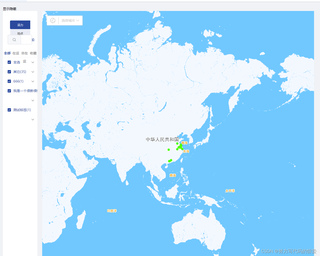
下面图片中的样式不会错乱,图2 图3 所示 我的就错乱了 打了 *** 号的 是我实现隐藏显示的样式代码
图1
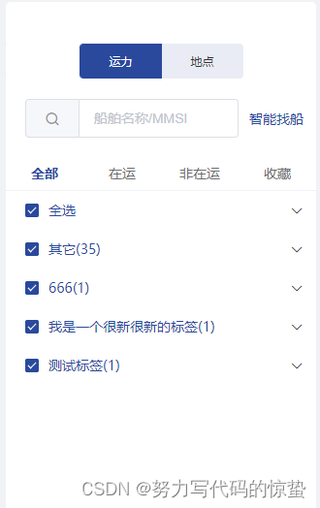
图2
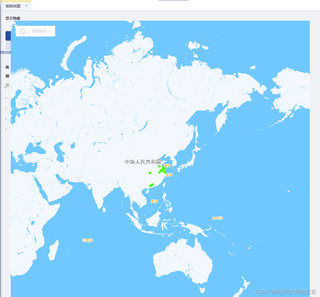
图3
```css
.left
        // display none
        float left
        box-sizing border-box
        width 0px             //***
        height 100%
        border-radius 5px
        background-color #FFFFFF
        transition width 1s             //***
        .ship-location-switch
            padding 40px 0 20px
            height 40px
            text-align center
            line-height @height
        .main
            height calc(100% - 100px)
            .search-ctn
                baseAcf()

                padding 0 20px
                height 40px
                line-height @height
                .input
                    float left
                    width calc(100% - 60px)
                .btn
                    float right
                    margin-right -20px
                    width 80px
            .list-ctn
                margin-top 20px
                height calc(100% - 60px)
                .list-tabs
                    baseAcf()

                    box-sizing border-box
                    height 35px
                    border-bottom 1px solid #f0f2f5
                    .tab
                        float left
                        width 25%
                        height 34px
                        color #6d6d6d
                        text-align center
                        font-size 14px
                        line-height @height
                        cursor pointer
                        &.is-selected
                            color $color-theme
                            font-weight 700
                .list-tools,
                .list .tag .header
                    baseAcf()

                    padding-left 20px
                    height 40px
                    line-height @height
                    .checkbox
                        float left
                    .expand-btn
                        baseTrans()

                        float right
                        width 40px
                        height 40px
                        text-align center
                        line-height @height
                        cursor pointer
                        i
                            font-size 12px
                        &.is-expand
                            transform rotate(180deg)
                .list
                    overflow-x hidden
                    overflow-y auto
                    padding-left 20px
                    height calc(100% - 75px)
                    .tag
                        .header
                            padding 0
        &.super-search
            .unit-input-ctn
                baseAcf()

                height 60px
                .input
                    float left
                    width calc(100% - 30px)
                .unit
                    float left
                    margin-top 20px
                    width 30px
                    height 40px
                    text-align center
                    line-height @height
            .btn-ctn
                margin-top 10px
        &.super-search-result
            .result-tools
                margin-top -20px
                height 40px
                line-height @height
            .result-list
                overflow-y auto
                margin 0 -20px
                padding-left 20px
                height calc(100% - 80px)
            .btn-ctn
                margin-top 20px
                height 40px
                line-height @height
    .left.active
        display block               //***
        width 320px                //***
        transition width 1s      //***
.menu-toggle(@click="toggleMenu") 显示隐藏
    .left(
        :class="{ active: isMenuVisible }"
        v-show="!isShowSuperSearch && !isShowSuperSearchResult"
    )
data () {
    return {
isMenuVisible: false
        }
    },
methods: {
// 左侧导航栏显示/隐藏
        toggleMenu() {
            console.log(11)
            this.isMenuVisible = !this.isMenuVisible
            console.log('this.isMenuVisible: ', this.isMenuVisible)
        }
}
```


