
想显示一个选择难度的菜单,但是
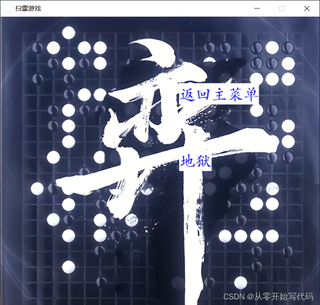
到这就点不了,问题大概是系统直接把这三个if都执行了
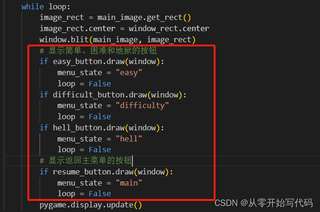
很奇怪,不知道哪里错了
这是主程序源码:
from meau_modle import button_new
#from music_mode import music
#from game import clear_mines
import pygame
pygame.init()
DISPLAY_WIDTH = DISPLAY_HEIGHT = 600
window = pygame.display.set_mode((DISPLAY_WIDTH, DISPLAY_HEIGHT))
window_rect = window.get_rect()
# 定义菜单变量
menu_state = "main"
game_loop=False
# 定义字体
font = pygame.font.SysFont("华文楷体", 30)

# 定义颜色
TEXT_COL = (0, 0, 255)

# 加载图片
resume_img = font.render("返回主菜单", True, TEXT_COL)
options_img = font.render("选择模式", True, TEXT_COL)
quit_img = font.render("退出程序", True, TEXT_COL)
# video_img = font.render("开始游戏", True, TEXT_COL)
audio_img = font.render("音乐设置", True, TEXT_COL)
# keys_img = font.render("按键设置", True, TEXT_COL)
# back_img = font.render("返回上节", True, TEXT_COL)
easy_img = font.render('简单', True, TEXT_COL)
difficult_img = font.render('困难', True, TEXT_COL)
hell_img = font.render('地狱', True, TEXT_COL)
main_image = pygame.image.load('主页面.bmp')

# 创建实例
resume_button = button_new.Button(336, 125, resume_img, 1)
options_button = button_new.Button(336, 250, options_img, 1)
quit_button = button_new.Button(336, 375, quit_img, 1)
# video_button = button_new.Button(336, 75, video_img, 1)
audio_button = button_new.Button(336, 200, audio_img, 1)
# keys_button = button_new.Button(336, 325, keys_img, 1)
# back_button = button_new.Button(336, 450, back_img, 1)
easy_button = button_new.Button(336, 250, easy_img, 1)
difficult_button = button_new.Button(336, 250, difficult_img, 1)
hell_button = button_new.Button(336, 250, hell_img, 1)


def draw_text(text, font, text_col, x, y):
  img = font.render(text, True, text_col)
  window.blit(img, (x, y))


def main_menu():
    music.music_play()
    global game_loop
    global menu_state
    run = True
    while run:
        image_rect = main_image.get_rect()
        image_rect.center = window_rect.center
        window.blit(main_image, image_rect)
        # 判断游戏是否继续
        if game_loop:
            # 判断菜单状态
            if menu_state == "main":
                # 在屏幕画按钮
                if resume_button.draw(window):
                    game_loop = False
                if options_button.draw(window):
                    menu_state = "options"
                    draw_difficulty_menu()
                if quit_button.draw(window):
                    run = False
            elif menu_state == 'easy':
                # clear_mines.easy()
                menu_state = "main"  # 游戏结束后返回主菜单
            elif menu_state == 'difficulty':
                # clear_mines.difficulty()
                menu_state = "main"  # 游戏结束后返回主菜单
            elif menu_state == 'hell':
                # clear_mines.hell()
                menu_state = "main"  # 游戏结束后返回主菜单
        else:
            draw_text("扫雷游戏(按空格键继续)", font, TEXT_COL, 140, 250)

        # 事件处理器
        for event in pygame.event.get():
            if event.type == pygame.KEYDOWN:
                if event.key == pygame.K_SPACE:
                    game_loop = True
            if event.type == pygame.QUIT:
                run = False
        pygame.display.update()


def draw_difficulty_menu():
    loop = True
    global menu_state
    while loop:
        image_rect = main_image.get_rect()
        image_rect.center = window_rect.center
        window.blit(main_image, image_rect)
        # 显示简单、困难和地狱的按钮
        if easy_button.draw(window):
            menu_state = "easy"
            loop = False
        if difficult_button.draw(window):
            menu_state = "difficulty"
            loop = False
        if hell_button.draw(window):
            menu_state = "hell"
            loop = False
        # 显示返回主菜单的按钮
        if resume_button.draw(window):
            menu_state = "main"
            loop = False
        pygame.display.update()

main_menu()
这是按钮的模块源码:
import pygame

# 按钮类


class Button():
    def __init__(self, x, y, image, scale):
        width = image.get_width()
        height = image.get_height()
        self.image = pygame.transform.scale(
            image, (int(width * scale), int(height * scale)))
        self.rect = self.image.get_rect()
        self.rect.topleft = (x, y)
        self.clicked = False

    def draw(self, surface):
        action = False
        pygame.draw.rect(surface, (255, 255, 255), (self.rect.x, self.rect.y,
                         self.image.get_width(), self.image.get_height()))
        bk = pygame.draw.rect(surface, (255, 255, 255), (self.rect.x,
                              self.rect.y, self.image.get_width(), self.image.get_height()), 3)
        # 得到鼠标的位置
        pos = pygame.mouse.get_pos()

        # 判断鼠标划过按钮并点击
        if bk.collidepoint(pos):
            if pygame.mouse.get_pressed()[0] == 1 and self.clicked == False:
                self.clicked = True
                action = True
                pygame.draw.rect(surface, (0, 0, 255),
                                    (self.rect.x, self.rect.y, self.image.get_width(), self.image.get_height()))

        if pygame.mouse.get_pressed()[0] == 0:
            self.clicked = False

        # 画按钮到屏幕
        surface.blit(self.image, (self.rect.x, self.rect.y))
        # pygame.display.update()
        return action


