
问题背景
问题:Windows无法通过SSH连接本地的虚拟机以及外网服务器,但是用PuTTY、MobaXterm可以连接(openSSH建立TCP链接失败),Windows无法使用正常openssh建立连接!
昨天创建了ubuntu虚拟机,然后需要用到vscode就行项目编辑,突然就想到可以用window的vscode通过SSH连接,只要开虚拟机我就可以在window直接用vscode了,于是说干就干,跟着这篇文章进行了环境搭建:https://blog.csdn.net/wqy00803/article/details/118004961 ;一切都很顺利,但是最经典的事情发生了,在我用VScode进行最后一步连接的时候,弹出了失败:
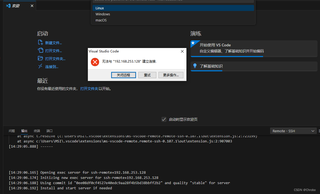
开始懵逼加纳闷模式XD
2024/01/18更新
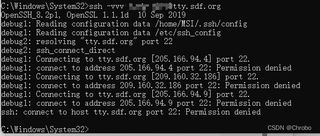
找到一个可以测试SSH连接的外网服务器:https://sdf.org/
老样子还是不行,PuTTY等工具还是可以连上的,所以问题肯定不在虚拟机这边:
2024/01/19更新
现在基本确认问题就在window上的SSH了,虚拟机服务器绝对没问题;Windows由于某些原因阻止了openssh的网络连接,甚至连与服务器建立TCP连接的机会都没有!
已经检查过防火墙,防火墙没有对其限制,并且关闭防火墙也无效;尝试用终端重置网络设置也无效;
现在的问题是究竟是什么让window阻止了openssh的连接?
请各位不要用GPT之类的东西查这问题了,我已经懒得回复了,都没有抓到问题的重点,而且我也有GPT,不是不会用,是根本没有相关案例;
现在最简单的方法就是整个电脑重装系统,但是这不是根本意义上的解决问题,没有找到问题所在,所以还是希望有人能知道其中的原理;
环境配置检查
window端:
使用的openSSH是自带的,后面以为是版本问题,换了最新版本:
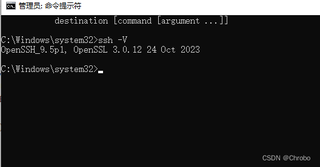
事实证明还是不行
秘钥文件权限确认过没问题,openSSH 服务也是设置的自动开启;
虚拟机端
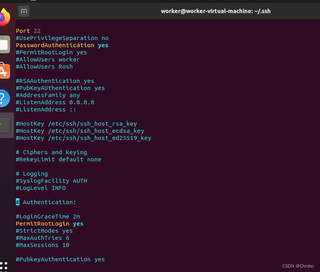
虚拟机装的Ubuntu是20.04版本,已经检查过ssh状态,确认秘钥文件的权限是正确的(660);
服务器处于开启状态;配置文件中也有打开相关配置,下图是关键配置设置:
问题排查
VsCode进行连接时,调试窗口有以下信息
[14:29:02.097] Log Level: 2
[14:29:02.102] SSH Resolver called for "ssh-remote+192.168.253.128", attempt 1
[14:29:02.103] "remote.SSH.useLocalServer": false
[14:29:02.103] "remote.SSH.useExecServer": false
[14:29:02.103] "remote.SSH.showLoginTerminal": false
[14:29:02.103] "remote.SSH.remotePlatform": {"ubuntu18.04":"linux"}
[14:29:02.103] "remote.SSH.path": undefined
[14:29:02.103] "remote.SSH.configFile": C:\Users\MSI\.ssh\config
[14:29:02.103] "remote.SSH.useFlock": true
[14:29:02.103] "remote.SSH.lockfilesInTmp": false
[14:29:02.103] "remote.SSH.localServerDownload": auto
[14:29:02.103] "remote.SSH.remoteServerListenOnSocket": false
[14:29:02.103] "remote.SSH.showLoginTerminal": false
[14:29:02.103] "remote.SSH.defaultExtensions": []
[14:29:02.103] "remote.SSH.loglevel": 2
[14:29:02.104] "remote.SSH.enableDynamicForwarding": true
[14:29:02.104] "remote.SSH.enableRemoteCommand": false
[14:29:02.104] "remote.SSH.serverPickPortsFromRange": {}
[14:29:02.104] "remote.SSH.serverInstallPath": {}
[14:29:02.109] VS Code version: 1.85.1
[14:29:02.109] Remote-SSH version: remote-ssh@0.107.1
[14:29:02.109] win32 x64
[14:29:02.110] SSH Resolver called for host: 192.168.253.128
[14:29:02.110] Setting up SSH remote "192.168.253.128"
[14:29:02.114] Using commit id "0ee08df0cf4527e40edc9aa28f4b5bd38bbff2b2" and quality "stable" for server
[14:29:02.116] Install and start server if needed
[14:29:03.862] Checking ssh with "D:\VMware Workstation\bin\ssh.exe -V"
[14:29:03.864] Got error from ssh: spawn D:\VMware Workstation\bin\ssh.exe ENOENT
[14:29:03.865] Checking ssh with "C:\Windows\system32\ssh.exe -V"
[14:29:03.866] Got error from ssh: spawn C:\Windows\system32\ssh.exe ENOENT
[14:29:03.867] Checking ssh with "C:\Windows\ssh.exe -V"
[14:29:03.869] Got error from ssh: spawn C:\Windows\ssh.exe ENOENT
[14:29:03.869] Checking ssh with "C:\Windows\System32\Wbem\ssh.exe -V"
[14:29:03.870] Got error from ssh: spawn C:\Windows\System32\Wbem\ssh.exe ENOENT
[14:29:03.870] Checking ssh with "C:\Windows\System32\WindowsPowerShell\v1.0\ssh.exe -V"
[14:29:03.871] Got error from ssh: spawn C:\Windows\System32\WindowsPowerShell\v1.0\ssh.exe ENOENT
[14:29:03.871] Checking ssh with "C:\Program Files\dotnet\ssh.exe -V"
[14:29:03.872] Got error from ssh: spawn C:\Program Files\dotnet\ssh.exe ENOENT
[14:29:03.873] Checking ssh with "D:\TortoiseSVN\bin\ssh.exe -V"
[14:29:03.874] Got error from ssh: spawn D:\TortoiseSVN\bin\ssh.exe ENOENT
[14:29:03.874] Checking ssh with "C:\Program Files\OpenSSH\bin\ssh.exe -V"
[14:29:03.913] > OpenSSH_9.5p1, OpenSSL 3.0.12 24 Oct 2023

[14:29:03.921] Using SSH config file "C:\Users\MSI\.ssh\config"
[14:29:03.922] Running script with connection command: "C:\Program Files\OpenSSH\bin\ssh.exe" -T -D 56062 -F "C:\Users\MSI\.ssh\config" "192.168.253.128" bash
[14:29:03.929] Terminal shell path: C:\Windows\System32\cmd.exe
[14:29:04.561] > ssh: connect to host 192.168.253.128 port 22: Permission denied
> ]0;C:\Windows\System32\cmd.exe
[14:29:04.561] Got some output, clearing connection timeout
[14:29:04.578] > 过程试图写入的管道不存在。
[14:29:05.875] "install" terminal command done
[14:29:05.875] Install terminal quit with output: ]0;C:\Windows\System32\cmd.exe过程试图写入的管道不存在。
[14:29:05.875] Received install output: ]0;C:\Windows\System32\cmd.exe过程试图写入的管道不存在。
[14:29:05.876] Failed to parse remote port from server output
[14:29:05.878] Resolver error: Error:
    at g.Create (c:\Users\MSI\.vscode\extensions\ms-vscode-remote.remote-ssh-0.107.1\out\extension.js:2:642703)
    at t.handleInstallOutput (c:\Users\MSI\.vscode\extensions\ms-vscode-remote.remote-ssh-0.107.1\out\extension.js:2:640069)
    at t.tryInstall (c:\Users\MSI\.vscode\extensions\ms-vscode-remote.remote-ssh-0.107.1\out\extension.js:2:761983)
    at async c:\Users\MSI\.vscode\extensions\ms-vscode-remote.remote-ssh-0.107.1\out\extension.js:2:722522
    at async t.withShowDetailsEvent (c:\Users\MSI\.vscode\extensions\ms-vscode-remote.remote-ssh-0.107.1\out\extension.js:2:725828)
    at async I (c:\Users\MSI\.vscode\extensions\ms-vscode-remote.remote-ssh-0.107.1\out\extension.js:2:719493)
    at async t.resolve (c:\Users\MSI\.vscode\extensions\ms-vscode-remote.remote-ssh-0.107.1\out\extension.js:2:723199)
    at async c:\Users\MSI\.vscode\extensions\ms-vscode-remote.remote-ssh-0.107.1\out\extension.js:2:907003
[14:29:05.888] ------


[14:29:06.165] Opening exec server for ssh-remote+192.168.253.128
[14:29:06.174] Initizing new exec server for ssh-remote+192.168.253.128
[14:29:06.188] Using commit id "0ee08df0cf4527e40edc9aa28f4b5bd38bbff2b2" and quality "stable" for server
[14:29:06.192] Install and start server if needed
[14:40:59.505] getPlatformForHost was canceled
[14:40:59.506] Exec server for ssh-remote+192.168.253.128 failed: Error: 已取消连接
[14:40:59.507] Error opening exec server for ssh-remote+192.168.253.128: Error: 已取消连接
其中有这么一条语句:“> ssh: connect to host 192.168.253.128 port 22: Permission denied”,也就是说,在调用ssh执行连接时就出错了。
于是先看下虚拟机是否有问题,虚拟机输入service ssh status查看状态,ssh服务器正常运行;
接下来用工具看看是否能连接,这里使用MobaXterm进行测试:
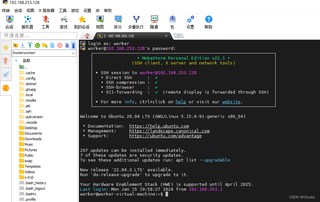
MobaXterm成功连接到虚拟机上,那么接下来就是查看Window的问题了;
命令调试窗口输入ssh -v worker@192.168.253.128进行连接,报错:
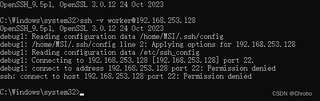
那么问题很明显了,就是Window出了问题;
最头疼的事情是,在查了2天的资料后发现,其他人在连接失败时都会有错误原因跟在“Permission denied”后面,
多半是用户错误啊、文件没权限啊、防火墙啊之类的,但是我没有!于是我把搜到的所有可能做法都做了一遍,
很遗憾,并没有什么卵用。依然是连接失败XD
后续跟踪 2024/01/17
有个老哥说试一下telnet端口通不通,于是我试了一下,一开始对22端口进行telnet不通,
在修改完网络配置后,telnet 192.168.253.128 22是通的;但是依旧不能成功连接SSH,
然后找到这篇文章:https://zhuanlan.zhihu.com/p/613089875
根据里面提到的过程,对比我的log如下:
ssh -vvv worker@192.168.253.128
OpenSSH_9.5p1, OpenSSL 3.0.12 24 Oct 2023
debug1: Reading configuration data /home/MSI/.ssh/config
debug1: /home/MSI/.ssh/config line 2: Applying options for 192.168.253.128
debug1: Reading configuration data /etc/ssh_config
debug2: resolve_canonicalize: hostname 192.168.253.128 is address
debug3: expanded UserKnownHostsFile '~/.ssh/known_hosts' -> '/home/MSI/.ssh/known_hosts'
debug3: expanded UserKnownHostsFile '~/.ssh/known_hosts2' -> '/home/MSI/.ssh/known_hosts2'
debug3: ssh_connect_direct: entering
debug1: Connecting to 192.168.253.128 [192.168.253.128] port 22.
debug3: set_sock_tos: set socket 4 IP_TOS 0x48
debug1: connect to address 192.168.253.128 port 22: Permission denied
ssh: connect to host 192.168.253.128 port 22: Permission denied
很明显在建立TCP链接的时候失败了,失败原因是权限问题
“connect to host 192.168.253.128 port 22: Permission denied”
那么这个权限到底指的是哪边的权限有问题?
是window没有权限建立tcp,还是虚拟机服务器?
已知用PuTTY等工具是可以直接连接到虚拟机的,
所以更倾向于Win10这边没有权限进行操作,就是不知道是什么权限。
接下来我在外网看到一篇文章跟我的现象一模一样:https://stackoverflow.com/questions/54080120/ssh-connect-to-host-example-com-port-22-permission-denied
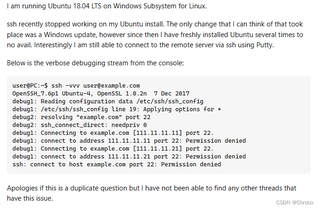
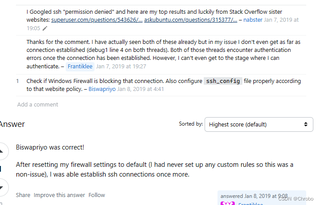
这位老兄的意思大致是,进行SSH连接的时候,还没有进行校验就已经被拒绝了;
他在重置了防火墙后,SSH能够正常连接;
我尝试重置防火墙,还是不行,关闭所有防火墙也无效;
现在很明显问题就是SSH在建立TCP链接的时候就被拒接掉了!
我查了防火墙中也没有对其进行限制,甚至我开了白名单。
究竟是什么拒绝了啊!
我想要达到的结果
有没有人遇到过这个问题?有什么排查问题的思路吗?现在已经知道是windows的openssh这边的问题了,就是不知道问题出在哪里;实在是想用vscode进行SSH连接诶。


