在运用make命令来编译libtool时报错,'aclocal-1.16' is missing on your system,报错为make: *** [aclocal.m4] Error 127
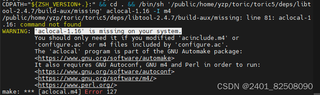

在运用make命令来编译libtool时报错,'aclocal-1.16' is missing on your system,报错为make: *** [aclocal.m4] Error 127
 分享
分享
 关注
关注引自免费微信小程序:皆我百晓生
在Linux环境下,当你尝试编译libtool时遇到错误提示 'aclocal-1.16' is missing on your system 和 make: *** [aclocal.m4] Error 127,这表明你的系统中缺少aclocal-1.16这个工具,它是autoconf套件的一部分,用于生成项目所需的aclocal.m4文件。
解决这个问题的步骤如下:
步骤1:安装autoconf和automake
确保你已经安装了最新版本的autoconf和automake。在Ubuntu/Debian系列系统中,可以通过以下命令安装:
sudo apt-get update
sudo apt-get install autoconf automake
如果你使用的是CentOS或Fedora等RPM-based系统,则使用:
sudo yum install autoconf automake
或者对于较新版本的系统使用DNF:
sudo dnf install autoconf automake
步骤2:检查并安装适当的aclocal版本
如果系统仓库中没有提供特定版本的aclocal-1.16,你可能需要更新autoconf到包含该版本的包,或者根据项目需求选择一个兼容的版本。
步骤3:重新运行configure和make
安装完所需依赖后,返回到libtool源代码目录,并重新运行配置脚本(如果存在)以及make命令:
./configure
make
通过以上步骤,你应该能够解决由于缺失aclocal-1.16导致的编译问题。如果libtool项目明确要求aclocal-1.16版本,请确认你的系统支持安装该版本,或查找替代解决方案以满足项目需求。
分享 nginx安装,make install报错: cannot create regular file启动报错find: “/lost+found”: 权限不够/opt/module/pcre-8.37
 创建了问题
2月4日
创建了问题
2月4日
