把fbx模型转化成了qml跟meshes文件,怎么在窗口的控件上加载到显示?
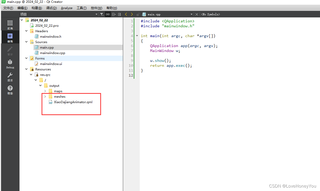

把fbx模型转化成了qml跟meshes文件,怎么在窗口的控件上加载到显示?
 分享
分享
该回答引用自GPT-3.5,由博主GISer Liu编写:
要在Qt Quick中加载FBX模型,你需要遵循以下步骤:
将FBX模型转换为QML和meshes文件:
创建Qt Quick项目并配置环境:
将QML文件和meshes文件添加到项目中:
在QML文件中加载模型:
Model)来加载模型文件。例如:import QtQuick 2.15
import Qt3D.Core 2.15
import Qt3D.Render 2.15
import Qt3D.Extras 2.15
Entity {
components: [
RenderSettings {
activeFrameGraph: ForwardRenderer {
clearColor: Qt.rgba(0.1, 0.1, 0.1, 1)
camera: Camera {
id: camera
projectionType: CameraLens.PerspectiveProjection
fieldOfView: 45
aspectRatio: 16 / 9
nearPlane : 0.1
farPlane : 1000.0
position: Qt.vector3d( 0, 0, 40 )
upVector: Qt.vector3d( 0, 1, 0 )
viewCenter: Qt.vector3d( 0, 0, 0 )
}
}
},
InputSettings { }
],
CameraSelector {
camera: camera
autoUpdateViewCenter: true
},
components: [
DirectionalLight {
color: "white"
intensity: 1
worldDirection: Qt.vector3d(-1, -1, -1)
}
],
Model {
source: "path/to/your/model.qml"
}
}
source属性中的路径为你的QML模型文件的路径。编译并运行项目:
通过以上步骤,你应该能够在Qt Quick项目中成功加载并显示你的FBX模型。如果在实施过程中遇到任何问题或报错,欢迎进一步提供详细信息,我将尽力帮助你解决。
如果该回答解决了您的问题,请采纳!如果没有,请参考以下方案进行修订

分享 创建了问题
2月22日
创建了问题
2月22日


