
问题:这么让这个提交和取消独占表格的一行
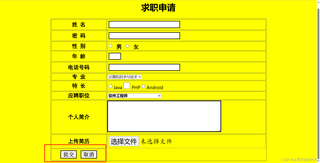
预期效果
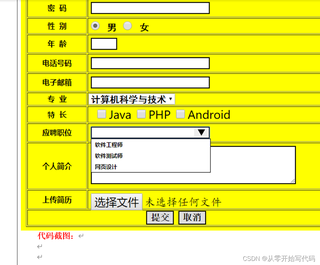
源码如下:
<!doctype html>
<html>

<head>
    <meta charset="utf-8">
    <title>求职申请</title>
    <style type="text/css">
        body {
            background-color: yellow;
        }

        input {
            border: 2px solid #000;
            margin: 5px;
            height: 20px;
            font-family: "楷体";
            font-size: 24px
        }

        .font {
            font-family: 黑体;
            font-size: 20px;
            font-weight: 800;
        }

        .checkbox {
            width: 25px;
            height: 25px;
            border: 2px solid #000;
            font-weight: 800;
        }

        .btn1 {
            width: 20px;
            height: 20px;
            border: 2px solid #000;
            background-color: #FFF;
        }

        .btn {
            width: 60px;
            height: 30px;
            border: 2px solid #000;
            font-family: 宋体;
            font-size: 20px;
            font-weight: 800;
        }
    </style>
</head>
<form action="http://my.scse.cn" method="post" enctype="multipart/form-data">
    <h1 align="center">求职申请</h1>
    <center>
        <table border="1" width="800px">
            <tr>
                <th class="font">姓 名</td>
                <td><input type="text"></td>
            </tr>
            <tr>
                <th class="font">密 码</td>
                <td><input type="password"></td>
            </tr>
            <tr>
                <th class="font">性 别</td>
                <td><label for="male" class="font"><input type="radio" name="sex" id="male"> 男 </label>
                    <label for="female" class="font"><input type="radio" name="sex" id="female"> 女</label>
                </td>
            </tr>
            <tr>
                <th class="font">年 龄</td>
                <td><input type="text" size="2"></td>
            </tr>
            <tr>
                <th class="font">电话号码</td>
                <td><input type="tel"></td>
            </tr>
            <tr>
                <th class="font">专 业</td>
                <td><select name="sub" id="sub">
                        <option value="计算机科学与技术" checked>计算机科学与技术</option>
                        <option value="物联网工程">物联网工程</option>
                        <option value="会计">会计</option>
                        <option value="英语翻译">英语翻译</option>
                </td>
            </tr>
            <tr>
                <th class="font">特 长</td>
                <td><input type="checkbox">Java<input type="checkbox" class="checkbox">PHP<input type="checkbox">Android</td>
            </tr>
            <tr height="30px">
                <th class="font">应聘职位</td>
                <td><select name="offer" id="offer" style="width:200px;font-size:14px;font-weight: 700;">
                        <option value="软件工程师" checked>软件工程师</option>
                        <option value="软件测试师">软件测试师</option>
                        <option value="网页设计">网页设计</option>
                </td>
            </tr>
            <tr>
                <th class="font">个人简介</td>
                <td><textarea name="introduction" id="introduction" cols="60" rows="7"
                        style="border:3px solid #000;"></textarea></td>
            </tr>
            <tr height="50px">
                <th class="font">上传简历</td>
                <td><input type="file" style="border: none; height: auto;"></td>
            </tr>
            <tr>
                <th rowspan="2">
                <input type="submit" class="btn" value="提交">
                <input type="reset" class="btn" value="取消"></th>
            </tr>
        </table>
    </center>

</form>

<body>
</body>

</html>


