Lansional 2024-03-24 18:55 采纳率: 88%
浏览 6
已结题

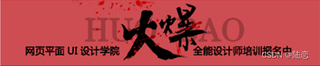
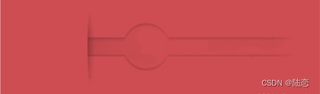
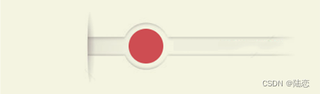
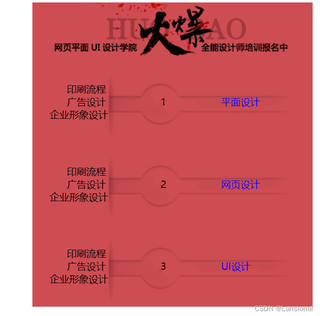
怎样修改成如下图的字体颜色并且数字居中

怎样修改成如下图的字体颜色并且数字居中
原图:
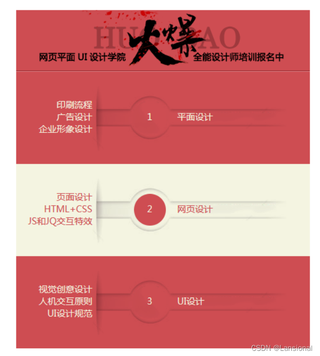
img


<!DOCTYPE html>
<html lang="en">

<head>
    <meta charset="UTF-8">
    <meta name="viewport" content="width=device-width, initial-scale=1.0">
    <title>Red Page with Four Boxes</title>
    <style>
        /* 设置外层大 div 样式 */
        #redDiv {
            width: 461px;
            /* 设置宽度为自适应 */
            height: auto;
            /* 设置高度为自适应 */
            background-color: red;
            display: flex;
            /* 设置为 Flex 布局 */
            flex-direction: column;
            /* 设置为垂直方向排列 */
            margin: auto;
        }

        /* 盒子1 */
        #box1 {
            width: 461px;
            /* 设置宽度为461像素 */
            height: 95px;
            /* 设置高度为95像素 */
            background-image: url('head.png');
            /* 使用图片填充背景 */
        }

        /* 盒子2、盒子3、盒子4 */
        #box2,
        #box3,
        #box4 {
            width: 461px;
            /* 设置宽度为461像素 */
            height: 135px;
            /* 设置高度为135像素 */
            background-image: url('bg.png');
            /* 使用图片填充背景 */
            position: relative;
            /* 设置定位方式 */
        }

        /* 移除无序列表的黑点 */
        ul {
            list-style-type: none;
            /* 移除列表样式 */
            padding: 0;
            /* 移除内边距 */
        }

        /* 文字1的样式,使其居中显示 */
        #text1 {
            text-align: center;
            /* 文本居中 */
            position: absolute;
            width: 100%;
            top: 50%;
            transform: translateY(-50%);
        }

        /* 超链接的样式 */
        .hyperlink {

            text-decoration: none;
            /* 去除下划线 */
        }

        /* 鼠标移动到超链接上的效果 */
        .hyperlink:hover {
            color: blue;
            /* 鼠标悬停时的颜色 */
        }

        /* 点击超链接之后的文字颜色变化效果 */
        .hyperlink:active {
            color: green;
            /* 点击时的颜色 */
        }


        /* 盒子2的鼠标悬停效果 */
        #box2:hover {
            background-image: url('bg1.png');
            /* 当鼠标悬停时切换背景图片 */
        }

        /* 盒子3的鼠标悬停效果 */
        #box3:hover {
            background-image: url('bg1.png');
            /* 当鼠标悬停时切换背景图片 */
        }

        /* 盒子4的鼠标悬停效果 */
        #box4:hover {
            background-image: url('bg1.png');
            /* 当鼠标悬停时切换背景图片 */
        }

        .clicked {
            color: green;
            /* 点击后的颜色 */
        }
    </style>

    <script>
        document.addEventListener('DOMContentLoaded', function () {
            var links = document.querySelectorAll('a'); // 获取所有超链接
            links.forEach(function (link) {
                link.addEventListener('click', function () {
                    link.classList.add('clicked'); // 被点击后添加 'clicked' 类
                });
            });
        });
    </script>

</head>

<body>
    <!-- 网页内容 -->
    <div id="redDiv">
        <!-- 盒子1 -->
        <div class="smallBox" id="box1">盒子1</div>

        <!-- 盒子2 -->
        <div id="box2" class="b">
            <ul> <br>
                <li> &nbsp; &nbsp; &nbsp; &nbsp; &nbsp; &nbsp; 印刷流程</li>
                <li> &nbsp; &nbsp; &nbsp; &nbsp; &nbsp; &nbsp; 广告设计 &nbsp; &nbsp; &nbsp; &nbsp; &nbsp; &nbsp;
                    &nbsp; &nbsp; &nbsp;
                    1
                    &nbsp; &nbsp; &nbsp; &nbsp; &nbsp; &nbsp; &nbsp; &nbsp; &nbsp;
                    <a href="#" class="hyperlink">平面设计</a>
                </li>
                <li>&nbsp; &nbsp; &nbsp; 企业形象设计</li>
            </ul>


        </div>

        <!-- 盒子3 -->
        <div id="box3" class="b">
            <ul> <br>
                <li> &nbsp; &nbsp; &nbsp; &nbsp; &nbsp; &nbsp; 印刷流程</li>
                <li> &nbsp; &nbsp; &nbsp; &nbsp; &nbsp; &nbsp; 广告设计 &nbsp; &nbsp; &nbsp; &nbsp; &nbsp; &nbsp;
                    &nbsp; &nbsp; &nbsp;
                    2
                    &nbsp; &nbsp; &nbsp; &nbsp; &nbsp; &nbsp; &nbsp; &nbsp; &nbsp;
                    <a href="#" class="hyperlink">网页设计</a>

                </li>
                <li>&nbsp; &nbsp; &nbsp; 企业形象设计</li>
            </ul>

        </div>

        <!-- 盒子4 -->
        <div id="box4" class="b">
            <ul> <br>
                <li> &nbsp; &nbsp; &nbsp; &nbsp; &nbsp; &nbsp; 印刷流程</li>
                <li> &nbsp; &nbsp; &nbsp; &nbsp; &nbsp; &nbsp; 广告设计 &nbsp; &nbsp; &nbsp; &nbsp; &nbsp; &nbsp;
                    &nbsp; &nbsp; &nbsp;
                    3
                    &nbsp; &nbsp; &nbsp; &nbsp; &nbsp; &nbsp; &nbsp; &nbsp; &nbsp;
                    <a href="#" class="hyperlink">UI设计</a>

                </li>
                <li>&nbsp; &nbsp; &nbsp; 企业形象设计</li>
            </ul>

        </div>
    </div>
</body>

</html>

运行结果:
img

  • 写回答

2条回答 默认 最新

  • 陆恋 2024-03-25 12:01
    关注

    可以利用flex布局,以下可以参考下,图片放置在同一根目录

    img

    img

    img


    <!DOCTYPE html>
    <html lang="en">
     
    <head>
        <meta charset="UTF-8">
        <meta name="viewport" content="width=device-width, initial-scale=1.0">
        <title>Red Page with Four Boxes</title>
        <style>
            /* 设置外层大 div 样式 */
            #redDiv {
                width: 461px;
                /* 设置宽度为自适应 */
                height: auto;
                /* 设置高度为自适应 */
                background-color: red;
                display: flex;
                /* 设置为 Flex 布局 */
                flex-direction: column;
                /* 设置为垂直方向排列 */
                margin: auto;
            }
     
            /* 盒子1 */
            #box1 {
                width: 461px;
                /* 设置宽度为461像素 */
                height: 95px;
                /* 设置高度为95像素 */
                background-image: url('head.png');
                /* 使用图片填充背景 */
            }
     
            /* 盒子2、盒子3、盒子4 */
            #box2,
            #box3,
            #box4 {
                width: 461px;
                /* 设置宽度为461像素 */
                height: 135px;
                /* 设置高度为135像素 */
                background-image: url('bg.png');
                /* 使用图片填充背景 */
                position: relative;
                /* 设置定位方式 */
                /* --------------------------- */
                display: flex;
                align-items: center;
                color: #f4f4e1;
            }
     
            /* 移除无序列表的黑点 */
            ul {
                list-style-type: none;
                /* 移除列表样式 */
                padding: 0;
                /* 移除内边距 */
                /* --------------------------- */
                display: flex;
                align-items: center;
                width: 100%;
                margin: -2px 0px 0px;
            }
     
            /* 文字1的样式,使其居中显示 */
            #text1 {
                text-align: center;
                /* 文本居中 */
                position: absolute;
                width: 100%;
                top: 50%;
                transform: translateY(-50%);
            }
     
            /* 超链接的样式 */
            .hyperlink {
     
                text-decoration: none;
                /* 去除下划线 */
    
                /* --------------------------- */
                color: #f4f4e1;
            }
     
            /* 鼠标移动到超链接上的效果 */
            .hyperlink:hover {
                color: blue;
                /* 鼠标悬停时的颜色 */
            }
     
            /* 点击超链接之后的文字颜色变化效果 */
            .hyperlink:active {
                color: green;
                /* 点击时的颜色 */
            }
            
            /* -----------超链接样式---------------- */
            
            .b:hover .hyperlink {
                color: #ce4d52;
            }
            .b:hover .hyperlink {
                color: #ce4d52;
            }
            .b:hover .hyperlink:hover {
                color: blue;
                /* 鼠标悬停时的颜色 */
            }
            .b:hover .hyperlink:active{
                color: green;
                /* 点击时的颜色 */
            }
     
            /* 盒子2的鼠标悬停效果 */
            #box2:hover {
                background-image: url('bg1.png');
                /* 当鼠标悬停时切换背景图片 */
                /* --------------------------- */
                color: #ce4d52;
            }
     
            /* 盒子3的鼠标悬停效果 */
            #box3:hover {
                background-image: url('bg1.png');
                /* 当鼠标悬停时切换背景图片 */
                /* --------------------------- */
                color: #ce4d52;
            }
     
            /* 盒子4的鼠标悬停效果 */
            #box4:hover {
                background-image: url('bg1.png');
                /* 当鼠标悬停时切换背景图片 */
                /* --------------------------- */
                color: #ce4d52;
            }
            
            .clicked {
                color: green;
                /* 点击后的颜色 */
            }
            /* -----------盒子内部样式---------------- */
            .b li{
                box-sizing: border-box;
            }
            .b li:nth-child(1){
                width: 27.6%;
                text-align: right;
                padding-right: 2%;
                flex-shrink: 0;
            }
            .b li:nth-child(2){
                width: 10.5%;
                margin-left: 12.8%;
                flex-shrink: 0;
                text-align: center;
                line-height: 1;
            }
            .b:hover li:nth-child(2){
                color: #f4f4e1;
            }
            .b li:nth-child(3){
                padding-left: 5%;
            }
        </style>
     
        <script>
            document.addEventListener('DOMContentLoaded', function () {
                var links = document.querySelectorAll('a'); // 获取所有超链接
                links.forEach(function (link) {
                    link.addEventListener('click', function () {
                        link.classList.add('clicked'); // 被点击后添加 'clicked' 类
                    });
                });
            });
        </script>
     
    </head>
     
    <body>
        <!-- 网页内容 -->
        <div id="redDiv">
            <!-- 盒子1 -->
            <div class="smallBox" id="box1"></div>
     
            <!-- 盒子2 -->
            <div id="box2" class="b">
                <ul>
                    <li>
                        <div>印刷流程</div>
                        <div>企业形象设计</div>
                        <div>广告设计</div>
                    </li>
                    <li>1</li>
                    <li><a href="#" class="hyperlink">平面设计</a></li>
                </ul>
            </div>
     
            <!-- 盒子3 -->
            <div id="box3" class="b">
                <ul>
                    <li>
                        <div>印刷流程</div>
                        <div>企业形象设计</div>
                        <div>广告设计</div>
                    </li>
                    <li>1</li>
                    <li><a href="#" class="hyperlink">平面设计</a></li>
                </ul>
            </div>
     
            <!-- 盒子4 -->
            <div id="box4" class="b">
                <ul>
                    <li>
                        <div>印刷流程</div>
                        <div>企业形象设计</div>
                        <div>广告设计</div>
                    </li>
                    <li>1</li>
                    <li><a href="#" class="hyperlink">平面设计</a></li>
                </ul>
            </div>
        </div>
    </body>
     
    </html>
    
    本回答被题主选为最佳回答 , 对您是否有帮助呢?
    评论
查看更多回答(1条)

报告相同问题?

问题事件

  • 系统已结题 4月5日
  • 已采纳回答 3月28日
  • 创建了问题 3月24日