一个图像的R,G,B三个分值相比较,将符合条件的区域更改灰度值为0或255
请问怎么设计
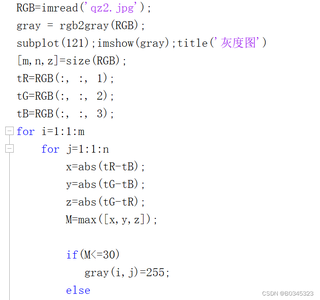
一下是个人写的程序
一个图像的R,G,B三个分值相比较,将符合条件的区域更改灰度值为0或255
请问怎么设计
一下是个人写的程序
 分享
分享
 关注
关注让阿豪来帮你解答,本回答参考chatgpt3.5编写提供,如果还有疑问可以评论或留言问题描述: 给定一副图像,需要根据像素点的 R、G、B 三个分值进行判断和处理,使符合一定条件的像素点的灰度值变为 0 或 255。 解决方案: 针对这个问题,可以设计以下步骤来实现:
from PIL import Image
img_path = "test.jpg"
img = Image.open(img_path)
width, height = img.size
pixels = img.load()
for x in range(width):
    for y in range(height):
        r, g, b = pixels[x, y]
        # 具体处理逻辑
if r > 100 and g < 50 and b < 50:
    pixels[x, y] = (0, 0, 0)
elif r < 50 and g > 100 and b < 50:
    pixels[x, y] = (255, 255, 255)
img.save("processed.jpg")
完整代码
from PIL import Image
img_path = "test.jpg"
img = Image.open(img_path)
width, height = img.size
pixels = img.load()
for x in range(width):
    for y in range(height):
        r, g, b = pixels[x, y]
        if r > 100 and g < 50 and b < 50:
            pixels[x, y] = (0, 0, 0)
        elif r < 50 and g > 100 and b < 50:
            pixels[x, y] = (255, 255, 255)
img.save("processed.jpg")
示例效果 原图:  处理后:
处理后: 
分享

