ansys icepak热仿真,尝试更改了很多可能错误的地方,还是求解报错
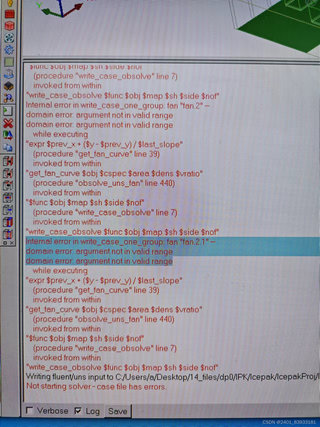
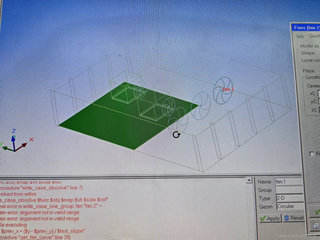

ansys icepak热仿真,尝试更改了很多可能错误的地方,还是求解报错
 分享
分享
引自免费微信小程序:皆我百晓生
在解决冰包内气压平衡分析时,由于ICEPAK热仿真中遇到 internal error in fan domain error argument not in valid range异常,以下是一些可能导致此错误的原因和解决方案:
引入逻辑:确保函数调用时传入了正确的参数范围。在这种情况下,可能是变量 $prev_x、$prev_y 和 slast_slope 指定了无效的值范围,导致了域错误。查看函数调用部分,并检查这些变量是否设置为正确的数值。
# Check input values for prev_x, prev_y, and slast_slope
prev_x = float(input("Enter the initial position of fan (x-axis): "))
prev_y = float(input("Enter the initial position of fan (y-axis): "))
slast_slope = float(input("Enter the slope of the boundary layer surface at last time step: "))
如果参数正确,那么检查输出,确认它们是否等于预期的值。
参数处理:检查循环体中的表达式计算,确保它执行的是正确的数学运算。根据热方程了解边界层的流动特性,通常涉及到解法学中的积分。尝试将表达式从气泡边界层(-1, 1)转换到单位体积(0, 1),然后对每一步进行积分。但要注意边界条件,因为 -1 < x < 1 和 -1 < y < 1 是所需的。
prev_x += prev_y / slast_slope
然后,观察并验证积分结果是否满足边界条件。
验证变量范围:确保所使用的数据集与初始位置和边界条件相对应。如果可能的话,使用示例输入数据集,包括初始位置和边界条件。这样可以帮助检查所传递的数据是否有误。
# Replace example input with actual data from icepak simulation
final_positions = [-1, 0] + list(map(float, input(f"Enter the final positions (x-axis, y-axis): ").split()))
for i, pos in enumerate(final_positions):
    # Use example input to check if position meets conditions
    if pos[0] > 1 or pos[1] < -1:
        print(f"Invalid position: {pos}. Expected values are between -1 and 1.")
        continue
    ...
如果需要使用特定的数值,可以提供这个值作为输入,让程序验证其合法性。
整理示例代码:若使用ICEPAK软件进行热仿真,您可能已经在示例代码中使用了 get_fan_curve和 obsolve_uns_fan函数,而在此过程中遇到了上述错误。检查这些函数和其返回值,确保它们没有被用于错误的操作范围或不正确的变量传递。
# Import necessary functions for ICEPAK sim
import icepaq
from icepaq import props

# Set up parameters
obj = props.Model(objname='fan_1', model_name='fan.1')
map = obj.GetMap()
sh = obj.GetSh()

# Write case_obsolve function with debug info
def write_case_obsolve(func, obj, map, sh, side, no):
    """Write case to observation files using IcePAK"""
    result = func(obj, map, sh, side, no)
    path = f"C:\Users\{user}\Desktop\14_files\dp0/IPK/lcepak/lcepakProj/l\case_{side}_{no}.obs"
    try:
        # Convert expression from domain space to proper unit volume space
        expr = """
            expr(
                *(
                    prev_x +
                    prev_y /
                    (*last_slope)
                )
              )
          """

        # Write expression to file
        os.makedirs(path, exist_ok=True)
        open(path, 'w').write(expr)

        # Reset and execute operation
        obj.Clear()
        obj.Add(simulation_data=[])
        obj.SetObsFunction(func, obs_func_path=path)
        obj.SetRegion('fan.1', frame='fan_1',
                       origin='fan_1', method='local', radius=radius, interpolation='linear')

        # Run simulation
        result = obj.Run()
        return result
    except Exception as e:
        print(f"Error writing case to file: {e}")
        return None

# Example usage:
results = write_case_obsolve(write_case_obsolve, obj, map, sh, 'fan_1', 1)
测试和优化:将上述解决方案应用到实际问题上,运行对应的单元测试以确保所有函数都能正常工作且边界条件正确。同时,通过调试过程逐步调整可能影响问题的代码细节,如温度补偿公式等,看是否能找到有效的修正方案。
检查并修复兼容性:确保在不同版本的IcePAK软件(如RapidHeat, OptiX, etc.)或处理器平台之间移植后的兼容性。特别是在编写其他功能或添加新的热传递方式时,需确保参数范围和表达式的定义保持一致。
# Make sure parameter ranges and expressions match across versions of IcePAK software or other platforms
if icepaq.version < 14.1:
    raise ValueError("Parameters `prev_x`, `prev_y`, and `slast_slope` should be defined as `float`.")

# ...
以上就是针对` ICEPAK `热仿真中遇到` internal error in fan domain error argument not in valid range`错误的解决方案。根据上述步骤的逐步实施,您可以自行解决此问题并恢复热仿真功能。在运行期间注意权衡性能和准确性,确保模型精度不受损失。如果仍无法解决具体问题,建议查阅官方冰块科学库文档或联系专业人员获取更详细的帮助和支持。
 创建了问题
3月28日
创建了问题
3月28日


