
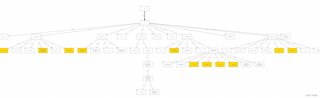
我设计的是基于AntV的g6库一个纵向的紧凑树形,数据是后端请求的,子节点比较多,节点之间自定义的箭头,但是箭头要么被覆盖,要么指向是相反的怎么解决呀
#AntVg6库#g6库
draw(cfg, group) {
    const targetNodeModel = cfg.targetNode.getModel(); // 从目标节点获取模型
    const edgeLabel = targetNodeModel.edgeLabel;
    const lineWidth = widthByPercent(edgeLabel);

    // 动态计算箭头的大小
    const arrowWidth = lineWidth * 2;  // 让箭头宽度是线宽的两倍
    const arrowLength = 10;  // 设置箭头长度

    const midPoint = {
      x: (cfg.startPoint.x + cfg.endPoint.x) / 2,
      y: (cfg.startPoint.y + cfg.endPoint.y) / 2,
    };

    const endArrow = {
      path: G6.Arrow.triangle(arrowWidth, arrowLength, 0),
      d:20,
      fill: cfg.color || '#000',
    };
    // 添加边路径
    const edge = group.addShape('path', {
      attrs: {
        path: [
          ['M', cfg.startPoint.x, cfg.startPoint.y],
          ['L', cfg.endPoint.x, cfg.endPoint.y]
        ],
        stroke:'#000',
        lineWidth: widthByPercent(edgeLabel),
        endArrow,
      },
      name: 'edge-path',
    });

    if (edgeLabel) {
      // 绘制边上的标签
      group.addShape('text', {
        attrs: {
          text: edgeLabel,
          fill: '#595959', // 标签字体颜色
          textAlign: 'center',
          textBaseline: 'middle',
          x: midPoint.x-25, // 标签的 x 坐标
          y: midPoint.y, // 标签的 y 坐标稍微向上偏移避免与线重叠
        },
        name: 'edge-label',
      });
    }

    return edge;
  },
});


