sc unitprice lowestprice if unitprice<10000
reg unitprice ibn.year if inrange(year,2003,2022), nocons
coefplot,vertical
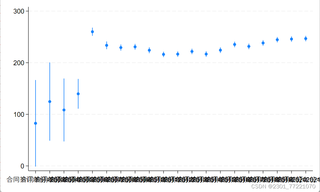

sc unitprice lowestprice if unitprice<10000
reg unitprice ibn.year if inrange(year,2003,2022), nocons
coefplot,vertical
 分享
分享
以下内容由CHATGPT及阿里嘎多学长共同生成、有用望采纳:
在Stata中,coefplot 函数用于绘制回归系数图,如果x轴的标签(通常是解释变量的名称)重叠,可以尝试以下几种方法来解决这个问题:
调整x轴刻度间距:
xticks 命令可以改变x轴的刻度间隔,使得标签之间的距离增大。例如,你可以试试:
coefplot, vertical xticks(1/5) // 将刻度间隔设置为每5个年份一个标签
xtickvalues 和 xticklabels。减少标签数量:
local years_to_show "2003 2005 2008 2011 2014 2017 2020"
coefplot, vertical xtick(years_to_show)
调整标签角度:
mlabangle()函数没有解决问题,你还可以尝试使用 mlabel 命令来旋转标签,使其更容易阅读:
mlabell ang(45) // 旋转45度
使用graph 命令:
coefplot仍无法满足需求,可以考虑直接使用graph 命令绘制散点图,并手动调整x轴标签:
twoway (scatter unitprice ibn.year if inrange(year,2003,2022) if unitprice < 10000) ///
       (line r(mean unitprice) ibn.year if inrange(year,2003,2022)), ///
       xtitle("Year") ytitle("Unit Price") ///
       xlab(rotate(45) "Year, ibn.year") ///
       legend(off)
rotate选项来倾斜x轴标签。查看输出的图形文件:
请根据你的具体需求和图表的复杂性选择合适的方法。如果以上建议不能解决问题,可能需要提供更多的细节或者尝试不同的可视化策略。
分享 创建了问题
4月8日
创建了问题
4月8日

