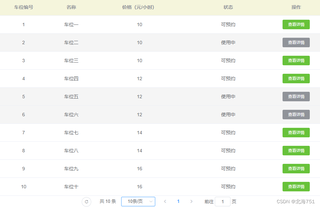
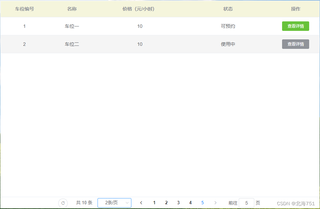
如图,前端使用element-ui使用分页组件时,后端获取的数据在修改显示分页条数时,页码不会初始化为1的情况,一直是默认页码大小,即最后一页,但实际显示数据内容是第一页的数据,请问一下如何设置在调整页面内容大小的同时把页面显示大小时初始化页面下标为1

 分享
分享
 关注
关注引自免费微信小程序:皆我百晓生
要解决这个问题,你需要在前端处理分页逻辑时添加一个额外的步骤:当用户选择不同的每页显示条数时,你应该重新加载数据,并将当前页码重置为1。这里是一个基于Vue.js和Element UI的示例代码,展示如何实现这个功能。
首先,确保你已经在项目中安装了Vue.js和Element UI,然后创建一个新的Vue组件,例如CarPark.vue,并包含以下内容:
<template>
  <div>
    <el-pagination
      v-model="currentPage"
      :page-size="pageSize"
      @size-change="handleSizeChange"
      @current-change="handleCurrentChange"
      layout="total, prev, pager, next, jumper"
      :total="total"
    ></el-pagination>

    <table border>
      <thead>
        <tr>
          <th>车位编号</th>
          <th>名称</th>
          <th>价格(元/小时)</th>
          <th>状态</th>
          <th>操作</th>
        </tr>
      </thead>
      <tbody>
        <tr v-for="(item, index) in displayedItems" :key="index">
          <td>{{ item.parkingNumber }}</td>
          <td>{{ item.name }}</td>
          <td>{{ item.price }} 元/小时</td>
          <td>{{ item.status }}</td>
          <td><a href="#">查看详情</a></td>
        </tr>
      </tbody>
    </table>
  </div>
</template>

<script>
export default {
  data() {
    return {
      currentPage: 1,
      pageSize: 10, // 默认每页显示条数
      total: 0, // 总记录数
      displayedItems: [], // 显示的数据列表
    };
  },
  methods: {
    handleSizeChange(newPageSize) {
      this.pageSize = newPageSize;
      this.currentPage = 1; // 当改变每页显示条数时,重置当前页码
      this.fetchData();
    },
    handleCurrentChange(newPage) {
      this.currentPage = newPage;
      this.fetchData();
    },
    fetchData() {
      // 这里应该替换为实际从服务器获取数据的异步请求
      fetch(`api/parkinglots?page=${this.currentPage}&size=${this.pageSize}`)
        .then((response) => response.json())
        .then((data) => {
          this.total = data.total;
          this.displayedItems = data.items;
        })
        .catch((error) => console.error("Error fetching data:", error));
    },
  },
  mounted() {
    this.fetchData();
  },
};
</script>
在这个例子中,我们定义了一个Vue组件,它包含了Element UI的分页组件。每当用户更改每页显示的条数(通过调用handleSizeChange方法),我们会立即重置当前页码为1,并调用fetchData方法重新获取数据。同样,当用户切换页面时(通过调用handleCurrentChange方法),也会执行相同的操作。
注意,fetchData函数是一个模拟的异步请求,你需要将其替换为实际从服务器获取数据的方法。这个函数会根据当前的页码和每页显示的条数参数来构造API请求的URL,然后发送请求并处理响应。
这样,在改变每页显示条数时,页面会自动重置为第一页,并显示新的数据。
分享 创建了问题
4月11日
创建了问题
4月11日


