Matlab simulink 怎么把这两条直线波形,转化成周期的三角波,要除2Π,不知道怎么搭建,加个mod取余好像,有没有懂哥
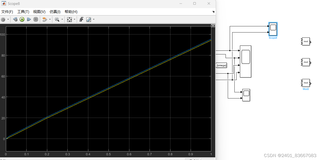

Matlab simulink 怎么把这两条直线波形,转化成周期的三角波,要除2Π,不知道怎么搭建,加个mod取余好像,有没有懂哥
 分享
分享
 关注
关注引自免费微信小程序:皆我百晓生
在Simulink中创建一个周期三角波,可以按照以下步骤操作:
为了确保三角波的周期性,你可能需要调整 Sine Wave 模块的频率,以匹配你想要的周期。例如,如果你想要每个周期是 0.2 秒,则频率应设置为 5 Hz(因为1/0.2 = 5)。注意,由于 Simulink 默认的时间步长,可能会有轻微的不精确,但通过适当调整仿真参数(例如 "Solver" 设置中的 "Fixed-step size"),可以改善精度。
以下是对应的 Simulink 模型图示例:
+-----------------------+
|                       |
|     Constant          |
|                       |
+-----------------------+
        |                |
        V                |
+-----------------------+
|                       |
|   Sine Wave           |
|                       |
+-----------------------+
        |                |
        V                |
+-----------------------+
|                       |
|    Multiplier         |
|                       |
+-----------------------+
        |                |
        V                |
+-----------------------+
|                       |
|      Unit Delay       |
|                       |
+-----------------------+
        |                |
        V                |
+-----------------------+
|                       |
|         Sum           |
|                       |
+-----------------------+
        |                |
        V                |
+-----------------------+
|                       |
|       Scope           |
|                       |
+-----------------------+
如果你需要完整的 Simulink 模型代码,由于这是一个图形化界面环境,无法直接提供代码,但是你可以按照上述步骤手动构建模型,或者我可以为你提供伪代码,不过请注意,这并不能直接在 Simulink 中运行,只能作为参考:
% 创建 Constant 模块
const = constant(1);

% 创建 Sine Wave 模块
sine_wave = sinewave('Frequency', 1, 'Amplitude', 0, 'PhaseOffset', 0);
sine_wave.Offset = const;

% 创建 Multiplier 模块
multiplier = multiplier();

% 创建 Unit Delay 模块
delay = rateTransition('Sample time', 0.1);

% 创建 Sum 模块
sum_module = adder();

% 连接各个模块
connect(const, sine_wave.OutputPort);
connect(sine_wave.OutputPort, multiplier.InputPort1);
connect(const, multiplier.InputPort2);
connect(multiplier.OutputPort, sum_module.InputPort1);
connect(delay.OutputPort, sum_module.InputPort2);

% 创建 Scope 模块
scope = scope();
connect(sum_module.OutputPort, scope.InputPort);

% 配置仿真参数
simulator = simset('StopTime', 10, 'FixedStepSize', 0.01); % 假设我们想模拟10秒,时间步长为0.01秒
simout = sim(scopeBlock, simulator);
plot(simout.time, simout.values);
这段伪代码展示了如何在 MATLAB 中配置一个类似的系统,而不是在 Simulink 中直接操作。在实际操作中,你应该在 Simulink 环境中构建模型,而不是使用 MATLAB 代码。
分享 创建了问题
4月16日
创建了问题
4月16日

