依赖导入不进去,试了好几种办法了,我之前换过jdk好像就开始这样了,无效依赖虽然没有报错,但是根本没用,seata的注解用的时候会报错,卡了几天了,删除lastupdate试了,还有工程模块加java这个加成功了但是打开Maven看却没有,再次打开看jar包是灰色的
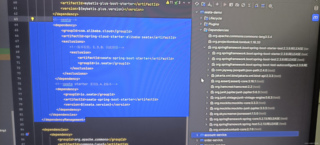

依赖导入不进去,试了好几种办法了,我之前换过jdk好像就开始这样了,无效依赖虽然没有报错,但是根本没用,seata的注解用的时候会报错,卡了几天了,删除lastupdate试了,还有工程模块加java这个加成功了但是打开Maven看却没有,再次打开看jar包是灰色的
 分享
分享
 关注
关注引自免费微信小程序:皆我百晓生
看起来你在尝试集成Seata分布式事务管理框架到你的Spring Boot项目中,但遇到了一些问题。首先,让我们简化一下pom.xml文件中的依赖部分,并解决可能存在的冲突。这里有一个修改后的pom.xml依赖部分示例:
<?xml version="1.0" encoding="UTF-8"?>
<project xmlns="http://maven.apache.org/POM/4.0.0"
         xmlns:xsi="http://www.w3.org/2001/XMLSchema-instance"
         xsi:schemaLocation="http://maven.apache.org/POM/4.0.0 http://maven.apache.org/xsd/maven-4.0.0.xsd">
    <!-- ... 其他部分省略 -->
    <properties>
        <mybatis_plus_version>3.5.3</mybatis_plus_version>
        <seata_version>1.4.2</seata_version>
        <spring_boot_version>2.3.9.RELEASE</spring_boot_version>
    </properties>

    <dependencies>
        <!-- MyBatis Plus Starter -->
        <dependency>
            <groupId>com.baomidou</groupId>
            <artifactId>mybatis-plus-boot-starter</artifactId>
            <version>${mybatis_plus_version}</version>
        </dependency>

        <!-- Seata Spring Cloud Starter -->
        <dependency>
            <groupId>com.alibaba.cloud</groupId>
            <artifactId>spring-cloud-starter-alibaba-seata</artifactId>
            <version>${seata_version}</version>
        </dependency>

        <!-- Test相关依赖,可移除或根据实际测试框架调整 -->
        <dependency>
            <groupId>org.springframework.boot</groupId>
            <artifactId>spring-boot-starter-test</artifactId>
            <scope>test</scope>
        </dependency>

        <!-- 根据需要添加其他测试库,例如JUnit Jupiter, Hamcrest等 -->
        <dependency>
            <groupId>org.junit.jupiter</groupId>
            <artifactId>junit-jupiter-engine</artifactId>
            <version>5.6.3</version>
            <scope>test</scope>
        </dependency>
        <dependency>
            <groupId>org.junit.vintage</groupId>
            <artifactId>junit-vintage-engine</artifactId>
            <version>5.6.3</version>
            <scope>test</scope>
        </dependency>
        <!-- ... 其他测试库,如Mockito、JsonPath等 -->

    </dependencies>
    <!-- ... 其他部分省略 -->
</project>
注意:
<scope>为test,这将确保这些依赖只在测试时被引入。<dependencyManagement>部分。如果你仍然遇到问题,可以检查以下几点:
mvn clean install命令。application.properties或.gitignore)影响了依赖的加载。.m2目录(仅限于开发环境),然后从头开始构建。如果以上步骤都无法解决问题,请提供详细的错误信息,以便进一步分析。
分享 已结题
(查看结题原因) 12月19日
修改了问题
4月19日
创建了问题
4月19日
已结题
(查看结题原因) 12月19日
修改了问题
4月19日
创建了问题
4月19日

