Visual studio 2019版本 WINFORM的NUGET包里面ScottPlot5.0以上版本好像装进去工具箱里看不到控件 可以直接使用的 ?
ScottPlot4.0的就可以。
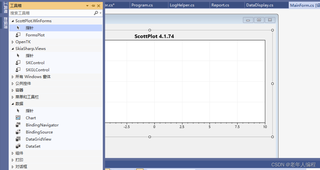

Visual studio 2019版本 WINFORM的NUGET包里面ScottPlot5.0以上版本好像装进去工具箱里看不到控件 可以直接使用的 ?
ScottPlot4.0的就可以。
 分享
分享
Hi, 你安装好了这个NuGet包之后,rebuild项目或者重启VS试试看呢。
你也可以参考下这个方法: https://scottplot.net/faq/add-winforms-programmatically/
Steps
These steps create a new WinForms App and add a ScottPlot control without using the Visual Studio designer:
Step 1: Open Visual Studio and create a new Windows Forms App
Step 2: Right-click the project, select “Manage NuGet Packages”, search for “ScottPlot”, and install the “ScottPlot.WinForms” package
Step 3: Edit your Form’s .cs file to create a FormsPlot instance and add it to the Form at startup as demonstrated in the code below.
ScottPlot 5
public partial class Form1 : Form
{
    readonly ScottPlot.WinForms.FormsPlot formsPlot1;

    public Form1()
    {
        InitializeComponent();

        // Add the FormsPlot
        formsPlot1 = new() { Dock = DockStyle.Fill };
        this.Controls.Add(formsPlot1);

        // Add sample data to the plot
        double[] data = ScottPlot.Generate.Sin();
        formsPlot1.Plot.Add.Signal(data);
        formsPlot1.Refresh();
    }
}
 创建了问题
4月27日
创建了问题
4月27日


