以下内容由CHATGPT及阿里嘎多学长共同生成、有用望采纳:
您想要解决的问题
您提问的目的是解决在使用MyBatis框架进行数据库操作时遇到的“Invalid bound statement (not found)”错误,该错误导致前端页面数据消失。您希望找到问题的根源并得到一个解决方案,以恢复前端页面的数据展示。
图片内容
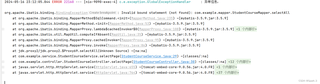
- 第一张图片显示了一个错误日志,指出在尝试执行
selectAll方法时,MyBatis无法找到对应的XML映射文件。 - 第二张图片是一个空的数据表格,表明前端页面没有数据显示。
- 第三张图片展示了项目的资源配置,包括MyBatis的配置信息,如日志实现、映射文件位置等。
- 第四张图片是
StudentCourseMapper.xml文件的内容,包含了一个selectAll的SQL查询语句。
问题出现原因
根据提供的信息,问题可能出现的原因有:
- MyBatis无法找到或识别
StudentCourseMapper的XML映射文件。 selectAll方法在XML映射文件中定义有误,导致MyBatis无法正确执行。
问题解决方案
- 确保XML映射文件位置正确:检查
application.yml或mybatis-config.xml中mapper-locations的配置是否正确指向了XML文件的位置。 - 检查XML映射文件的命名空间和id:确保
StudentCourseMapper.xml中的namespace和id与Mapper接口中的完全一致。 - 检查XML中的SQL语句:确认SQL语句没有语法错误,例如在第四张图片中的SQL语句,
if标签的属性test内的表达式应该是#{name} != null而非name != null。
提供代码
以下是针对上述问题的修改后的StudentCourseMapper.xml文件内容:
<?xml version="1.0" encoding="UTF-8" ?>
<!DOCTYPE mapper
        PUBLIC "-//mybatis.org//DTD Mapper 3.0//EN"
        "http://mybatis.org/dtd/mybatis-3-mapper.dtd">
<mapper namespace="com.example.mapper.StudentCourseMapper">

    <select id="selectAll" resultType="com.example.entity.StudentCourse">
        select * from student_course
        <where>
            <if test="_parameter != null and name != null">
                and name like concat('%', #{name}, '%')
            </if>
            <if test="_parameter != null and no != null">
                and no like concat('%', #{no}, '%')
            </if>
            <if test="_parameter != null and studentId != null">
                and student_id = #{studentId}
            </if>
        </where>
        order by id desc
    </select>

</mapper>
代码运行方式
- 确保您的开发环境已安装Java和Maven。
- 将修改后的XML文件放置在项目正确的资源目录下。
- 重新构建项目并部署到服务器。
代码预期运行结果
如果上述修改正确,重新运行应用后,前端页面应该能够正确显示从数据库查询到的数据。
推荐相关链接
请尝试上述解决方案,并根据需要调整您的项目配置。如果问题仍然存在,可能需要进一步检查项目设置或代码实现。