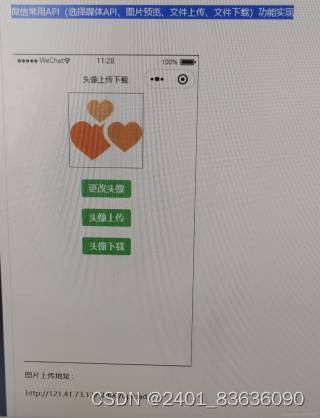
头像更改、头像上传、头像下载 微信小程序wxml和js代码编写根据图片内容编写

 分享
分享
 关注
关注引自免费微信小程序:皆我百晓生
在微信小程序中,要实现头像的更改、上传和下载,你需要使用微信提供的API,包括wx.chooseImage()用于选择图片,wx.uploadFile()用于上传图片,以及可能需要wx.downloadFile()用于下载图片(虽然通常用户不会直接从服务器下载头像)。下面我会提供一个详细的示例,包括WXML和JS代码。
首先,在你的app.js中配置网络请求域名,确保与图片URL匹配:
// app.js
App({
  globalData: {
    avatarUrl: 'http://21./'
  },
  onLaunch: function () {
    wx.getNetworkType({
      success: res => {
        console.log('当前网络状态:', res.networkType)
      }
    })
  }
})
然后,在你的页面的WXML中创建一个简单的界面,包含三个按钮分别对应头像选择、上传和下载的功能:
<!-- index.wxml -->
<view class="container">
  <button bindtap="chooseAvatar">选择头像</button>
  <button bindtap="uploadAvatar" hidden="{{isUploading}}">上传头像</button>
  <button bindtap="downloadAvatar" hidden="{{!avatarUrl}}">下载头像</button>
  <image src="{{avatarUrl}}" hidden="{{!avatarUrl}}" />
</view>
接下来,在对应的index.js中编写事件处理函数:
// index.js
Page({
  data: {
    isUploading: false,
    avatarUrl: ''
  },

  chooseAvatar: function () {
    this.setData({ isUploading: true });
    wx.chooseImage({
      count: 1, // 最多可以选择的图片数量,这里只选一张
      sizeType: ['original'], // 可以指定是原图还是压缩图,默认二者都有
      sourceType: ['album', 'camera'], // 可以指定来源是相册还是相机,默认二者都有
      success(res) {
        const tempFilePaths = res.tempFiles[0].path;
        this.uploadAvatar(tempFilePaths);
      }
    });
  },

  uploadAvatar: function (tempFilePath) {
    this.setData({ isUploading: true });
    wx.uploadFile({
      url: 'https://your-server.com/upload', // 你的服务器端上传接口
      filePath: tempFilePath,
      name: 'file',
      formData: { key: 'my-image-key' }, // 根据服务器需求添加其他表单数据
      success: function (res) {
        let serverAvatarUrl = JSON.parse(res.data).url; // 假设服务器返回的是一个JSON对象,其中包含url字段
        this.setData({
          isUploading: false,
          avatarUrl: serverAvatarUrl
        });
      }.bind(this),
      fail: function () {
        this.setData({ isUploading: false });
        wx.showToast({
          title: '上传失败',
          icon: 'none',
          duration: 2000
        });
      }.bind(this)
    });
  },

  downloadAvatar: function () {
    if (!this.data.avatarUrl) return;

    wx.downloadFile({
      url: this.data.avatarUrl,
      success: function (res) {
        const临时文件路径 = res.tempFilePath;
        wx.saveImageToPhotosAlbum({
          filePath:临时文件路径,
          success: function () {
            wx.showToast({
              title: '已保存到相册',
              icon: 'success',
              duration: 2000
            });
          }
        });
      }
    });
  }
})
注意:这个例子中的服务器端接口、URL和错误处理都是假设的,你需要根据实际情况进行调整。另外,对于文件下载,微信小程序只能将图片保存到本地相册,而不能直接显示为下载文件。
以上代码应该能帮助你在微信小程序中实现头像的更改、上传和下载功能。如果你有其他疑问或者需要进一步的帮助,请随时告诉我。
分享 已结题
(查看结题原因) 5月20日
已采纳回答
5月20日
创建了问题
5月20日
已结题
(查看结题原因) 5月20日
已采纳回答
5月20日
创建了问题
5月20日
