el-table cell-class-name添加类名改变列的宽度不生效,类名已经添加上了,样式不生效(要不添加width属性实现)

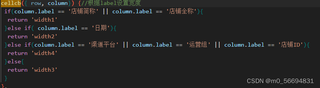
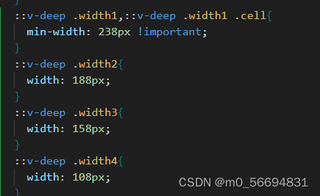

el-table cell-class-name添加类名改变列的宽度不生效,类名已经添加上了,样式不生效(要不添加width属性实现)
 分享
分享
 关注
关注引自免费微信小程序:皆我百晓生
看起来你在尝试通过cell-class-name来动态地为 Element UI 的 el-table 列添加不同的 CSS 类,然后通过这些类来设置列的宽度。然而,你遇到的问题是样式并没有生效。这可能是因为在 Vue.js 中,CSS 样式优先级的问题,或者可能是选择器的匹配问题。
首先,确保你的 CSS 规则具有足够的优先级。由于 Vue 的单文件组件 (SFC) 使用 scoped 样式,外部样式表的规则可能不会覆盖内部的 scoped 样式。为了使全局样式生效,你需要使用 !important 来提升优先级,或者将样式写入到全局样式表中。但是,频繁使用 !important 不是一个好的做法,因为它可能会导致样式冲突。
接下来,检查你的 CSS 选择器是否正确。你使用的 ::v-deep 是 Vue 2.x 版本中的深度选择器,但在 Vue 3.x 中已经被移除,取而代之的是使用 >>> 或者在 CSS 预处理器中使用 >>> 或者 .deep 符号。考虑到你提供的代码片段没有明确指出 Vue 的版本,我将提供适用于 Vue 2 和 Vue 3 的两种情况下的解决方案。
对于 Vue 2.x,请使用下面的 CSS 规则:
/* 在你的全局样式表中 */
.min-width {
  min-width: 238px !important;
}

.width2 {
  width: 188px !important;
}

.width3 {
  width: 158px !important;
}

.width4 {
  width: 108px !important;
}
对于 Vue 3.x,请使用下面的 CSS 规则:
/* 在你的全局样式表中 */
.min-width {
  min-width: 238px !important;
}

.width2 >>> * {
  width: 188px !important;
}

.width3 >>> * {
  width: 158px !important;
}

.width4 >>> * {
  width: 108px !important;
}
或者如果你使用的是 SASS 或者 Less,可以这样写:
// 在你的全局 SCSS 文件中
.min-width {
  min-width: 238px !important;
}

.width2 {
  & >>> * {
    width: 188px !important;
  }
}

.width3 {
  & >>> * {
    width: 158px !important;
  }
}

.width4 {
  & >>> * {
    width: 108px !important;
  }
}
然后,在你的 Vue 组件中保持你的 cellcb 函数不变,它会根据列的 label 添加相应的类名。
如果你仍然遇到问题,可能需要检查是否有其他样式覆盖了这些类的宽度设置。你可以使用浏览器开发者工具查看元素的实际样式,以便找出潜在的冲突。
分享 创建了问题
5月24日
创建了问题
5月24日


