

所写代码实际效果图:
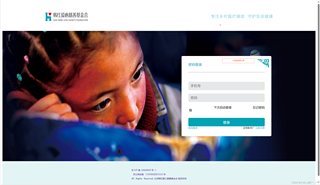
原网页图片呈现:

对于以上两张图片,第一张为以下代码所呈现的效果图,那么如何添加javascript、并修改css样式使得最终的效果能够与原网页图片相一致呢?哪位友友能提出一些建议,将感激不尽!
<!DOCTYPE html>
<html>
<head>
<meta charset="utf-8" />
<title></title>
</head>
<body>
<div class="bigHelp">
<div class="leftHelp">
<img src="img/logo.png">
</div>
<div class="rightHelp">
<p>专注乡村医疗援助 守护生命健康</p>
</div>
</div>
<div class="bigPicture" id="picture">
<div class="children">
<div class="loginbox" id="password" style="display:block">
<div class="character">
<p>扫码登录更方便</p>
<div class="mycard"></div>
</div>
<img src="img/login_QR_code.png" onclick="showHelp()" class="QRcode">
<div class="loginhead">
<span>
密码登录
<span class="line"></span>
</span>
</div>
<input id="smartphone-count" type="text" maxlength="48"
placeholder="手机号" class="count">
<div class="passward">
<input id="passwaedlogin" type="text" maxlength="20"
placeholder="密码" class="count">
</div>
<div class="automatic">
<input id="automaticlogin" type="checkbox"
name="automaticlogin" title="下次自动登录"
lay-skin="primary" checked="checked">
<div class="automatic-checked" lay-skin="primary">
<span>下次自动登录</span>
</div>
<div onclick="changePed()" class="forget">忘记密码</div>
</div>
<button id="sumit" name="loginbtn" class="loginbtn">登录</button>
<div class="information">
<div onclick="messagelogin()" class="message">短信登录</div>
<div class="account">
没有账号?
<span onclick="btnbeg()" class="prompt">立即注册</span>
</div>
</div>
</div>
</div>
</div>
<div class="copyright">
<span>
<div class="copy1">
<a href="" target="_blank">京 ICP 备 12020659 号 -1</a>
</div>
<div class="copy2">
<a href="" target="_blank">
京公网安备 11010502051533 号
</a>
</div>
<div class="copy3">
<a href="" target="_blank">
All Rights Reserved. 北京韩红爱心慈善基金会 版权所有
</a>
</div>
</span>
</div>
<script>
</script>
</body>
</html>
```css
<style>
.bigHelp{
width:100%;
height:140px;
background-color:white;
display:flex;
align-items: center;
justify-content: space-between;
}
.leftHelp{
margin-top:3px;
margin-bottom: 0px;
margin-left: 3px;
margin-right: auto;
display: flex;
}
img{
width:200px;
height: 40px;
margin-top:3px;
margin-bottom: 0px;
margin-left: 200px;
margin-right: auto;
}
.rightHelp{
margin-top:3px;
margin-bottom: 0px;
margin-left: auto;
margin-right: 200px;
font-size: 18px;
color:#02A5B580;
letter-spacing: 2px;
}
p{
font-family:"blackadder itc";
}
.bigPicture{
background: url(https://hhax.oss-cn-beijing.aliyuncs.com/owe/childmenuPC/loginAdvertisement.jpg)no-repeat;
background-size: 100% 40.886vw;
width: 100%;
height: 40.866vw;
display: flex;
align-items: center;
position: relative;
}
.children{
margin: 4rem 13.8vw 4rem auto;
width: 28.125vw;
min-width: 348px;
background-color: #fff;
border-radius: 5px;
}
.children .loginbox{
height: 100%;
padding: 2rem 2rem;
border-radius: 7px;
position: relative;
}
.children .loginhead{
font-family: 'SourceHanSansCNMedium';
font-size: 1rem;
line-height: 1;
letter-spacing: 0;
margin-bottom: 2.75rem;
padding-bottom: 1.75rem;
color: var(--main_color);
border-bottom: 2px solid var(--shallow_grey_color);
}
:root {
--main_color: #00a4b5;
--main_color_hover: rgba(255, 255, 255, 0.5);
--main_color_opacity: rgba(245, 174, 37, 0.7);
--minor_color: rgb(227, 244, 245);
--grey_color: #8d8e8e;
--font_color: #666666;
--shallow_grey_color: #c8c8c8;
margin: 0;
padding: 0;
-webkit-tap-highlight-color: rgba(0,0,0,0);
}
.children .loginbox input{
height: 2.5rem;
font-size: 1rem;
color: var(--font_color);
background: #e6e7e9;
border: 1px solid #edebeb;
border-radius: 5px;
caret-color: unset;
margin-bottom: 1rem;
}
input[type="checkbox" i] {
background-color: initial;
cursor: default;
appearance: auto;
box-sizing: border-box;
margin: 3px 3px 3px 4px;
padding: initial;
border: initial;
}
.loginbox{
display: flex;
}
.character{
width: 8.5rem;
min-width: 150.4px;
height: 1.3rem;
color: #fc6542;
font-size: 0.5rem;
border: 1px solid;
text-align: center;
border-radius: 5px;
position: absolute;
top: 0.75rem;
right: 5rem;
line-height: calc(1.35rem - 2px);
display: flex;
justify-content: center;
align-content: stretch;
align-items: center;
}
.QRcode{
position: absolute;
top: 0.75rem;
right: 0.75em;
width: 3.5rem;
cursor: pointer;
}
.count{
display: block;
width: 100%;
padding-left: 10px;
-webkit-transition: all .3s;
box-sizing: border-box;
}
.automatic{
display: flex;
justify-content: space-between;
margin: 0;
padding: 0;
-webkit-tap-highlight-color: rgba(0,0,0,0);
box-sizing: border-box;
font-size: 14px;
}
:root {
--main_color: #00a4b5;
--main_color_hover: rgba(255, 255, 255, 0.5);
--main_color_opacity: rgba(245, 174, 37, 0.7);
--minor_color: rgb(227, 244, 245);
--grey_color: #8d8e8e;
--font_color: #666666;
--shallow_grey_color: #c8c8c8;
}
.children .loginbtn{
margin-top: 0rem;
background: var(--main_color);
border-radius: 4px;
width: 100%;
line-height: 2.5rem;
color: #fff;
height: 2.5rem;
font-size: 1.0rem;
text-shadow: none;
font-weight: 400;
border: 1px solid var(--main_color);
}
.information{
display: flex;
justify-content: space-between;
margin-top: 1.25rem;
margin: 0;
padding: 0;
-webkit-tap-highlight-color: rgba(0,0,0,0);
box-sizing: border-box;
font-size: 11px;
}
.message{
color: #00a4b5;
}
.prompt{
color:#00a4b5 ;
}
.copyright{
padding: 2rem 0 2rem 0;
background: var(--minor_color);
font-size: 10px;
line-height: 2;
display: flex;
justify-content: center;
align-items: center;
flex-direction: column;
box-sizing: border-box;
}
a{
text-decoration: none;
}
</style>
```


