
前端js里面如何获取到后端返回的文件id和文件名?我这里写的方法不知道应该怎么获取后端返回的值
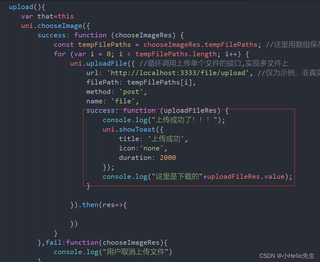
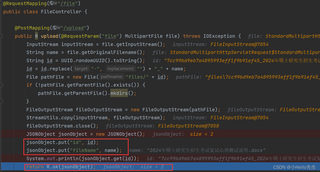

前端js里面如何获取到后端返回的文件id和文件名?我这里写的方法不知道应该怎么获取后端返回的值
 分享
分享
以下内容由CHATGPT及阿里嘎多学长共同生成、有用望采纳:
根据您提供的两张图片中的代码片段,我将指导您如何在前端JavaScript中获取后端返回的文件id和文件名。
在前端代码中,您使用了uni.chooseImage来选择图片,然后通过uni.uploadFile方法上传文件。在uni.uploadFile的success回调函数中,您需要处理后端的响应数据以获取文件id和文件名。
后端响应数据的处理:
uni.uploadFile的success回调函数需要正确处理后端返回的数据。后端应该返回一个JSON对象,包含文件id和文件名。前端代码中的错误:
uni.uploadFile的success回调函数中的console.log和uni.showToast应该在.then的回调中执行,而不是直接在success回调中。后端返回的数据格式:
{"id": "文件id", "fileName": "文件名"}。在后端代码中,您使用了Spring框架的@RequestMapping和@PostMapping注解来处理文件上传请求。
后端响应对象的构建:
JSONObject并放入了文件id和文件名。但是,您需要确保返回的是一个标准的JSON格式。代码中的错误:
System.out.println(jsonObject.get(id));这一行应该被删除或替换,因为它可能会导致错误,因为get方法需要一个字符串参数,而id是一个变量。返回正确的JSON对象:
jsonObject.toString()来返回JSON字符串。uni.chooseImage({
success: function (chooseImageRes) {
const tempFilePaths = chooseImageRes.tempFilePaths;
for (var i = 0; i < tempFilePaths.length; i++) {
uni.uploadFile({
url: 'http://localhost:3333/file/upload', // 确保这是正确的后端接口地址
filePath: tempFilePaths[i],
name: 'file',
method: 'post',
success: function (uploadFileRes) {
// 处理后端返回的数据
const responseData = JSON.parse(uploadFileRes.data);
console.log("文件id:", responseData.id);
console.log("文件名:", responseData.fileName);
uni.showToast({
title: '上传成功',
icon: 'none',
duration: 2000
});
},
fail: function (error) {
console.log("上传失败:", error);
uni.showToast({
title: '上传失败',
icon: 'none',
duration: 2000
});
}
});
}
},
fail: function (error) {
console.log("选择图片失败:", error);
}
});
import org.springframework.web.bind.annotation.PostMapping;
import org.springframework.web.bind.annotation.RequestMapping;
import org.springframework.web.bind.annotation.RequestParam;
import org.springframework.web.bind.annotation.RestController;
import org.springframework.web.multipart.MultipartFile;
import org.json.JSONObject;
import java.io.File;
import java.io.FileOutputStream;
import java.io.IOException;
import java.io.InputStream;
import java.nio.file.Files;
import java.nio.file.Path;
import java.nio.file.Paths;
import java.util.UUID;

@RestController
@RequestMapping("/file")
public class FileController {

    @PostMapping("/upload")
    public String upload(@RequestParam("file") MultipartFile file) throws IOException {
        InputStream inputStream = file.getInputStream();
        String name = file.getOriginalFilename();
        String id = UUID.randomUUID().toString().replace("-", "") + "_" + name;
        Path path = Paths.get("files", id);
        Files.createDirectories(path.getParent());
        try (FileOutputStream fileOutputStream = new FileOutputStream(path.toFile())) {
            Files.copy(inputStream, fileOutputStream);
        }
        JSONObject jsonObject = new JSONObject();
        jsonObject.put("id", id);
        jsonObject.put("fileName", name);
        return jsonObject.toString();
    }
}
请注意,您需要根据实际的后端接口地址和文件存储逻辑调整示例代码。希望这能帮助您解决问题!
分享 系统已结题
6月9日
系统已结题
6月9日 已采纳回答
6月1日
创建了问题
6月1日
已采纳回答
6月1日
创建了问题
6月1日


