在机械装置中经常会遇到这样的情况,需要将一个连杆在旋转过程中能够顺利通过一个平面。设连杆是一个长为L,半径为r的圆柱棒,平面厚度为d给出平面上对应的“曲线洞”的模型。
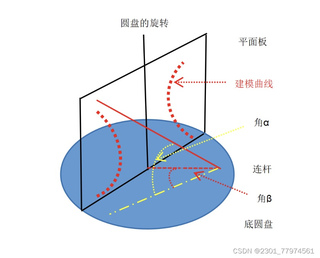

在机械装置中经常会遇到这样的情况,需要将一个连杆在旋转过程中能够顺利通过一个平面。设连杆是一个长为L,半径为r的圆柱棒,平面厚度为d给出平面上对应的“曲线洞”的模型。
 分享
分享
下午好🌅🌅🌅
本答案参考ChatGPT-3.5
这是一个涉及到机械工程和计算机图形学的问题,你想要创建一个模型来模拟直杆(连杆)通过一个旋转的平面装置。这个过程通常涉及到数学建模和三维几何计算。以下是一个简单的Python代码示例,使用Pygame库来创建一个基本的动画模型,虽然这可能不是最精确的物理模型,但它可以给你一个基本的概念。
import pygame
from pygame.locals import *

# 定义常量
L = 10  # 连杆长度
r = 2   # 半径
d = 3   # 平面厚度
angle_a = 90  # 初始角度
angle_B = 45  # 连杆旋转角度

# 初始化Pygame
pygame.init()
screen = pygame.display.set_mode((800, 600))
clock = pygame.time.Clock()

# 创建连杆
class Rod(pygame.sprite.Sprite):
    def __init__(self):
        super().__init__()
        self.image = pygame.Surface((2 * r, L))
        self.image.fill((255, 0, 0))  # 红色代表连杆
        self.rect = self.image.get_rect()
        self.center = (400, 300)  # 初始位置
        self.angle = 0

    def update(self):
        self.image = pygame.transform.rotate(self.image, self.angle)
        self.rect.center = self.center

# 创建平面
class Plane(pygame.sprite.Sprite):
    def __init__(self):
        super().__init__()
        self.image = pygame.Surface((800, d))
        self.image.fill((0, 255, 0))  # 绿色代表平面
        self.rect = self.image.get_rect(center=(400, 300 + L/2))

# 创建游戏对象
rod = Rod()
plane = Plane()
all_sprites = pygame.sprite.Group(rod, plane)

# 游戏主循环
while True:
    for event in pygame.event.get():
        if event.type == QUIT:
            pygame.quit()
            sys.exit()

    # 更新连杆角度
    rod.angle += angle_B / 180 * 3.14  # 每次循环增加旋转角度

    # 检查连杆是否穿过平面
    if rod.rect.bottom >= plane.rect.top and rod.rect.top <= plane.rect.bottom + d:
        print("连杆通过了平面")

    # 清除屏幕
    screen.fill((0, 0, 0))

    # 绘制
    all_sprites.update()
    all_sprites.draw(screen)

    # 更新帧率
    clock.tick(60)

    # 更新屏幕
    pygame.display.flip()
这个代码创建了一个红色的连杆和一个绿色的平面,并在每次循环中逐渐旋转连杆。当连杆底部接触到平面时,它会打印一条消息表示通过。请注意,这只是一个基础示例,实际的模型可能需要更复杂的碰撞检测算法来确保准确地模拟物理行为。
解决方案列表:
pygame.sprite模块来管理游戏对象。 分享 创建了问题
6月1日
创建了问题
6月1日

