
开发一个APP商城在制作tabbar的时候显示不出来
代码没有检查出错误,但是显示不出来tabbar,一个星期了快要碎了怎么就显示不出tabbar,刚刚我试了一下页面css改成红色都显示出来了就tabbar显示不出来,我就写了tabbar其他什么都没写,不知道哪里会覆盖哪里急需help
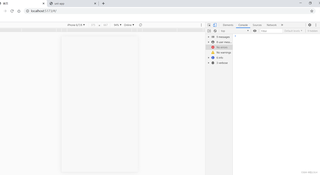
以下为运行结果:
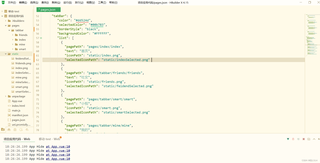
pages.json代码如下:
{
    "pages": [ //pages数组中第一项表示应用启动页,参考:https://uniapp.dcloud.io/collocation/pages
        {
            "path" : "pages/tabbar/index/index",
            "style" :
            {
                "navigationBarTitleText" : "首页",
                "navigationStyle": "custom"
            }

        }
        ,{
            "path" : "pages/tabbar/friends/friends",
            "style" :
            {
                "navigationBarTitleText" : "社交",
                "navigationBarBackgroundColor": "#00b783",
                "navigationBarTextStyle": "white",
                "enablePullDownRefresh": false
            }

        }
        ,{
            "path" : "pages/tabbar/smart/smart",
            "style" :
            {
                "navigationBarTitleText" : "小悦",
                "navigationBarBackgroundColor": "#00b783",
                "navigationBarTextStyle": "white",
                "enablePullDownRefresh": false
            }

        }
        ,{
            "path" : "pages/tabbar/mine/mine",
            "style" :
            {
                "navigationBarTitleText" : "我的",
                "navigationBarBackgroundColor": "#00b783",
                "navigationBarTextStyle": "white",
                "enablePullDownRefresh": false
            }

        }
    ],
    "globalStyle": {
        "navigationBarTextStyle": "black",
        "navigationBarTitleText": "uni-app",
        "navigationBarBackgroundColor": "#F8F8F8",
        "backgroundColor": "#F8F8F8"
    },
     "tabBar": {
        "color": "#dd524d",
        "selectedColor": "#00b783",
        "borderStyle": "black", // 修改边框样式值为"black"或其他有效颜色值,原值"#fff"不正确
        "backgroundColor": "#FFFFFF",
        "list": [
          {
            "pagePath": "pages/index/index",
            "text": "首页",
            "iconPath": "static/index.png", // 添加图标路径,如果有的话
            "selectedIconPath": "static/indexSelected.png" // 选中时的图标路径,如果有的话
          },
          {
            "pagePath": "pages/tabbar/friends/friends",
            "text": "社交",
            "iconPath": "static/friends.png",
            "selectedIconPath": "static/feidendSelected.png"
          },
          {
            "pagePath": "pages/tabbar/smart/smart",
            "text": "小悦",
            "iconPath": "static/smart.png",
            "selectedIconPath": "static/smartSelected.png"
          },
          {
            "pagePath": "pages/tabbar/mine/mine",
            "text": "我的",
            "iconPath": "static/mine.png",
            "selectedIconPath": "static/mineSelected.png"
          }
        ]
      }
    }
运行环境为uni-app、浏览器chrome(运行-运行到浏览器-chrome)


