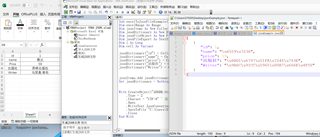
结合GPT给出回答如下请题主参考
VBA可以通过将Excel数据转换为JSON格式来实现将数据写入JSON文件。在将数据写入JSON文件之前,我们需要确保安装了VBA-JSON库。下面是一个使用VBA将Excel数据写入JSON的示例。
首先,我们需要创建一个新的VBA模块并添加VBA-JSON库的引用。可以在此处下载并安装VBA-JSON库:https://github.com/VBA-tools/VBA-JSON
然后,在VBA模块中添加以下代码:
Option Explicit

Sub ConvertExcelToJSON()
    Dim json As Object
    Dim jsonArray As Object
    Dim dataRange As Range
    Dim lastRow As Long
    Dim lastColumn As Long
    Dim i As Long, j As Long

    ' 获取数据范围
    With Sheet1 ' 替换为你要操作的工作表
        lastRow = .Cells(.Rows.Count, 1).End(xlUp).Row
        lastColumn = .Cells(1, .Columns.Count).End(xlToLeft).Column
        Set dataRange = .Range(.Cells(1, 1), .Cells(lastRow, lastColumn))
    End With

    ' 创建 JSON 对象
    Set json = CreateObject("Scripting.Dictionary")
    Set jsonArray = CreateObject("Scripting.Dictionary")

    ' 循环遍历 Excel 数据并添加到 JSON 对象
    For i = 2 To lastRow
        Set jsonArray(i - 1) = CreateObject("Scripting.Dictionary")

        For j = 1 To lastColumn
            jsonArray(i - 1)(dataRange.Cells(1, j).Value) = dataRange.Cells(i, j).Value
        Next j
    Next i

    json("data") = jsonArray

    ' 将 JSON 对象写入文件
    Dim fileName As String
    fileName = "output.json" ' 替换为你要保存的文件名和路径

    Dim fileNumber As Integer
    fileNumber = FreeFile

    Open fileName For Output As fileNumber
    Print #fileNumber, ConvertToJson(json)
    Close fileNumber

    MsgBox "Excel 数据已成功转换为 JSON 并保存到 " & fileName, vbInformation
End Sub
请确保将Sheet1替换为要操作的工作表的名称。还需要将output.json替换为要保存的JSON文件的名称和路径。
上述代码将Excel数据转换为具有以下结构的JSON对象:
{
  "data": [
    {
      "列标题1": "值1",
      "列标题2": "值2",
      ...
    },
    {
      "列标题1": "值3",
      "列标题2": "值4",
      ...
    },
    ...
  ]
}
在保存并运行上述代码后,Excel数据将被转换为JSON并保存到指定的文件中。
请注意,如果Excel数据中包含中文字符,可能会出现中文不显示问题。如果要确保中文显示正确,可以按照以下步骤操作:
- 可以使用
ADODB.Stream对象将JSON字符串写入文件,这样可以保持文件的编码为UTF-8。在打开文件并写入JSON字符串之前,添加以下代码:
Dim stream As Object
Set stream = CreateObject("ADODB.Stream")
stream.Open
stream.Type = 2
stream.Charset = "UTF-8"
stream.WriteText ConvertToJson(json)
stream.SaveToFile fileName, 2 ' 2 表示以二进制模式保存文件
stream.Close
- 在保存JSON文件之前,将Excel数据范围中的中文字符转换为Unicode编码。可以使用以下函数来进行转换:
Function ConvertToUnicode(s As String) As String
    Dim i As Long
    Dim result As String

    result = ""

    For i = 1 To Len(s)
        result = result & "&#" & AscW(Mid(s, i, 1)) & ";"
    Next i

    ConvertToUnicode = result
End Function
然后在添加Excel数据到JSON对象的代码中,将以下行:
jsonArray(i - 1)(dataRange.Cells(1, j).Value) = dataRange.Cells(i, j).Value
更改为:
jsonArray(i - 1)(dataRange.Cells(1, j).Value) = ConvertToUnicode(dataRange.Cells(i, j).Value)
上述更改将Excel数据中的中文字符转换为Unicode编码。在保存JSON文件之后,可以在文本编辑器中打开JSON文件,并将编码转换为中文内容。