两条横线和“或者”怎么位列一行,然后实现图上的样子,
注册用textinput怎么实现
求详细过程
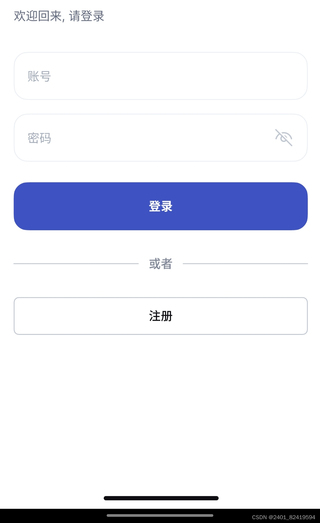

两条横线和“或者”怎么位列一行,然后实现图上的样子,
注册用textinput怎么实现
求详细过程
 分享
分享
以下内容由CHATGPT及阿里嘎多学长共同生成、有用望采纳:
在HarmonyOS开发中,要实现您所描述的功能,我们可以采用以下步骤:
在HarmonyOS中,可以使用DependentObject组件来创建UI界面,并通过布局来实现元素的排列。要将两条横线和“或者”文本并列显示,可以使用DirectionalLayout布局,并将两个Text组件和一个Divider组件作为子组件添加进去。
示例代码如下:
DirectionalLayout linearLayout = new DirectionalLayout(this);
linearLayout.setOrientation(DirectionalLayout.ORIENTATION_HORIZONTAL);
linearLayout.setSpaceBetweenChildren(10); // 设置子组件之间的间距

// 创建两条横线,使用Divider组件
Divider line1 = new Divider(this);
line1.setWidth(50); // 设置横线宽度
line1.setHeight(2); // 设置横线高度
line1.setBgColor(Color.GRAY); // 设置横线颜色

Divider line2 = new Divider(this);
line2.setWidth(50);
line2.setHeight(2);
line2.setBgColor(Color.GRAY);

// 创建“或者”文本组件
Text orText = new Text(this);
orText.setText("或者");
orText.setTextColor(Color.BLACK);
orText.setTextSize(14); // 设置文本大小

// 将组件添加到布局中
linearLayout.addComponent(line1);
linearLayout.addComponent(orText);
linearLayout.addComponent(line2);

// 将布局添加到页面中
this.addComponent(linearLayout);
在HarmonyOS中,可以通过监听组件的点击事件来实现类似按钮的功能。例如,如果您想要在用户点击注册时执行某些操作,可以为注册按钮添加点击事件监听器。
示例代码如下:
Button registerButton = new Button(this);
registerButton.setText("注册");
registerButton.setTextSize(14);
registerButton.setClickedListener(new Component.ClickedListener() {
    @Override
    public void onClick(Component component) {
        // 点击注册按钮时执行的操作
        performRegistration();
    }
});

// 将按钮添加到页面中
this.addComponent(registerButton);
TextInput组件可以用来收集用户输入的信息,如用户名和密码。
示例代码如下:
// 创建用户名输入框
TextInput usernameInput = new TextInput(this);
usernameInput.setPlaceholderText("请输入用户名");
usernameInput.setInputType(TextInput.InputType.TEXT);

// 创建密码输入框
TextInput passwordInput = new TextInput(this);
passwordInput.setPlaceholderText("请输入密码");
passwordInput.setInputType(TextInput.InputType.PASSWORD);

// 将输入框添加到页面中
this.addComponent(usernameInput);
this.addComponent(passwordInput);
由于HarmonyOS的文档和示例代码通常由华为提供,您可以访问华为开发者官网获取最新的开发文档和示例代码。以下是一些可能有用的链接:
请注意,具体的实现细节可能会随着HarmonyOS版本的更新而变化,因此建议参考最新的官方文档。
分享 系统已结题
6月12日
系统已结题
6月12日 已采纳回答
6月4日
创建了问题
6月4日
已采纳回答
6月4日
创建了问题
6月4日


