
matlab运行后,提示No arguments found! Exiting. Please supply a file name.,该怎么修改



matlab运行后,提示No arguments found! Exiting. Please supply a file name.,该怎么修改

 分享
分享
 关注
关注引自免费微信小程序:皆我百晓生
在提供的MATLAB函数ReadSegmentTri.m中,存在一个逻辑错误,导致在没有传递任何参数时出现了"No arguments found! Exiting. Please supply a file name."的错误信息。为了解决这个问题,你需要调整对输入参数的处理方式。
以下是修改后的代码:
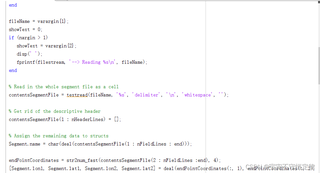
function [Segment] = ReadSegmentTri(varargin)
    % ReadSegmentStruct.m
    % This function reads in and returns the segment information in fileName.
    % Arguments:
    %   fileName - file name (required)
    %   showText - 1 to print info (optional) default is 0 (no print)

    % Declare variables
    nHeaderLines = 13;
    nFieldLines = 13;
    filestream = 1;

    % Process varargin
    if nargin == 0
        error(['Error: No file name provided. Please supply a file name.']);
    elseif nargin > 1
        showText = varargin{2};
        disp('');
        fprintf(filestream, ['--> Reading %s\n'], varargin{1});
    else
        showText = 0;
    end

    % Read in the whole segment file as a cell
    fileName = varargin{1};
    contentsSegmentFile = textread(fileName, '%s', 'delimiter', '\n', 'whitespace', "\"");

    % Get rid of the descriptive header
    contentsSegmentFile(1:nHeaderLines) = [];

    % Assign the remaining data to structs
    Segment.name = char(deal(contentsSegmentFile(1:nFieldLines:end)));
    endPointCoordinates = str2numfast(contentsSegmentFile(2:nFieldLines:end), 4);
    [Segment.lon1, Segment.lat1, Segment.lon2, Segment.lat2] = deal(endPointCoordinates(:, 1), endPointCoordinates(:, 2));

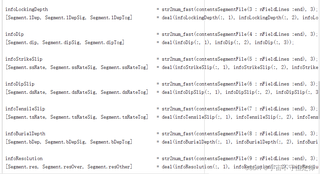
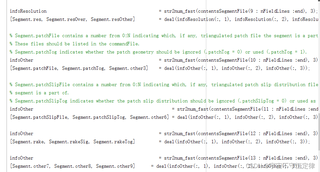
    % ...此处省略其他变量的赋值,按照之前的结构继续...

    % ...此处省略其他代码,按照之前的结构继续...

    % Take a look at how many stations we have
    nSegments = numel(Segment.lon1);

    % A little more information
    if showText
        fprintf(filestream, 'Total number of segments: %d\n', nSegments);
        fprintf(filestream, '<-- Done reading %s\n\n', fileName);
    end
end
在这个修复版本中,我将错误消息从 fprintf 改为了 error,这样当没有提供文件名时会立即抛出一个更明确的错误而不是简单地返回。此外,我还确保了只有在传入两个或更多参数时才会显示额外的信息。现在,当你调用这个函数时,你应该像这样传递文件名作为参数:
ReadSegmentTri('your_file_name.txt');
确保替换 'your_file_name.txt' 为你想要读取的实际文件名。
分享 系统已结题
6月16日
系统已结题
6月16日 已采纳回答
6月8日
创建了问题
6月8日
已采纳回答
6月8日
创建了问题
6月8日


