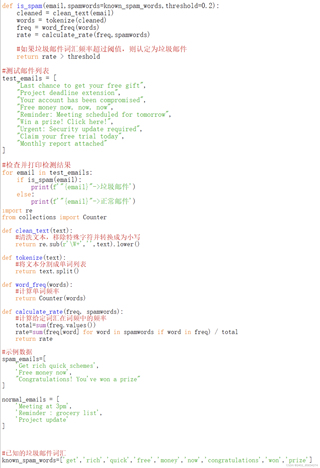
尽管在修改测试邮件列表和阈值后,运行的结果还是一致,没有识别出垃圾邮件,全都是正确邮件

 分享
分享
 关注
关注引自免费微信小程序:皆我百晓生
从描述来看,当前的垃圾邮件识别系统在处理特定的邮件时未能正确分类。这可能是因为几个原因:垃圾邮件特征不明显、阈值设置不当、或是训练数据不足等。要解决这个问题,可以从以下几个方面入手:
clean_text函数能有效去除邮件中的非文本信息,如HTML标签、URLs等。tokenize函数中考虑使用更高级的分词方法,例如nltk或spaCy库提供的分词器,它们能更好地处理英文文本。0.2可能过低,导致即使有少量垃圾词汇,邮件也不被标记为垃圾。可以尝试增加阈值,观察效果。known_spam_words可能不全面,需要根据实际垃圾邮件的特征进行扩充。可以通过分析大量的垃圾邮件样本,提炼更多常见的垃圾邮件词汇。以下是基于上述建议对代码的部分改进:
import re
from collections import Counter
from nltk.tokenize import word_tokenize # 引入nltk的分词器

# 更新垃圾词汇表
known_spam_words = ['get', 'rich', 'quick', 'free', 'money', 'now', 'congratulations', 'won', 'prize', 'click', 'urgent']

def clean_text(text):
    # 清洗文本,移除特殊字符并转换为小写
    return re.sub(r'\W+', ' ', text).lower()

def tokenize(text):
    # 使用nltk的分词器
    return word_tokenize(text)

def word_freq(words):
    # 计算单词频率
    return Counter(words)

def calculate_rate(freq, spamwords):
    # 计算给定词汇在词频中的频率
    total = sum(freq.values())
    rate = sum(freq[word] for word in spamwords if word in freq) / total
    return rate

def is_spam(email, spamwords=known_spam_words, threshold=0.3): # 调整阈值
    cleaned = clean_text(email)
    words = tokenize(cleaned)
    freq = word_freq(words)
    rate = calculate_rate(freq, spamwords)
    return rate > threshold

# 测试邮件列表
test_emails = [
    "Last chance to get your free gift",
    "Project deadline extension",
    "Your account has been compromised",
    "Free money now, now, now",
    "Reminder: Meeting scheduled for tomorrow",
    "Win a prize! Click here!",
    "Urgent: Security update required",
    "Claim your free trial today",
    "Monthly report attached"
]

# 检查并打印检测结果
for email in test_emails:
    if is_spam(email):
        print(f'"{email}" -> 垃圾邮件')
    else:
        print(f'"{email}" -> 正常邮件')
通过以上步骤,应该能显著提升垃圾邮件识别系统的性能。如果问题仍未解决,可能需要进一步的数据分析和模型调优。
分享 已结题
(查看结题原因) 6月19日
创建了问题
6月19日
已结题
(查看结题原因) 6月19日
创建了问题
6月19日


