我已经通过pip install PyQt6 PyQt6-WebEngine安装了,为什么还是不能使用
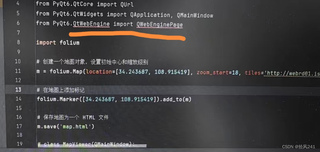

我已经通过pip install PyQt6 PyQt6-WebEngine安装了,为什么还是不能使用
 分享
分享
 关注
关注引自免费微信小程序:皆我百晓生
遇到PyQt6的QtWebEngine模块无法使用的问题,通常是由于安装环境或依赖关系不正确导致的。既然你已经尝试过pip install PyQt6 PyQt6-WebEngine,但仍然遇到问题,我们可以尝试以下步骤来解决:
首先确认PyQt6-WebEngine是否真的被安装到了你的Python环境中。在Python shell中运行以下命令检查:
import PyQt6.QtWebEngineWidgets
print(PyQt6.QtWebEngineWidgets.__file__)
这应该返回一个路径,指向QtWebEngineWidgets模块的实际位置。
有时候,简单的卸载再安装可以解决问题。使用以下命令进行操作:
pip uninstall PyQt6 PyQt6-WebEngine
pip install PyQt6 PyQt6-WebEngine
确保在干净的环境中执行这些命令,可能需要使用虚拟环境。
确认你的项目使用的Python解释器是安装了PyQt6和PyQt6-WebEngine的那一个。在PyCharm中,可以通过“File > Settings > Project: <Your_Project_Name> > Python Interpreter”检查和更改当前的解释器。
有时,旧版本的pip或setuptools可能会导致安装问题。更新它们:
pip install --upgrade pip setuptools
如果你使用的是Anaconda或Miniconda,尝试使用conda来安装PyQt6和PyQt6-WebEngine:
conda install -c anaconda pyqt=6
conda install -c conda-forge pyqt-webengine=6
确保你的代码中使用正确的导入语句。例如,对于QWebEngineView,应该是这样的:
from PyQt6.QtWebEngineWidgets import QWebEngineView
下面是一个完整的示例代码,用于展示如何在PyQt6中使用QtWebEngine显示HTML文件:
from PyQt6.QtCore import QUrl
from PyQt6.QtWidgets import QApplication, QMainWindow
from PyQt6.QtWebEngineWidgets import QWebEngineView

class MapViewer(QMainWindow):
    def __init__(self):
        super().__init__()
        self.browser = QWebEngineView()
        self.browser.setUrl(QUrl("file:///path/to/your/map.html"))
        self.setCentralWidget(self.browser)
        self.show()

if __name__ == "__main__":
    app = QApplication([])
    window = MapViewer()
    app.exec()
请将"/path/to/your/map.html"替换为你实际的HTML文件路径。
按照以上步骤操作,你应该能够解决PyQt6和QtWebEngine的使用问题。如果问题仍然存在,可能需要更深入地检查你的系统环境或寻求社区支持。
分享 系统已结题
6月27日
系统已结题
6月27日 创建了问题
6月19日
创建了问题
6月19日

