系统框架:vue3+ts+qiankun
需求:在qiankun子应用通过window.open打开一个指定的新窗口
问题1:所有路由信息会丢失(meta、matched全空了)
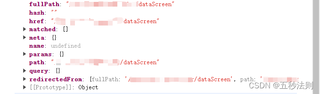
问题2:在子模块打开新页面总是会带上子模块的路径前缀,导致window.open打开的页面会401


系统框架:vue3+ts+qiankun
需求:在qiankun子应用通过window.open打开一个指定的新窗口
问题1:所有路由信息会丢失(meta、matched全空了)
问题2:在子模块打开新页面总是会带上子模块的路径前缀,导致window.open打开的页面会401
 分享
分享
 关注
关注引自免费微信小程序:皆我百晓生
这个问题涉及到Vue 3 + QianKun 的使用以及如何正确地使用window.open()方法来创建新的窗口。这里有几个步骤可以帮助解决这些问题:
window.open()的使用首先,确保你正在使用的window.open()方法是正确的。这个方法通常用于打开外部链接,而不是内部组件。
// 使用QianKun引入Vue Router
import { useRouter } from 'vue-router';
const router = useRouter();

// 创建一个新的Vue Router实例
const newRouterInstance = router.createRoute('new_route');

// 打开一个新的浏览器窗口并导航到新页面
window.open(newRouterInstance.href);
要防止路由信息丢失,可以考虑以下几点:
router.push()替换为router.replace()以保存路由状态。例如,可以在父组件中添加一个名为currentMatchedRoutes的数据属性,用于存储当前被选择的路由信息。
export default {
  // ...
  currentMatchedRoutes: [], // 存储当前匹配的路由信息
};
然后,在子组件中根据需要设置当前匹配的路由信息。
export default {
  // ...
  mounted() {
    this.updateCurrentMatchedRoutes();
  },
  methods: {
    updateCurrentMatchedRoutes() {
      const matchedRoute = this.$route.matched[0];
      if (matchedRoute) {
        this.currentMatchedRoutes.push(matchedRoute);
      }
    }
  }
};
为了防止在子模块打开新页面时带入子模块的路径前缀,可以将子模块的路径作为参数传递给window.open(),并将结果重定向回父组件。
例如:
// 父组件
<template>
  <div id="app">
    <child-screen v-if="showChildScreen"></child-screen>
  </div>
</template>

<script>
import ChildScreen from './components/ChildScreen.vue';

export default {
  name: 'App',
  components: {
    ChildScreen
  },
  data() {
    return {
      showChildScreen: false
    };
  },
  methods: {
    openNewWindow() {
      window.open(this.newWindowUrl, '_blank');
      this.showChildScreen = true;
    }
  }
};
</script>
在这个例子中,当调用openNewWindow方法时,它将触发window.open操作,同时保持showChildScreen的状态为true,直到用户关闭新窗口后才将其更改为false。
这样,即使在子模块中打开了新页面,也不会影响到父组件中的路由信息。
以上就是解决qiankun子应用与新窗口路由跳转问题的一些基本思路。确保遵循最佳实践,如使用window.open()替代router.push(),并且在需要时保存和更新路由信息,以便在子模块中正确地跳转到新的页面。
分享 创建了问题
6月26日
创建了问题
6月26日


