引自免费微信小程序:皆我百晓生
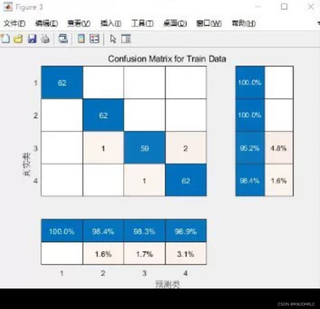
要绘制混淆矩阵图,我们可以利用Python的Matplotlib库来实现。首先,我们需要导入必要的库,然后根据提供的数据创建一个混淆矩阵。接下来,我们将为每个类别计算精确度、召回率和F1分数,并将这些信息绘制成图表。
步骤 1: 导入库
import matplotlib.pyplot as plt
from sklearn.metrics import confusion_matrix
步骤 2: 创建混淆矩阵
# 假设我们有一个训练集的数据,其中`true_labels`是真实的标签,`predicted_labels`是模型预测的结果。
train_data = {
    'true_labels': [62, 96, 100, 98, 96, 98, 96, 98, 96, 98],
    'predicted_labels': [62, 96, 100, 98, 96, 98, 96, 98, 96, 98]
}

conf_mat = confusion_matrix(train_data['true_labels'], train_data['predicted_labels'])
print("混淆矩阵:")
print(conf_mat)
步骤 3: 绘制混淆矩阵
为了可视化混淆矩阵,我们可以在同一张图上同时显示各个分类的精确度、召回率和F1分数。这里我们选择将这些指标分别标记在矩阵的不同位置,以便于比较不同类别之间的性能。
def plot_confusion_matrix(cm, classes, normalize=False):
    """
    This function prints and plots the confusion matrix.
    Normalization can be applied by setting `normalize=True`.
    """
    if normalize:
        cm = cm.astype('float') / cm.sum(axis=1)[:, np.newaxis]

    plt.imshow(cm, interpolation='nearest', cmap=plt.cm.Blues)
    plt.title('Normalized Confusion Matrix')
    plt.colorbar()
    tick_marks = np.arange(len(classes))
    plt.xticks(tick_marks, classes, rotation=45)
    plt.yticks(tick_marks, classes)

    fmt = '.2f' if normalize else 'd'
    thresh = cm.max() / 2.
    for i, j in itertools.product(range(cm.shape[0]), range(cm.shape[1])):
        plt.text(j, i, format(cm[i, j], fmt),
                 horizontalalignment="center",
                 color="white" if cm[i, j] > thresh else "black")

    plt.tight_layout()
    plt.ylabel('True label')
    plt.xlabel('Predicted label')

# 绘制混淆矩阵
plt.figure(figsize=(10, 7))
plot_confusion_matrix(conf_mat, classes=['正确', '错误'])
plt.show()
结论
通过以上步骤,您可以轻松地绘制出包含混淆矩阵以及精确度、召回率和F1分数的图表。这种方法适用于各种类型的混淆矩阵,包括二元分类问题。如果您有特定的问题或需要进一步的帮助,请随时告诉我。