为什么我一直报错啊Failed to read config file: open config/application.yaml: The system cannot find the file specified.
明明有这个文件,为什么就是说没有啊
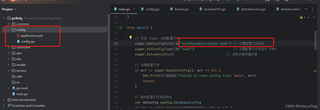

为什么我一直报错啊Failed to read config file: open config/application.yaml: The system cannot find the file specified.
明明有这个文件,为什么就是说没有啊
 分享
分享
该回答引用自GPT-3.5, 由博主 GISer Liu 编写:
用户在使用Go语言读取YAML配置文件时遇到问题,系统提示找不到指定的文件。用户确认文件存在,但仍然报错。这可能是由于以下几个原因:
首先,确保Go程序中指定的文件路径是正确的。可以通过打印当前工作目录和文件路径来验证。
package main

import (
    "fmt"
    "os"
)

func main() {
    // 获取当前工作目录
    currentDir, err := os.Getwd()
    if err != nil {
        fmt.Println("Failed to get current directory:", err)
        return
    }
    fmt.Println("Current directory:", currentDir)

    // 打印文件路径
    filePath := "config/application.yaml"
    fmt.Println("File path:", filePath)

    // 尝试打开文件
    file, err := os.Open(filePath)
    if err != nil {
        fmt.Println("Failed to open config file:", err)
        return
    }
    defer file.Close()

    fmt.Println("Config file opened successfully")
}
如果相对路径有问题,可以尝试使用绝对路径来读取文件。
package main

import (
    "fmt"
    "os"
)

func main() {
    // 获取当前工作目录
    currentDir, err := os.Getwd()
    if err != nil {
        fmt.Println("Failed to get current directory:", err)
        return
    }

    // 构建绝对路径
    filePath := currentDir + "/config/application.yaml"
    fmt.Println("File path:", filePath)

    // 尝试打开文件
    file, err := os.Open(filePath)
    if err != nil {
        fmt.Println("Failed to open config file:", err)
        return
    }
    defer file.Close()

    fmt.Println("Config file opened successfully")
}
确保文件具有读取权限。可以通过命令行检查文件权限:
ls -l config/application.yaml
如果权限不足,可以使用以下命令修改权限:
chmod 644 config/application.yaml
通过以上步骤,可以逐步排查并解决Go程序找不到YAML文件的问题。首先确认文件路径是否正确,然后尝试使用绝对路径,最后检查文件权限。希望这些步骤能帮助您解决问题。
如果该回答解决了您的问题,请采纳!如果没有,请私信联系或评论您的疑惑
分享 系统已结题
12月19日
系统已结题
12月19日 已采纳回答
12月11日
创建了问题
7月14日
已采纳回答
12月11日
创建了问题
7月14日


