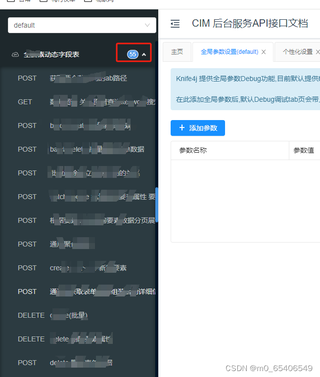
Swagger2的ui页面只能显示55个接口,后续新增的接口就看不到,这得怎么解决啊

 分享
分享
以下内容由AIGC及阿里嘎多学长共同生成、有用望采纳:
根据用户提供的图片和描述,Swagger2的UI界面存在一个限制,即最多只能显示55个API接口。这可能是由于Swagger2的UI组件在设计时对接口数量有一定的限制。以下是几种可能的解决方案:
使用Swagger UI的分组功能:
apis()方法,可以对API进行分组,每个组可以包含一定数量的API接口。这样,用户可以通过切换不同的组来查看更多的API接口。升级到Swagger 3(OpenAPI):
自定义Swagger UI:
使用其他API文档工具:
以下是一个基于Spring Boot和Swagger2的配置示例,展示如何使用分组功能来组织API接口:
import org.springframework.context.annotation.Bean;
import org.springframework.context.annotation.Configuration;
import springfox.documentation.builders.RequestHandlerSelectors;
import springfox.documentation.spi.DocumentationType;
import springfox.documentation.swagger2.annotations.EnableSwagger2;
import springfox.documentation.service.ApiInfo;
import springfox.documentation.service.Contact;

import java.util.Collections;

@Configuration
@EnableSwagger2
public class SwaggerConfig {

    @Bean
    public Docket apiDocket() {
        return new Docket(DocumentationType.SWAGGER_2)
                .select()
                .apis(RequestHandlerSelectors.basePackage("com.example.api")) // 指定包路径
                .build()
                .groupName("API Group 1"); // 分组名称
    }

    // 可以添加更多的Docket bean来创建更多的API组
}
希望这些建议能帮助你解决Swagger2 UI显示API接口数量限制的问题。如果需要更具体的帮助,请提供更多的项目信息或代码示例。
分享 已结题
(查看结题原因) 7月24日
创建了问题
7月24日
已结题
(查看结题原因) 7月24日
创建了问题
7月24日

