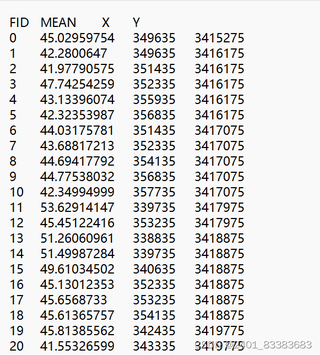
这是我要读取的文本数据,有几行之间的空格不一样,我没办法用空格去分割。
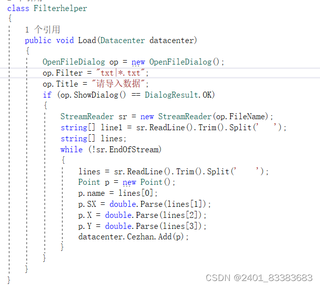
这是我原来的代码,我的意思是把数据逐行读取到数组中,然后按照索引赋值。但是我空格数量不知道。

 分享
分享
引用gpt4
要逐行读取并解析具有不定数量空格作为分隔符的文本数据,可以使用正则表达式来处理空格分隔。正则表达式能够匹配一个或多个空格,从而正确解析每一行的数据。
下面是一个修改后的代码示例,使用 Regex.Split 方法来处理空格分隔符:
using System;
using System.Collections.Generic;
using System.IO;
using System.Text.RegularExpressions;
using System.Windows.Forms;

class Point
{
    public string name { get; set; }
    public double SX { get; set; }
    public double X { get; set; }
    public double Y { get; set; }
}

class Datacenter
{
    public List<Point> Cezhan { get; set; } = new List<Point>();
}

class Filterhelper
{
    public void Load(Datacenter datacenter)
    {
        OpenFileDialog op = new OpenFileDialog
        {
            Filter = "txt files (*.txt)|*.txt",
            Title = "请导入数据"
        };

        if (op.ShowDialog() == DialogResult.OK)
        {
            using (StreamReader sr = new StreamReader(op.FileName))
            {
                string line;
                // Read and ignore the header line
                sr.ReadLine();

                while ((line = sr.ReadLine()) != null)
                {
                    // Use Regex to split the line by one or more spaces
                    string[] parts = Regex.Split(line.Trim(), @"\s+");

                    if (parts.Length >= 4)
                    {
                        Point p = new Point
                        {
                            name = parts[0],
                            SX = double.Parse(parts[1]),
                            X = double.Parse(parts[2]),
                            Y = double.Parse(parts[3])
                        };

                        datacenter.Cezhan.Add(p);
                    }
                }
            }
        }
    }
}
使用正则表达式:
Regex.Split(line.Trim(), @"\s+") 使用正则表达式 \s+ 来匹配一个或多个空格,这样可以确保即使有多个空格,也能正确分割。检查分割结果的长度:
if (parts.Length >= 4) 确保分割结果至少有四个部分,以避免分割错误的情况。逐行读取和处理:
sr.ReadLine() 逐行读取文件内容,并用正则表达式分割每一行。Point 对象并添加到 datacenter.Cezhan 列表中。这种方法可以有效处理每一行中不同数量的空格,确保数据能够正确解析并存储。
分享 系统已结题
8月3日
系统已结题
8月3日 创建了问题
7月26日
创建了问题
7月26日


