combobox 这种下拉选这框,请问如何选中。
网页直接点击,div title="2001年" class="ant-select-selection-selected-value" style="display: block; opacity: 1 2001年
这里会自动变化。
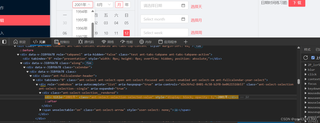


combobox 这种下拉选这框,请问如何选中。
网页直接点击,div title="2001年" class="ant-select-selection-selected-value" style="display: block; opacity: 1 2001年
这里会自动变化。
 分享
分享
 关注
关注🕒上午好,题主!目前:🟢[在线]
📢参考GPT-4o mini 模型、由清水白石008整理提供!
📣今日金句:“远离那些贬低你理想的人。狭隘的人经常如此,伟大的人会让你感觉自己也可以变好。”——马克·吐温
在网页中使用 ComboBox(下拉选择框)时,选中某个选项通常涉及到模拟用户的点击操作。根据你提供的信息,似乎你在使用一个基于 Ant Design 的下拉选择框。以下是一些常见的方法来选中下拉框中的选项,具体取决于你使用的技术栈(如 JavaScript、jQuery、Selenium 等)。
如果你想通过 JavaScript 直接选中下拉框中的某个选项,可以使用以下方法:
// 获取下拉框的 DOM 元素
const selectBox = document.querySelector('.ant-select-selection-selected-value');

// 点击下拉框以展开选项
selectBox.click();

// 等待下拉框展开后,选择特定的选项
setTimeout(() => {
    const optionToSelect = Array.from(document.querySelectorAll('.ant-select-item')).find(item => item.textContent === '2001年');
    if (optionToSelect) {
        optionToSelect.click(); // 点击选项
    }
}, 100); // 等待 100 毫秒以确保下拉框已展开
如果你在项目中使用 jQuery,可以使用以下代码:
// 点击下拉框以展开选项
$('.ant-select-selection-selected-value').click();

// 等待下拉框展开后,选择特定的选项
setTimeout(() => {
    $('.ant-select-item').filter(function() {
        return $(this).text() === '2001年';
    }).click(); // 点击选项
}, 100);
如果你在进行自动化测试,可以使用 Selenium 来选中下拉框中的选项。以下是一个使用 Java 的示例:
import org.openqa.selenium.By;
import org.openqa.selenium.WebDriver;
import org.openqa.selenium.WebElement;
import org.openqa.selenium.chrome.ChromeDriver;

public class SelectComboBox {
    public static void main(String[] args) {
        // 设置 ChromeDriver 的路径
        System.setProperty("webdriver.chrome.driver", "path/to/chromedriver");
        WebDriver driver = new ChromeDriver();

        // 打开网页
        driver.get("your-webpage-url");

        // 点击下拉框以展开选项
        WebElement selectBox = driver.findElement(By.className("ant-select-selection-selected-value"));
        selectBox.click();

        // 等待下拉框展开
        try {
            Thread.sleep(100); // 等待 100 毫秒
        } catch (InterruptedException e) {
            e.printStackTrace();
        }

        // 选择特定的选项
        WebElement optionToSelect = driver.findElement(By.xpath("//div[contains(@class, 'ant-select-item') and text()='2001年']"));
        optionToSelect.click();

        // 关闭浏览器
        driver.quit();
    }
}
通过以上方法,你应该能够成功选中 ComboBox 中的选项。如果你有特定的技术栈或框架,请提供更多信息,以便我能给出更具体的建议。
分享 系统已结题
8月21日
系统已结题
8月21日 已采纳回答
8月13日
创建了问题
8月12日
已采纳回答
8月13日
创建了问题
8月12日


