
/*
 *  Copyright 2014-2022 The GmSSL Project. All Rights Reserved.
 *
 *  Licensed under the Apache License, Version 2.0 (the License); you may
 *  not use this file except in compliance with the License.
 *
 *  http://www.apache.org/licenses/LICENSE-2.0
 */

#include <stdio.h>
#include <string.h>
#include <stdlib.h>
#include <gmssl/sm2.h>
#include <gmssl/error.h>


int main(void)
{
    SM2_KEY sm2_key;
    SM2_KEY pub_key;
    unsigned char plaintext[SM2_MAX_PLAINTEXT_SIZE];
    unsigned char ciphertext[SM2_MAX_CIPHERTEXT_SIZE];
    size_t len;

    sm2_key_generate(&sm2_key);
    memcpy(&pub_key, &sm2_key, sizeof(SM2_POINT));

    sm2_key_print(stdout, 0, 0, "SM2Key", &sm2_key);

    sm2_encrypt(&pub_key, (uint8_t*)"hello world", strlen("hello world"), ciphertext, &len);
    format_bytes(stdout, 0, 0, "ciphertext", ciphertext, len);

    if (sm2_decrypt(&sm2_key, ciphertext, len, plaintext, &len) != 1) {
        fprintf(stderr, "error\n");
        return 1;
    }
    plaintext[len] = 0;
    printf("plaintext: %s\n", plaintext);

    return 0;
}
代码如上,但是点击调试后却是图下这个样子
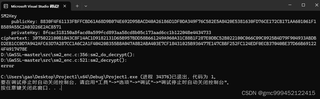
配置我是按照这篇配置的,前面都很顺利,就是最后没有成功,想问一下为什么,谢谢https://blog.csdn.net/D_Flash/article/details/139914573?ops_request_misc=%257B%2522request%255Fid%2522%253A%2522172416631216800186557046%2522%252C%2522scm%2522%253A%252220140713.130102334.pc%255Fall.%2522%257D&request_id=172416631216800186557046&biz_id=0&utm_medium=distribute.pc_search_result.none-task-blog-2~all~first_rank_ecpm_v1~times_rank-2-139914573-null-null.142^v100^pc_search_result_base4&utm_term=%E6%96%B0%E7%89%88GMSSL%E4%B8%8B%E8%BD%BD%E7%BC%96%E8%AF%91&spm=1018.2226.3001.4187


