使用FreeRTOS操作系统,基于STM32标准库函数的一个工程,第一次使用ST-Link下载时正常,如果把下载器拔出来,再次连接到电脑时就会出现下载器未连接的提示,此时必须使用STM32 ST-LINK Utility配合复位键将其擦除后才能下载,但是如果不把下载器拔出来,是可以多次下载的。
检查了下载器引脚(PA13和PA14),我的工程并没有占用这两个引脚,且debug配置也没发现问题。
使用同一个下载器下载其他工程没有出现这个问题
错误提示:
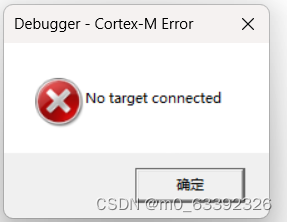
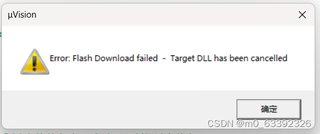

使用FreeRTOS操作系统,基于STM32标准库函数的一个工程,第一次使用ST-Link下载时正常,如果把下载器拔出来,再次连接到电脑时就会出现下载器未连接的提示,此时必须使用STM32 ST-LINK Utility配合复位键将其擦除后才能下载,但是如果不把下载器拔出来,是可以多次下载的。
检查了下载器引脚(PA13和PA14),我的工程并没有占用这两个引脚,且debug配置也没发现问题。
使用同一个下载器下载其他工程没有出现这个问题
错误提示:
 分享
分享
以下回复参考:皆我百晓生、券券喵儿等免费微信小程序作答:
这个问题可能是由于STM32的启动模式配置不正确导致的。请检查你的工程中的启动文件(startup_stm32fxxx.s)中的启动模式配置是否正确。正确的配置应该类似于以下代码:
; <h> System Reset and Clock Configuration registers configuration
;   - Set the system clock source to PLL (HSE)
;   - Set the AHB, APB1 and APB2 prescalers
;   - Configure Flash and Systick timer

; Set the clock source to HSI
    ldr rcc_cfg, =0x40021000
    ldr r1, [rcc_cfg]
    orr r1, #0x00000001
    str r1, [rcc_cfg]

; Set the PLL source to HSE and the PLL multiplier to /2
    ldr r1, =0x40021018
    ldr r2, [r1]
    orr r2, #0x00000010
    str r2, [r1]

; Set the system clock source to PLL
    ldr r1, =0x4002101C
    ldr r2, [r1]
    orr r2, #0x00000003
    str r2, [r1]

; Set the AHB prescaler to /1
    ldr r1, =0x40021020
    ldr r2, [r1]
    orr r2, #0x00000004
    str r2, [r1]

; Set the APB1 prescaler to /2
    ldr r1, =0x40021024
    ldr r2, [r1]
    orr r2, #0x00000008
    str r2, [r1]

; Set the APB2 prescaler to /1
    ldr r1, =0x40021028
    ldr r2, [r1]
    orr r2, #0x00000010
    str r2, [r1]

; Enable the flash prefetch buffer
    ldr r1, =0x40022000
    ldr r2, [r1]
    orr r2, #0x00000800
    str r2, [r1]

; Set the SysTick clock source to Core Clock Source
    ldr r1, =0x40011000
    mov r2, #0x00
    str r2, [r1, #0x04]
如果以上配置正确,那么请检查你的工程中是否使用了错误的引脚作为SWD接口。正确的引脚应该是PA13(SWDIO)和PA14(SWCLK)。如果这些引脚被其他外设占用,可能会导致下载器无法连接到目标设备。
分享 创建了问题
8月22日
创建了问题
8月22日


