bootstrap 表格不对齐,不对齐,我在onPostBody里设置也不行
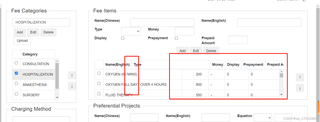
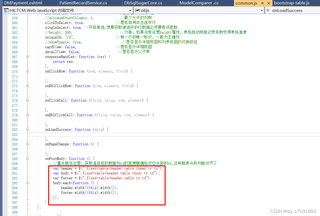

bootstrap 表格不对齐,不对齐,我在onPostBody里设置也不行
 分享
分享
AIGC生成:
你好,感谢你向我提出的问题。根据你的描述,Bootstrap 表格不对齐,并且你在 onPostBody 里设置也没有生效。
首先,让我们检查一下你的代码是否正确。Bootstrap 表格的对齐问题通常是由于 CSS 样式的冲突或表格结构的问题引起的。
假设你的代码如下所示:
<table class="table">
  <thead>
    <tr>
      <th>Column 1</th>
      <th>Column 2</th>
      <th>Column 3</th>
    </tr>
  </thead>
  <tbody>
    <tr>
      <td>Cell 1</td>
      <td>Cell 2</td>
      <td>Cell 3</td>
    </tr>
  </tbody>
</table>
如果你在 onPostBody 里设置了 CSS 样式,例如:
protected override void OnPostBody(string body)
{
    body += "<style>table { text-align: center; }</style>";
}
那么,这个设置可能会导致表格的对齐问题。
解决方法是,检查你的 CSS 样式是否正确,并且确保表格结构正确。如果你使用了 Bootstrap 的表格样式,可以尝试使用 Bootstrap 的内置样式,例如:
<table class="table table-striped table-bordered">
  ...
</table>
这将使用 Bootstrap 的默认样式来渲染表格。
如果你仍然遇到问题,可以提供更多的代码和信息,我将尽力帮助你解决问题。
示例代码:
<table class="table table-striped table-bordered">
  <thead>
    <tr>
      <th>Column 1</th>
      <th>Column 2</th>
      <th>Column 3</th>
    </tr>
  </thead>
  <tbody>
    <tr>
      <td>Cell 1</td>
      <td>Cell 2</td>
      <td>Cell 3</td>
    </tr>
  </tbody>
</table>
示例输出:
| Column 1 | Column 2 | Column 3 |
|---|---|---|
| Cell 1 | Cell 2 | Cell 3 |
希望这个回答能够帮助你解决问题。如果你仍然遇到问题,请提供更多的信息,我将尽力帮助你。
分享 系统已结题
9月6日
系统已结题
9月6日 创建了问题
8月29日
创建了问题
8月29日


