
问题遇到的现象和发生背景
我需要用HTML、JS、CSS写一个学生管理系统,但是在使用数据库时却找不到数据库了,URL是正确的。


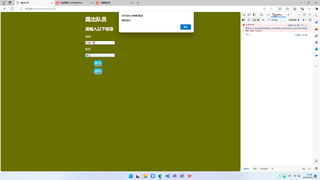

尝试过的解决方法
因为前面不加在线CORS的网址的话就会出现CORS限制的问题,所以我尝试过了Fetch All The Things,但是访问一直超时。目前我使用的是JSONPlaceholder,就会出现这样的问题。URL可以正常访问。

我想要达到的结果
能够正常 访问、读写 数据库
代码
工作目录:
start.html
index.html
file{
    jiaru.html
    shixi.html
    zhuanzheng.html
    tichu.html
    chakan.html
    index.js
    index.css
}
index.html:
<!DOCTYPE html>
<html lang="zh">
<head>
    <meta charset="UTF-8">
    <meta http-equiv="X-UA-Compatible" content="IE=edge">
    <meta name="viewport" content="width=device-width, initial-scale=1.0">
    <title>开始</title>
    <style type="text/css">
        .div{
            width: 400px;
            height: 250px;
            background-color: #E1E9EF;
            border-radius: 10px;
            font-size: 18px;
            padding: 120px 100px;
            margin: 120px auto;
        }
        .password_submit{
            height: 40px;
            width: 300px;
            border: none;
            background-color: #F8F9F9;
            padding: 0 35px;
            font-size: 15px;
            border-radius: 5px;
            box-shadow: 0px 1px 1px rgba(255, 255, 255, 0.7), inset 0px 2px 5px #aaaaaa;
            border-radius: 5px;
            color: saddlebrown;
            display: inline-block;
            font-size: 20px;
            cursor: pointer;
            text-align: center;
            text-decoration: none;
            outline: none;
            color:#fff;
            background-color: rgb(16, 185, 214);
            border: none;
            border-radius: 15px;
            box-shadow: 0 9px #999;
            margin-top: 20px;
            }
        .password_submit:hover{
        background-color: #1795bb;
        }
        .password_submit:active{
            background-color: #1795bb;
            box-shadow: 0 5px #666;
            transform:translateY(4px);
        }
        body{
            background: url(img23.jpg);
            background-repeat:no-repeat;
            background-size:100%;
        }
    </style>
</head>
<body>
    <div class="div">
        <h1>执勤队后台登录</h1>
        <p>请输入登录密码</p>
        <input type="password" class="password" placeholder="请输入密码" id="password">
        <br>
        <input type="submit" class="password_submit" value="登录" onclick="PassWord()">
    </div>
    <script type="text/javascript">
        function PassWord()
        {
            password = document.getElementById('password').value;
            JSON.parse(password);
            if(password == "123456"){
                window.location.href="start.html";
            }else{
                alert("密码错误");
            }
        }
    </script>
</body>
</html>
start.html:
<!DOCTYPE html>
<html lang="zh">
    <head>
        <meta charset="utf-8">
        <title>执勤队录入</title>
        <link rel="stylesheet" type="text/css" href=".\files\index.css">
    </head>
    <body>
        <h1>执勤队录入</h1>
        <a href=".\files\jiaru.html">
            <button id="button">加入执勤队</button>
        </a>
        <br>
        <a href=".\files\shixi.html">
            <button id="button">新增实习</button>
        </a>
        <br>
        <a href=".\files\zhuanzheng.html">
            <button id="button">新增转正</button>
        </a>
        <br>
        <a href=".\files\tichu.html">
            <button id="button">踢出队员</button>
        </a>
        <br>
        <a href=".\files\chakan.html">
            <button id="button">查看队员</button>
        </a>
    </body>
</html>
jiaru.html:
<!DOCTYPE html>
<html lang="zh">
    <head>
        <meta charset="UTF-8">
        <title>加入执勤队</title>
        <link rel="stylesheet" type="text/css" href="index.css">
    </head>
    <body>
        <h1>加入执勤队</h1>
        <h2>请填写以下信息</h2>
        <p>班级:</p><input type="text" placeholder="请填写班级" id="jiaru_class" class="input">
        <p>姓名:</p><input type="text" placeholder="请填写姓名" id="jiaru_name" class="input">
        <br>
        <script src="index.js"></script>
        <input type="submit" onclick="JiaRu()" id="button">
        <br>
        <a href="javascript:history.back(-1)">
            <button id="button">返回</button>           <!--返回键-->
        </a>

    </body>
</html>
shixi.html:
<!DOCTYPE html>
<html lang="zh">
    <head>
        <meta charset="UTF-8">
        <title>新增实习</title>
        <link rel="stylesheet" type="text/css" href="index.css">
    </head>
    <body>
        <h1>新增实习</h1>
        <h2>请填写以下信息</h2>
        <p>实习队员班级:</p><input type="text" id="shixi_duiyuan_class" placeholder="请输入实习班级" class="input">
        <p>实习队员姓名:</p><input type="text" id="shixi_duiyuan_name" placeholder="请输入实习姓名" class="input">
        <br>
        <p>导师班级:</p><input type="text" id="shixi_daoshi_class" placeholder="请输入导师班级" class="input">
        <p>导师姓名:</p><input type="text" id="shixi_daoshi_name" placeholder="请输入导师姓名" class="input">
        <br>
        <script src="index.js"></script>
        <input type="submit" onclick="ShiXi()" id="button">
        <br>
        <a href="javascript:history.back(-1)">
            <button id="button">返回</button>           <!--返回键-->
        </a>
    </body>
</html>
zhuanzheng.html:
<!DOCTYPE html>
<html lang="zh">
    <head>
        <meta charset="UTF-8">
        <title>新增转正</title>
        <link rel="stylesheet" type="text/css" href="index.css">
    </head>
    <body>
        <h1>新增转正</h1>
        <h2>请输入以下信息</h2>
        <p>导师班级:</p><input type="text" placeholder="请输入导师班级" id="zhuanzheng_daoshi_class" class="input">
        <br>
        <p>导师姓名:</p><input type="text" placeholder="请输入导师姓名" id="zhuanzheng_daoshi_name" class="input">
        <br>
        <p>实习班级:</p><input type="text" placeholder="请输入实习班级" id="zhuanzheng_duiyuan_class" class="input">
        <br>
        <p>实习姓名:</p><input type="text" placeholder="请输入实习姓名" id="zhuanzheng_duiyuan_name" class="input">
        <br>
        <script src="index.js"></script>
        <input type="submit" onclick="ZhuanZheng()" id="button">
        <br>
        <a href="javascript:history.back(-1)">
            <button id="button">返回</button>           <!--返回键-->
        </a>
    </body>
</html>
tichu.html:
<!DOCTYPE html>
<html lang="zh">
    <head>
        <meta charset="UTF-8">
        <title>踢出队员</title>
        <link rel="stylesheet" type="text/css" href="index.css">
    </head>
    <body>
        <h1>踢出队员</h1>
        <h2>请输入以下信息</h2>
        <p>班级:</p><input type="text" placeholder="请填写班级" id="tichu_class" class="input">
        <p>姓名:</p><input type="text" placeholder="请填写姓名" id="tichu_name" class="input">
        <br>
        <script src="index.js"></script>
        <input type="submit" onclick="TiChu()" id="button">
        <br>
        <a href="javascript:history.back(-1)">
            <button id="button">返回</button>           <!--返回键-->
        </a>
    </body>
</html>
index.js:
/*
JavaScript函数
*/

// 假设服务器端接收数据的API端点
const API_URL = 'https://shufeng2012.github.io/JF2ZQD.data'; // 您的实际API端点
const PROXY_URL = 'https://jsonplaceholder.typicode.com/'; // 使用在线CORS代理

// 加入执勤队
function JiaRu() {
    var jiaru_class = document.getElementById('jiaru_class').value;
    var jiaru_name = document.getElementById('jiaru_name').value;
    const newDate = {
        class: jiaru_class,
        name: jiaru_name,
        state: "未实习",
        daoshi_class: null,
        daoshi_name: null
    };
    sendData('POST', newDate, function(response) {
        alert('加入成功!');
    });
}

// 添加实习
function ShiXi() {
    var shixi_duiyuan_class = document.getElementById('shixi_duiyuan_class').value;
    var shixi_duiyuan_name = document.getElementById('shixi_duiyuan_name').value;
    var shixi_daoshi_class = document.getElementById('shixi_daoshi_class').value;
    var shixi_daoshi_name = document.getElementById('shixi_daoshi_name').value;
    const updatedDate = {
        class: shixi_duiyuan_class,
        name: shixi_duiyuan_name,
        state: "未转正",
        daoshi_class: shixi_daoshi_class,
        daoshi_name: shixi_daoshi_name
    };
    sendData('PUT', updatedDate, function(response) {
        alert('修改成功!');
    });
}

// 转正队员
function ZhuanZheng() {
    var zhuanzheng_daoshi_class = document.getElementById('zhuanzheng_daoshi_class').value;
    var zhuanzheng_daoshi_name = document.getElementById('zhuanzheng_daoshi_name').value;
    var zhuanzheng_duiyuan_class = document.getElementById('zhuanzheng_duiyuan_class').value;
    var zhuanzheng_duiyuan_name = document.getElementById('zhuanzheng_duiyuan_name').value;
    const updatedDate = {
        class: zhuanzheng_duiyuan_class,
        name: zhuanzheng_duiyuan_name,
        state: "已转正",
        daoshi_class: null,
        daoshi_name: null
    };
    sendData('PUT', updatedDate, function(response) {
        alert('修改成功!');
    });
}

// 踢出队员
function TiChu() {
    var tichu_class = document.getElementById('tichu_class').value;
    var tichu_name = document.getElementById('tichu_name').value;
    const updatedDate = {
        class: tichu_class,
        name: tichu_name,
        state: "已删除"
    };
    sendData('DELETE', updatedDate, function(response) {
        alert('删除成功!');
    });
}

// 查看队员
function ChaKan() {
    fetchData(function(dates) {
        var str = "";
        dates.forEach(function(item) {
            str += "<tr><td>" + item.class + "</td><td>" + item.name + "</td><td>" + item.state + "</td><td>" + item.daoshi_class + "</td><td>" + item.daoshi_name + "</td></tr>";
        });
        document.getElementById('tbody').innerHTML = str; // 假设有一个 id 为 tbody 的元素
    });
}

// 发送数据到服务器
function sendData(method, data, callback) {
    // 直接使用API_URL,而不是PROXY_URL
    fetch(PROXY_URL + API_URL, {
        method: method,
        headers: {
            'Content-Type': 'application/json'
        },
        body: JSON.stringify(data)
    })
    .then(response => response.json())
    .then(data => {
        console.log(data);
        callback(data);
    })
    .catch(error => console.error('Error:', error));
}

// 从服务器获取数据
function fetchData(callback) {
    // 直接使用API_URL,而不是PROXY_URL
    fetch(PROXY_URL + API_URL)
    .then(response => response.json())
    .then(data => {
        console.log(data);
        callback(data);
    })
    .catch(error => console.error('Error:', error));
}
index.css:
#button{
    display: inline-block;
    font-size: 20px;
    cursor: pointer;
    text-align: center;
    text-decoration: none;
    outline: none;
    color:#fff;
    background-color: rgb(16, 185, 214);
    border: none;
    border-radius: 15px;
    box-shadow: 0 9px #999;
    margin-top: 20px;
    margin-left: 550px;
}
#button:hover{
background-color: #1795bb;
}
#button:active{
    background-color: #1795bb;
    box-shadow: 0 5px #666;
    transform:translateY(4px);
}

table, th, td {
    border: 1px solid #fff;
    }
table {
    width: 50%;
    margin-top: 20px;
    margin-left: 300px;
    color: #fff;
}

h1,h2,.input,p{
    margin-left: 500px;
}

body{
    background-color: rgb(105, 112, 0);
}

h1,h2,p{
    color: #fff;
}


