vue导出PDF分页并且显示表头
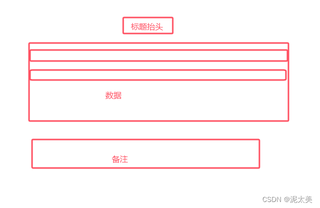
当我数据超过页面后,在下一行显示并且每页都带有标题抬头和备注
一共有13条数据,第一页只能显示10条,剩下的在第二页显示
第一页

第二页

vue导出PDF分页并且显示表头
当我数据超过页面后,在下一行显示并且每页都带有标题抬头和备注
一共有13条数据,第一页只能显示10条,剩下的在第二页显示
第一页
 分享
分享
在Vue中导出PDF并实现分页同时显示表头,可以使用html2canvas和jspdf库。以下是一个简单的实现示例:
1.安装依赖
npm install html2canvas jspdf
2.Vue组件中使用:
<template>
  <div>
    <button @click="exportPDF">导出PDF</button>
    <!-- 表格内容 -->
    <table id="my-table">
      <thead>
        <tr>
          <th>表头1</th>
          <th>表头2</th>
          <!-- 其他表头 -->
        </tr>
      </thead>
      <tbody>
        <!-- 表格数据行 -->
      </tbody>
    </table>
  </div>
</template>

<script>
import html2canvas from 'html2canvas';
import jsPDF from 'jspdf';

export default {
  methods: {
    async exportPDF() {
      const element = document.getElementById('my-table');
      const canvas = await html2canvas(element, { scale: 2 });
      const imgData = canvas.toDataURL('image/png');
      const pdf = new jsPDF('p', 'mm', 'a4');
      const imgProps= pdf.getImageProperties(imgData);
      const pdfWidth = pdf.internal.pageSize.getWidth();
      let height = imgProps.height;
      let width = imgProps.width;
      let y = 0;

      // 分页逻辑
      while (height > 0) {
        const pageHeight = (height > pdfWidth) ? pdfWidth : height;
        pdf.addImage(imgData, 'PNG', 0, y, pdfWidth, pageHeight);
        height -= pageHeight;
        y += pageHeight;
        if (height > 0) {
          pdf.addPage();
        }
      }

      pdf.save('download.pdf');
    }
  }
};
</script>
 修改了问题
9月4日
创建了问题
9月4日
修改了问题
9月4日
创建了问题
9月4日

