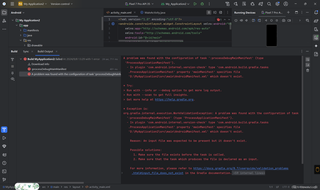
项目下载后,我就直接运行初始的hello world程序,但是运行的时候就给报错了,有谁知道是怎么个回事吗?并且能提供一下有效的解决方案!

 分享
分享
以下回复参考:皆我百晓生、券券喵儿等免费微信小程序作答:
从您提供的错误信息来看,问题似乎出在AndroidManifest.xml文件上。Gradle在构建过程中找不到该文件,这可能是因为它不存在或者路径不正确。以下是解决此问题的几个步骤:
src/main/目录下是否存在AndroidManifest.xml文件。如果不存在,你需要创建它。一个基本的AndroidManifest.xml文件应该看起来像这样:<?xml version="1.0" encoding="utf-8"?>
<manifest xmlns:android="http://schemas.android.com/apk/res/android"
package="com.example.myapp">
<application
android:allowBackup="true"
android:icon="@mipmap/ic_launcher"
android:label="@string/app_name"
android:roundIcon="@mipmap/ic_launcher_round"
android:supportsRtl="true"
android:theme="@style/AppTheme">
<activity android:name=".MainActivity">
<intent-filter>
<action android:name="android.intent.action.MAIN" />
<category android:name="android.intent.category.LAUNCHER" />
</intent-filter>
</activity>
</application>
</manifest>
确保文件名是AndroidManifest.xml(注意大小写)。
D:\MyApplication2\src\main\目录下。如果路径不正确,你需要将其移动到正确的位置。希望这些步骤能帮助你解决问题。如果问题仍然存在,请提供更多详细的错误信息或相关代码,以便我能更准确地帮助你。
分享 创建了问题
9月8日
创建了问题
9月8日


