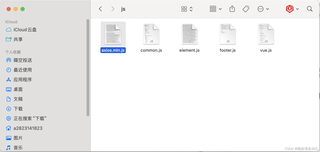
在使用nginx部署黑马点评前端项目时,配置了nginx.conf文件的upstream地址
如图:
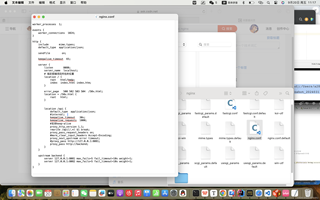
worker_processes  1;

events {
    worker_connections  1024;
}

http {
    include       mime.types;
    default_type  application/json;

    sendfile        on;

    keepalive_timeout  65;

    server {
        listen       8080;
        server_name  localhost;
        # 指定前端项目所在的位置
        location / {
            root   html/hmdp;
            index  index.html index.htm;
        }

        error_page   500 502 503 504  /50x.html;
        location = /50x.html {
            root   html;
        }


        location /api {
            default_type  application/json;
            #internal;
            keepalive_timeout   30s;
            keepalive_requests  1000;
            #支持keep-alive
            proxy_http_version 1.1;
            rewrite /api(/.*) $1 break;
            proxy_pass_request_headers on;
            #more_clear_input_headers Accept-Encoding;
            proxy_next_upstream error timeout;
            #proxy_pass http://127.0.0.1:8081;
            proxy_pass http://backend;
        }
    }

    upstream backend {
        server 127.0.0.1:8081 max_fails=5 fail_timeout=10s weight=1;
        server 127.0.0.1:8082 max_fails=5 fail_timeout=10s weight=1;
    }
}
请求转发到8081和8082端口却没有响应。nginx日志文件还一直报错说
2024/09/20 18:12:26 [error] 39313#0: *193 open() "/opt/homebrew/Cellar/nginx/1.27.1/html/hmdp/js/axios.min.map" failed (2: No such file or directory), client: 127.0.0.1, server: localhost, request: "GET /js/axios.min.map HTTP/1.1", host: "localhost:8080"
但是不清楚这个文件是什么,里面只有一个相似的js文件