
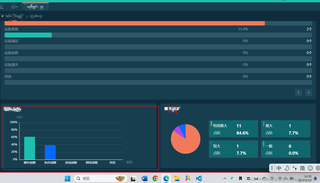
代码就是图片中框框组件中的代码,就是要实现这个组建的画面的截图,截图是成功了,但是截图的画面是上一次查询的结果的画面(上面有查询框,我没截),而不是本次结果的截图,哪位可有办法?
```html
<template>
  <div ref="image" class="ring-card">
    <h2 v-if="title" class="chart-title">{{ title }}</h2>
    <div v-loading="loading" class="ring-card__body">
      <level-chart v-if="category.length" :id="id" height="200px" width="100%" :x-data="category" :y-data="data" :show-legend="false" />
      <div v-else>暂无数据</div>
    </div>
  </div>
</template>

<script>
import LevelChart from '@/views/charts/LevelChart.vue'
import searchAPI from '@/api/commonSearch'
import html2canvas from 'html2canvas'
import { base64ToFile } from '@/utils/forDialog'
import fileAPI from '@/api/common'
export default {
  components: { LevelChart },
  props: {
    title: { type: String, default: '' },
    id: { type: String, required: true }, // 图表名称
    searchKey: { type: Object, default: () => { return { type: 1 } } } // 接口入参
  },
  data() {
    return {
      loading: true,
      colors: ['#F27A5B', '#AE46F5', '#0369FF', '#1CBFB0'],
      category: [], // 目录
      data: []// 数值
    }
  },
  watch: {
    searchKey: {
      handler(val) {
        this.initData()
        this.$nextTick(() => {
          this.clickGeneratePicture()
        })
      },
      deep: true
    }
  },
  created() {
    this.initData()
  },
  methods: {
    async initData() {
      this.loading = true
      try {
        console.log('222')
        const res = await searchAPI.getFailureType(this.searchKey)
        const arr = res.data.map(item => {
          return {
            ...item,
            percentage: item.totalNum ? (item.number * 100 / item.totalNum).approximate(1) : 0
          }
        })
        this.category = arr.map(e => e.name)
        this.data = arr.map(e => e.percentage)
        this.loading = false
      } catch (error) {
        this.loading = false
      }
    },
    clickGeneratePicture() {
      html2canvas(this.$refs.image).then(canvas => {
        const imgUrl = canvas.toDataURL('image/png')
        this.file = base64ToFile(imgUrl)
        this.dataURL = imgUrl
        this.uploadFile()
      })
    },
    async uploadFile() {
      const params = {
        type: 7,
        file: this.file
      }
      try {
        await fileAPI.upload(params)
      } catch (error) {
        console.log(error)
      }
    }
  }
}
</script>

<style lang="scss" scoped>
</style>
```


